
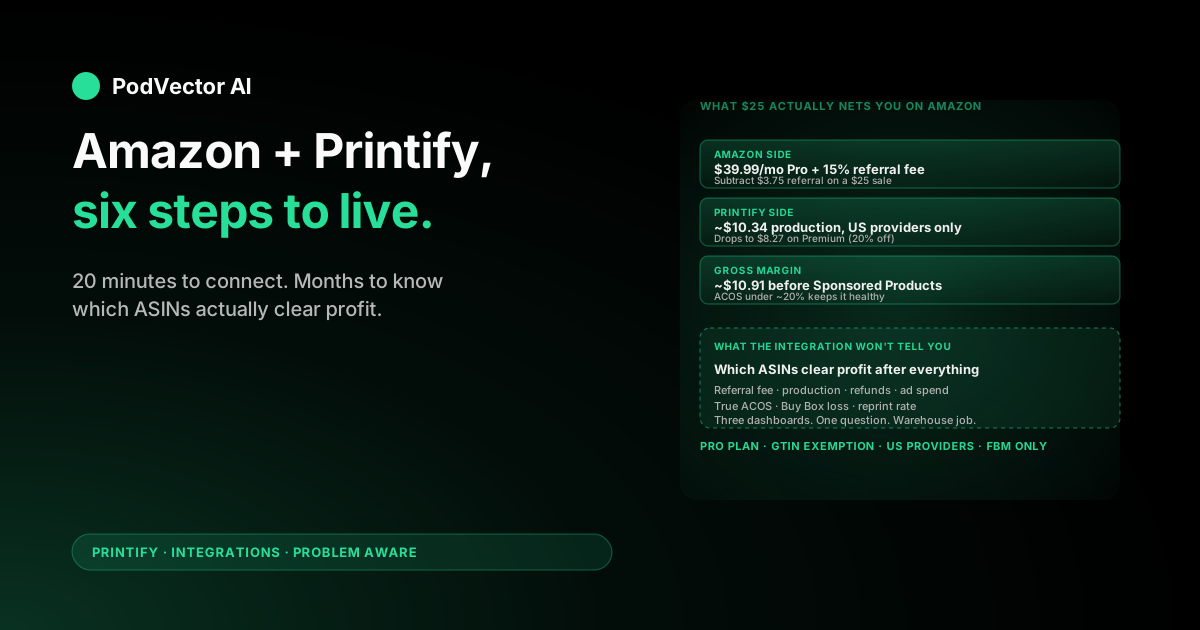
Quick Answer: Connecting Amazon and Printify takes about 20 minutes once your accounts are ready: open a Professional Seller account on Amazon US, get GTIN/UPC exemption for your categories, then in Printify click My new store → Amazon US and authorize. From there, you design in Printify and publish to Amazon listings.
The catch nobody mentions in the setup wizard: only US-based Printify providers can fulfill Amazon orders, and Amazon's 15% referral fee plus the Professional Seller fee changes the unit economics versus Etsy or Shopify in ways most beginner guides skip.
Before you connect: 5 prerequisites
You can start the connection on a half-set-up Amazon account. You'll hit a wall during product publish if any of these aren't in place first.
1. A Professional Seller account on Amazon US. The Individual plan ($0.99 per item sold) does not support Printify integration — you need the Professional plan at $39.99/month. Sign up at sell.amazon.com with bank account, government ID, tax info, and a credit card on file.
2. GTIN/UPC exemption approved. Printify products don't ship with manufacturer barcodes, so Amazon requires you to request an exemption for each category you plan to sell in (apparel, drinkware, home decor, etc.). Request it from Amazon Seller Central under Catalog → Add Products → Apply for a GTIN exemption. Approval usually lands in 24–48 hours.
3. A Printify account with at least one design. Free plan works. Premium ($29/month, 20% off catalog) only pays back at roughly $145+/month in production volume — wait for sales data before upgrading.
4. Designs sized for Amazon's image specs. Amazon main images must be on pure white backgrounds, at least 1600px on the longest side, JPEG or PNG. Printify renders mockups at 2000x2000 by default, which clears the Amazon minimum but may need background swapping for the main listing image.
5. Brand Registry enrollment (optional but recommended). Brand Registry unlocks A+ content, Sponsored Brands ads, and protection against listing hijackers. It requires a registered trademark — if you don't have one, you can launch without it and enroll later.
The 6-step Amazon–Printify connection
Once prerequisites are sorted, the integration itself is fast.
Step 1: Open Printify and start a new store. Log in at printify.com, click My stores in the top navigation, and select Add new store.
Step 2: Pick Amazon US from the platform list. Amazon US is the only Amazon marketplace Printify integrates with directly as of this writing — no Amazon UK, EU, Japan, or Canada via the native connector. Click Connect.
Step 3: Authorize via Amazon Seller Central. Printify redirects you to Amazon's MWS/SP-API authorization screen. Sign in with your Seller Central credentials, review the permissions (read/write on listings, orders, inventory), and click Confirm.
Step 4: Confirm the redirect back to Printify. You'll land back on Printify with a green "Connection successful" banner. If you see an error, it's almost always because the Seller account is still on the Individual plan or GTIN exemption hasn't posted yet (see prerequisites #1 and #2).
Step 5: Set your default print provider. Printify will only let you pick from US-based providers — Monster Digital, Swiftpod, MyLocker, and the other domestic options. International providers are locked out because Amazon's delivery promise can't be met with overseas fulfillment.
Step 6: Map your Amazon categories. Match your Printify product types (t-shirt, mug, poster) to Amazon's category tree. Apparel → Clothing, Shoes & Jewelry. Drinkware → Home & Kitchen. Get this right the first time — Amazon flags category mismatches as policy violations and can suppress listings.
For an even more granular walkthrough including screenshot detail at each click, see our Printify multi-channel setup guide, which covers the same auth pattern Amazon uses.
Publishing your first product to Amazon
Publishing to Amazon is the same flow as Etsy or Shopify, but with stricter listing requirements. Skip a field and Amazon rejects the publish call.
Design in Printify first. Pick a US-fulfillable blank. A Bella+Canvas 3001 tee from Monster Digital is the safe default for a first test. Upload artwork, position on the mockup, save.
Fill the Amazon-specific listing fields. Title (up to 200 characters, but Amazon truncates around 80 on mobile), brand name (must match your Brand Registry if enrolled), bullet points (5 maximum, ~200 characters each), product description (~2,000 characters), and search terms (up to 250 bytes of backend keywords).
Pick the right Amazon category and item type. Printify pre-suggests based on your product type, but verify. Wrong category is the #1 reason Amazon suppresses POD listings.
Set retail price. Printify shows your production cost. Amazon adds a 15% referral fee on top of any price you set (most apparel and home goods sit at 15%; jewelry is 20%, electronics 8%). We unpack the full math below.
Publish to Amazon. Click Publish to Amazon US. The listing goes into Amazon's review queue — typical wait is 15 minutes to 4 hours for fresh accounts, near-instant for established sellers.
QA the live listing. Once approved, check your Amazon listing for image quality, variant correctness, and pricing. Amazon's mobile and desktop layouts truncate differently — review both.
Already running on Etsy and curious whether your bestsellers will translate? Our Printify–Etsy guide and how-to-sell-Printify-on-Etsy walkthrough map the same product playbook to Etsy's buyer psychology — useful context for picking which channel goes first.
Amazon + Printify fees you'll actually pay
This is where Amazon stings POD sellers used to Etsy or Shopify margins. Here's the itemized breakdown on a $25 t-shirt sale fulfilled by a US Printify provider.
Amazon side:
- Professional Seller plan: $39.99/month flat (amortize over your monthly volume)
- Referral fee: 15% of sale price (apparel) = $3.75 on a $25 tee
- Closing fee: $0 on apparel (only applies to media — books, DVDs, video games)
- Sponsored Products ad spend (optional but realistic): typically 10–20% ACOS in apparel
Printify side (Bella+Canvas 3001 tee, US standard provider):
- Production cost: ~$10.34
- Shipping (you charge the customer separately or build into price): ~$4.99 to most US zones
Your take-home on a $25 retail tee, ignoring monthly plan amortization: $25 − $3.75 − $10.34 ≈ $10.91 gross margin, before any ad spend or the $39.99 monthly fee. That's roughly 44%.
Amazon's referral fee is steeper than Etsy's transaction fee (6.5%) and meaningfully steeper than Shopify's payment processing alone (2.9% + $0.30). But Amazon also doesn't charge per-listing fees or offsite ad surcharges, so the gap narrows once you factor in Etsy's $0.20 listing fee renewals and 12–15% Offsite Ads tax on accounts past $10K annual.
The Premium plan changes this math. A 20% production discount drops Printify cost from $10.34 to $8.27, lifting gross margin to ~$12.98. Whether that pays back depends on volume — see our breakdown of the Printify Premium free trial and the full Premium membership price breakdown for the math.
What to track once it's live
The integration handles fulfillment. It does not tell you which Amazon listings are actually working.
Inside 30 days of your first Amazon sale, you'll want answers to questions like:
- Which ASINs are profitable after the 15% referral fee, Printify cost, and Sponsored Products ad spend that drove them?
- What's your true ACOS — Amazon's reported number includes only Sponsored Products spend, not the full marketing cost per order?
- Which Printify provider has the lowest reprint and refund rate for Amazon's harsher review-driven returns?
- What's your real per-order cost — the $25 sale minus 15% referral, $10.34 production, $1.80 in attributed ad spend, and the $39.99 Professional plan amortized?
- Is the Buy Box yours on every listing, and what happens when a hijacker undercuts you by $0.50?
Amazon Seller Central shows the referral fees and Sponsored ads ROAS. Printify's dashboard shows production cost. Your bank account shows the net after the monthly plan fee. Stitching those three together — plus any external traffic ad spend on Meta or Google — is a project of its own.
This is the gap PodVector's AI employee, Victor, fills — on the Shopify side. Victor doesn't connect to Amazon Seller Central, but if your POD business runs on Shopify, he joins your Shopify orders, itemized Printify costs, and Meta and Google ad spend into one live view and answers questions like "which of my t-shirt designs cleared $5 net profit per unit last week after ad spend?" in plain English. He then proposes the next Shopify-side action — repricing a listing whose margin drifted, flagging a Printify provider with a spiking cost on a SKU — and asks for your approval before each change.
That's a Stage 4-and-beyond concern. For the connection itself, you're done as soon as the first test order ships and Amazon's review pings clear.
Troubleshooting common errors
"Connection failed" on the Amazon authorization step. Usually means you're on the Individual plan, not Professional. Upgrade in Seller Central under Settings → Account Info → Manage your services, wait 10 minutes, retry.
"GTIN required" error when publishing. Your exemption hasn't propagated yet, or you requested it for a different category than the product. Go back to Seller Central, confirm the exemption covers the category (apparel, drinkware, home decor, etc.), and republish.
Listing approved but suppressed within 24 hours. Almost always a category mismatch. Amazon's algorithm re-evaluates listings against category policies overnight. Check the suppression reason in Inventory → Manage Inventory → Listing Status and edit the category in Printify, not Amazon — edits made in Amazon don't sync back.
"Image does not meet requirements." Amazon's main image must be on a pure white background (RGB 255,255,255) with the product filling 85%+ of the frame. Printify's lifestyle mockups won't pass. Use Printify's plain product shot or a white-background mockup as the main image, and put lifestyle shots in the additional image slots.
Order placed on Amazon but not pulled into Printify. Amazon's order sync runs every 15 minutes, not real-time. If an order hasn't appeared in Printify after 30 minutes, disconnect and reconnect the store from Account settings → Stores. Re-authorization usually clears stuck order queues.
Variants not displaying correctly on Amazon. Amazon uses "parent-child" listing structure where a parent ASIN holds size/color variants. Printify creates this structure automatically, but if you edited the parent listing directly in Seller Central it can desync — always edit in Printify and republish.
If you're planning to run Amazon alongside Etsy or Shopify, our Printify integrations hub rounds up every supported channel, and the Printify topic page covers product picks, scaling tactics, and cost analyses across all of them.
FAQs
Does Printify's Amazon integration cost extra?
No. The integration is included on Printify's free plan. You pay Amazon's Professional Seller fee ($39.99/month), Amazon's 15% referral fee per sale, and Printify's per-order production cost — nothing extra to Printify for the integration itself.
Can I use the Printify Amazon integration outside the US?
Not directly. As of this writing, Printify's native Amazon integration only supports Amazon US (amazon.com). Sellers targeting Amazon UK, EU, Canada, Japan, or Australia have to use a third-party order routing tool or manually fulfill, which loses much of the integration's value.
Do I need Amazon Brand Registry to sell Printify products?
No. Brand Registry is optional. Without it you can still list and sell — you just won't have access to A+ content, Sponsored Brands ads, or listing-hijacker takedown tools. Most POD sellers launch without Brand Registry and enroll once a brand starts gaining traction (and they've registered a trademark).
Why does my Printify product list only show some print providers when selling on Amazon?
Amazon US orders can only be fulfilled by US-based Printify print providers. International providers (UK, EU, China) are hidden from the Amazon catalog because Amazon's delivery promise can't be met with overseas shipping times.
Can I use FBA (Fulfilled by Amazon) with Printify?
Not via the native integration. The Printify–Amazon connection is FBM (Fulfilled by Merchant) only — Printify ships each order directly to the customer when it's placed. FBA would require pre-printing inventory, sending it to Amazon's warehouses, and managing it as conventional stock, which defeats the on-demand model.
Who handles returns and refunds?
Amazon handles the customer-facing refund per its A-to-z guarantee. You're separately responsible for any Printify reprint or refund — Printify only refunds production cost on manufacturing defects, submitted within 30 days with photo evidence. Plan on absorbing 1–3% of revenue in unrecoverable refunds as a baseline POD cost.
How do Amazon's Sponsored Products ads work with Printify listings?
Same as any other Amazon listing. You set a daily budget, pick keywords (or use auto-targeting), and Amazon charges per click. Most POD apparel sellers see 20–40% ACOS on auto-campaigns starting out, dropping to 10–20% after a few weeks of negative-keyword pruning. Amazon's reported ACOS only counts Sponsored Products spend — your true cost-per-acquisition is higher once external Meta or Pinterest ads are included.
How long does the full Amazon-Printify setup take?
Plan on 3–5 business days end-to-end for a new account: 1 day to set up Amazon Professional Seller, 1–2 days for GTIN exemption approval, 1 hour for the Printify connection itself, and a few hours to set up your first listings. Established Amazon sellers adding Printify can be live in under an hour.
Where can I find Printify's official Amazon integration docs?
Printify's official Amazon integration page has the marketing overview plus links to current setup videos and help articles.
Running Shopify too? Hand those post-launch ops to an AI employee
Connecting Amazon and Printify is the easy part. Knowing which ASINs to scale, which Sponsored Products campaigns to kill, and which Printify providers to swap when refund rates spike — that's a daily fight across Seller Central, Printify's dashboard, and your bank statement.
Victor doesn't manage Amazon — he's built for Shopify-based POD stores. He joins your Shopify orders, itemized Printify costs, and Meta and Google ad spend into one live view, and proposes the next move with your approval. Flags Printify providers whose costs spike. Reprices Shopify listings when margins drift. Tells you in plain English which t-shirt design cleared $5 net profit per unit last week.
Try Victor free