
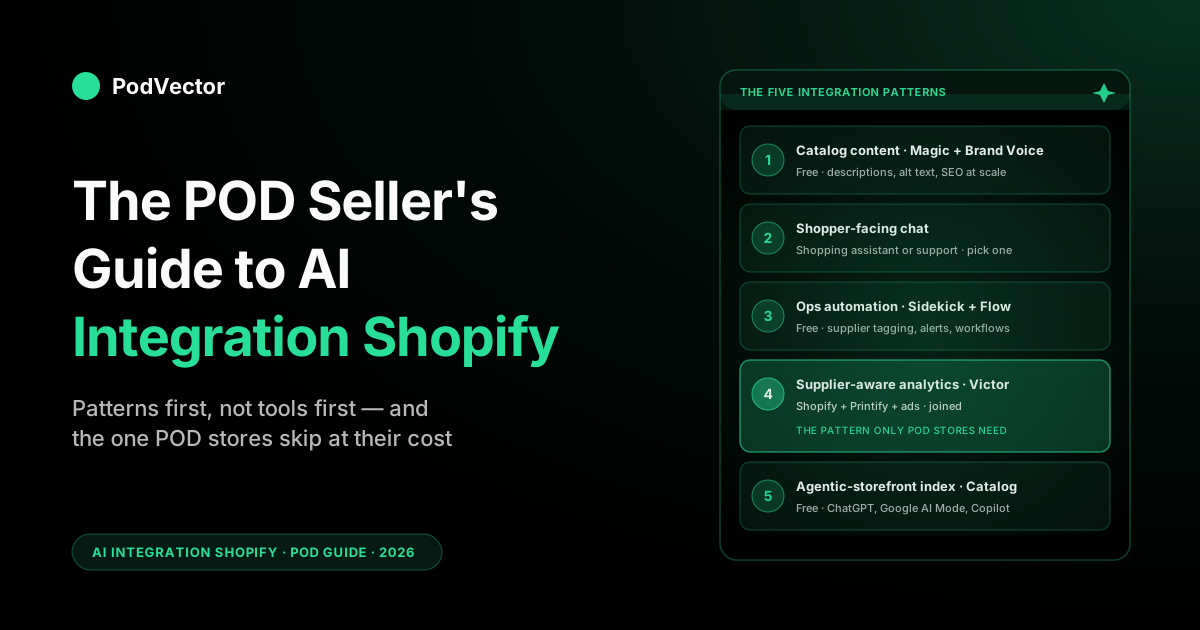
Quick Answer: AI integration on Shopify in 2026 means wiring the integration patterns your store actually needs — not installing a pile of apps — and doing them in the right order. It splits two ways: integrations that live inside Shopify (Magic, Sidekick, Flow, the AI Toolkit) and integrations that connect Shopify out to external assistants and data tools (the Shopify app for ChatGPT, the Shopify app for Claude, and supplier-aware analytics operators via OAuth).
For a print-on-demand store there are five patterns to pick from: catalog content (descriptions, alt text, SEO), shopper-facing chat, ops automation (Sidekick + Flow), supplier-aware analytics, and the agentic-storefront index for ChatGPT Shopping and Google AI Mode. Each one solves a real POD problem; each one fails in a POD-specific way if integrated naively. This guide walks the five patterns, the keep-it-simple integration order, and the one pattern most POD operators skip — supplier-aware analytics — that quietly turns a "best-seller" into a money-loser when Printify cost per variant moves and nobody notices.
What "AI integration" actually means on Shopify in 2026
If you ran a search for "AI integration Shopify" in 2022 you got an article about installing Tidio. The phrase meant "wire a chatbot into your store." That's not what it means today.
In 2026, "AI integration" on Shopify covers anything from a generative button inside the admin (Magic), to a conversational assistant that builds Shopify Flow workflows for you (Sidekick), to an external AI employee pulling Shopify orders alongside Printify supplier costs and Meta ad spend, to your store's product catalog being indexed by ChatGPT Shopping and Google AI Mode. Five very different surfaces. Five very different integration jobs.
The temptation, especially for a print-on-demand operator running everything alone, is to skim a roundup of "the 19 best AI Shopify apps" and install whichever ones have the most positive reviews. That is exactly the wrong move and it's how POD stores end up paying for seven AI subscriptions that overlap each other and still can't answer "is this T-shirt design making money." Tools-first integration is what creates the bloat.
Pattern-first integration is what gets you the wins. We'll do this guide pattern-by-pattern — what the integration is, what it does well, where it fails on POD specifically, and what to install for it.
Before we walk the patterns, one orientation note. Shopify itself is doing a lot of the integration work for you in 2026.
Magic is free on every plan including Starter. Sidekick is free in the admin.
The AI Toolkit (released April 2026) wires popular AI coding assistants — Cursor, Codex, and others — directly into the Shopify developer surface. The agentic-storefront integrations (ChatGPT Shopping, Google AI Mode, Microsoft Copilot) are server-to-server — Shopify ships your catalog to them via the public Catalog feed, no install needed.
Shopify has also opened a second, store-management direction. Its "Connecting your Shopify store to AI tools" flow now lets you link your store to the Shopify app for ChatGPT and the Shopify app for Claude, so you can preview, claim, and manage a store from inside those assistants, plus a CLI connector that authorizes an AI tool on your own machine to hit the Shopify Admin API. Every one of these is OAuth-gated — you review and approve the data scopes before anything connects. This is the "outbound" half of AI integration: not an AI feature living in your admin, but your store data flowing out to an assistant you already use.
So a chunk of "AI integration" in 2026 is just turning on what's already there. Another chunk is one OAuth click — connecting an assistant you already talk to. The last chunk is the bits Shopify won't ever do for you, the most important of which is supplier-aware margin analytics. We'll get there in Pattern 4.
The five integration patterns a POD store actually needs
Across roughly 200 POD operators we've watched stand up an AI stack in the last year, the same five integration patterns recur. Not all five are needed on day one — most stores get away with three for the first quarter — but every operator who runs a serious print-on-demand business eventually wires all five.
| Pattern | What gets integrated | POD-specific reason | Typical cost |
|---|---|---|---|
| 1. Catalog content | Generative AI → product descriptions, alt text, SEO metadata, blog drafts | POD stores ship 50–500 SKUs per design family; manual writing doesn't scale | Free (Magic) → $20/mo |
| 2. Shopper-facing chat | AI chat widget → Shopify products, inventory, order data | Long-tail design catalogs benefit disproportionately from conversational discovery | $0–$200/mo |
| 3. Ops automation | Sidekick + Shopify Flow → admin actions, supplier-tagged workflows | POD ops involves multiple suppliers, regions, fulfillment SLAs — Flow handles routing | Free |
| 4. Supplier-aware analytics | External AI → Shopify orders + Printify/Printful costs + ad spend | Shopify alone doesn't store supplier cost; "best-seller" can be unprofitable | $30–$200/mo |
| 5. Agentic-storefront index | Shopify Catalog → ChatGPT Shopping, Google AI Mode, Copilot | POD long-tail surfaces in conversational queries that keyword search misses | Free (auto) |
The order in the table is roughly the order to roll them out. Patterns 1, 3, and 5 are essentially free and live inside Shopify — turn them on first. Patterns 2 and 4 are the paid layers and need real shopping-around. We'll go pattern by pattern.
Pattern 1: Catalog content integration (Magic + Brand Voice)
The first integration pattern is also the lowest-friction one and the highest-leverage on day one for a POD store: wire generative AI into the product catalog. On Shopify in 2026 this is almost entirely a "turn on the native thing" job — Shopify Magic ships in the admin for free and is the umbrella for every generative button across Products, Collections, Email, Blog, Inbox, and the theme editor.
For a POD operator launching a new design family, the integration looks like this in practice. You bulk-upload 40 product images from your Printify or Printful catalog.
In Products, you select all 40 and hit "Generate descriptions." Magic produces 40 first-draft descriptions in roughly two minutes. You walk through them, edit the ones that are off, then hit "Generate alt text" and "Generate SEO." 90 minutes later you have a launch-ready catalog where the alternative is two days of typing. The Brand Voice Cloning feature added in Winter '26 means Magic learns from your existing copy, so the output reads like your store rather than generic ecommerce filler.
Where this pattern fails for POD: Magic doesn't know your supplier. It will happily generate "premium heavyweight cotton tee" for a product that's actually a mid-weight Bella+Canvas 3001, and it will write "ships in 2-3 days" by default when your Printify EU fulfillment is more like 5-9.
The fix is a prompt prefix in your generation requests — "this is a unisex Bella+Canvas 3001 fulfilled by Printify with a 5-9 business day SLA in EU, 2-5 in US" — which Brand Voice respects once you've trained it on a few corrected examples. For the deeper feature-by-feature breakdown of every Magic surface and where each one earns its keep, the guide to Shopify Magic AI features covers it product by product.
Pattern 2: Shopper-facing chat integration
The second pattern is the one most operators think of first when they hear "AI integration Shopify": a chat widget on the storefront that talks to shoppers. In 2026 this category has split into two distinct sub-patterns and you need to be clear which one you're integrating.
The first sub-pattern is shopping assistant — an AI that helps shoppers buy, answers pre-purchase questions, recommends products, handles sizing and shipping objections. Tools in this lane: Manifest, AskTimmy, ShopAI, Tidio's shopping mode, Shop app's built-in assistant. Integration is App Store install plus catalog connection; most read live Shopify product, inventory, and shipping data and quote against it.
The second sub-pattern is support chatbot — an AI that handles post-purchase tickets, order-status questions, return requests, fulfillment-delay queries. Tools: Gorgias AI, Zendesk AI, Re:amaze, Tidio's support mode. Integration is the same App Store install plus a knowledge-base sync.
POD stores often try to use one tool for both jobs and end up with neither working well. A shopping assistant tuned for conversion will give vague answers about shipping; a support chatbot tuned for ticket deflection won't proactively recommend a different colorway. Pick the integration based on which problem is bigger right now — pre-purchase friction or post-purchase ticket volume — and add the other later.
POD-specific failure mode: any chat that doesn't pull live shipping SLAs by supplier will eventually promise "3-day delivery" to a customer whose Printify Australia order takes 14. The integration step that prevents this is feeding the assistant a per-supplier SLA table at install time and refreshing it monthly. The longer write-up of what to look for in a shopper-facing assistant is in the Shopify AI shopping assistant guide; for the support side, the Shopify AI chatbot for POD walkthrough covers the same ground from the ticket angle.
Pattern 3: Ops automation integration (Sidekick + Flow)
The third pattern is the one POD operators most consistently under-use, because it doesn't have a dedicated app to install and doesn't show up in the "best AI Shopify apps" listicles. It's the integration of Sidekick (Shopify's native conversational admin assistant) with Shopify Flow (Shopify's native workflow engine), and it's free on every plan.
Sidekick lives in the bottom-right of every admin page. You ask it questions and you give it tasks.
The agentic upgrade Shopify rolled out in 2026 means Sidekick can now build Shopify Flow workflows from a description. "Tag any order from a Printify EU warehouse so I can filter by region in reports" → Sidekick generates a Flow that does exactly that. "Send me a Slack alert when daily orders drop below 20" → done. "Pause any product where inventory hits zero and email me" → done. For a POD operator running everything solo, this collapses 30 minutes of clicking through Flow's visual builder into a 30-second prompt.
The integration here is less "install something" and more "actually open Sidekick and start using it." The deeper guide is the Shopify Sidekick AI guide, which walks the specific Flow workflows worth setting up first for a POD store: supplier tagging, low-inventory alerts, abandoned-cart timing tweaks, and the supplier-region-specific shipping zone configuration. None of it requires a developer; all of it requires actually doing it.
Where this pattern fails: Sidekick will happily build a Flow that fires on every order if you don't constrain it, which can spam your inbox or your Slack into uselessness. The integration discipline is to always ask Sidekick "show me the Flow you'll build before you save it" — it'll display the trigger, conditions, and actions, and you can refine before committing. Treat Sidekick-generated Flows like AI-generated code: review the diff before merging.
Pattern 4: Supplier-aware analytics integration (the POD-specific one)
This is the integration pattern that doesn't appear in any generic "AI integration Shopify" article — because it doesn't apply to a generic DTC store. For a POD store it's the most consequential of the five, and it's the one no native Shopify surface will ever cover, because Shopify, by design, doesn't store your supplier cost data.
The problem is mechanical. When a Printify or Printful order ships, Shopify records the order revenue, the discount, the shipping the customer paid, and the tax. It does not record what Printify charged you for the blank tee, the print, and the supplier's outbound shipping. Those costs live in the Printify or Printful billing screens, and they move — supplier price increases hit your margins silently because Shopify reporting still says "this product made $24" when you actually netted $4 after the supplier invoice.
The integration pattern that fixes this is an external AI employee that connects to Shopify, your supplier (Printify or Printful), and your ad accounts (Meta, Google), brings all your numbers together in one place, and lets you ask margin questions in plain language. Victor is built for exactly this — a POD-specific AI employee that lives outside Shopify, pulls live data from all three sources, and answers questions like "which designs lost money last week once supplier cost and ads are factored in" or "what's my true profit margin on the Vintage Sunset collection." Victor doesn't just answer questions — he can act too. With your approval, he can pause an underperforming campaign in Meta Ads or Google Ads, change a Shopify price, or set up a discount to move slow stock.
The integration mechanics are simple: OAuth into Shopify, OAuth into Printify or Printful, OAuth into Meta and Google, then ask questions. No Shopify app install — the integration runs server-to-server through the same APIs Shopify itself exposes. The deeper write-up of how this layer fits with the in-Shopify analytics is in the complete guide to AI analytics for print-on-demand, and the architecture-level view is in the complete guide to AI agents for ecommerce analytics.
Pattern 5: Agentic-storefront integration (Catalog as the index)
The fifth pattern is the one POD operators are most likely to ignore in 2026 and most likely to regret ignoring in 2027. It's the integration between your Shopify catalog and the agentic shopping surfaces — ChatGPT Shopping, Google AI Mode, Microsoft Copilot — that surface products in conversational queries. Shopify and Google have since co-developed the Universal Commerce Protocol (UCP), an open standard now backed by 20+ retailers that lets AI agents transact directly with any merchant, with native shopping rolling out inside Google AI Mode.
The integration is largely automatic. Shopify ships your catalog into a structured Catalog feed and the agentic surfaces query it. You don't install anything. What you do control is whether your catalog data is good enough that the agents can match your products to relevant queries. Three things matter:
- Tags. Magic auto-tagging in 2026 fills in product tags ("vintage", "tiger illustration", "EU-shipped", "unisex tee") that conversational queries match against. Without good tags, your products are invisible to "find me a vintage tiger tee that ships from Europe" queries.
- Alt text. Image alt text is what conversational agents read when matching visual queries. A POD catalog with descriptive alt text on every product image surfaces; one with "image-1.jpg" doesn't.
- Structured metadata. Product type, vendor, fulfillment region, material — all of these flow into Catalog and become filters the agents use.
This is a slow-burn integration: the floor is rising over the next 12-24 months as more shopping traffic moves through agentic surfaces, but it's not going to drive your week-1 revenue. The cost of doing it now is essentially zero — Pattern 1 (Magic catalog content) does most of the work — and the cost of skipping it is being invisible to a growing slice of buyers in 2027. For the broader picture of how AI is reshaping the buying journey, the POD seller's guide to AI for ecommerce walks the full surface area.
The keep-it-simple integration order
If you're staring at your Shopify admin wondering where to start, the order that consistently works for a POD store of any size:
- Week 1: Pattern 1. Turn on Shopify Magic across Products, Collections, Email, Blog, and Inbox. Train Brand Voice on five existing well-written product descriptions. Generate alt text for every product image (this also feeds Pattern 5).
- Week 1: Pattern 3. Open Sidekick. Build three Flows: supplier tagging, low-inventory alerts, daily-orders-below-threshold alert. All three should take under 10 minutes via Sidekick prompts.
- Week 2: Pattern 4. Connect Victor (or any external AI employee that handles POD supplier data) to Shopify, Printify or Printful, and your ad accounts. Run your first margin-by-design report. This is almost always the report that surprises a POD operator most.
- Week 3: Pattern 2. Pick one of shopping assistant or support chatbot — whichever pain point is louder right now. Install, connect to live catalog and shipping data, monitor for two weeks before adding the second sub-pattern.
- Ongoing: Pattern 5. Pattern 1's tag and alt-text generation already sets you up. Audit your Catalog feed quarterly to make sure tags and metadata are still descriptive as your design library grows.
The pattern most POD operators want to start with — shopping assistant on the storefront — is Pattern 2 in this order, deliberately. It's high-visibility and feels like progress, but it's also the most expensive month-one integration and the one that breaks loudest if your underlying catalog (Pattern 1) and supplier-SLA data (Pattern 4) aren't right. Get the boring infrastructure right first.
Three integration failures that cost POD sellers money
Three failure modes recur across POD stores that integrated the wrong way:
Failure 1: Tools-first integration. Operator reads a "19 best AI Shopify apps" listicle, installs eight of them, ends up with overlapping subscriptions and no clear answer to any business question. The fix is to start from the pattern (the job to be done) and pick the smallest tool that covers it.
Failure 2: Trusting Shopify-only "profit" numbers. Shopify's analytics will report a "profit margin" on a product if you've entered a cost-of-goods value manually, but on a POD store that COGS value is stale the moment Printify changes a blank price or you switch a supplier from Printful to Printify Choice. Without Pattern 4 — a live supplier-aware analytics integration — your margins are wrong by the time you read them. The best AI for ecommerce comparison walks the analytics tools that actually pull live supplier cost.
Failure 3: Skipping Pattern 5 because it doesn't have a dashboard. Agentic-storefront integration doesn't have a "results" page in your Shopify admin, so it feels invisible and gets deprioritized. The cost shows up 6-12 months later as conversational shopping traffic grows and your store doesn't surface. The fix is to treat Pattern 5 as a byproduct of doing Pattern 1 well — every Magic-generated tag and alt text feeds the agentic index automatically.
FAQs
Do I need to install anything for AI integration on Shopify in 2026?
For Patterns 1, 3, and 5: no. Magic, Sidekick, Flow, and the agentic-storefront Catalog integration are all native and free. For Pattern 2 (shopper-facing chat) and Pattern 4 (supplier-aware analytics), yes — those require either an App Store install or an external tool that connects to Shopify via OAuth.
How do I connect my Shopify store to ChatGPT or Claude?
Through Shopify's "Connecting your Shopify store to AI tools" flow. There's a Shopify app for ChatGPT and a Shopify app for Claude that let you preview, claim, and manage a store from inside the assistant, plus a CLI connector that authorizes an AI tool on your local machine to call the Shopify Admin API. All three are OAuth-gated — you approve the exact data scopes before the connection goes live. For a POD operator this is handy for ad-hoc store admin, but note it's a general-commerce connection: it doesn't see Printify or Printful supplier cost, so it can't answer true-margin questions on its own (that's Pattern 4).
Which AI integration should a brand-new POD store do first?
Pattern 1 (Magic catalog content) on day one. It's free, it scales your catalog from launch, and it sets up the tags and alt text that Pattern 5 uses later.
Patterns 3 and 4 follow in week 2. Pattern 2 (storefront chat) waits until you have enough traffic for the chat data to be meaningful — typically 100+ sessions per day.
Can Shopify Sidekick replace a separate AI analytics tool?
Sidekick is excellent at answering Shopify-only questions: "what's my conversion rate this week," "which products had the most refunds last month." It can't answer cross-system questions because it doesn't see Printify, Printful, or your ad spend. For "is this product profitable once supplier cost and ads are factored in," you need an external integration (Pattern 4).
How much should AI integration on Shopify cost a POD store per month?
Realistic budget for a single-operator POD store: $0 for Patterns 1, 3, and 5 (native Shopify), $30-$200 for Pattern 4 (external analytics), and $0-$200 for Pattern 2 (chat) depending on the tool. Most POD stores under $50K/month revenue can run a complete AI stack for under $100/month. Anyone quoting you $1,000/month for "AI integration" is selling you bloat.
What's the biggest difference between AI integration on Shopify vs other platforms?
Shopify ships more native AI than any other major commerce platform — Magic, Sidekick, Flow, the AI Toolkit, the Catalog feed for agentic surfaces. On WooCommerce or BigCommerce you assemble equivalent capability from third-party plugins, which is more work and more cost. The integration story on Shopify in 2026 is mostly "turn on what's already there"; on other platforms it's still mostly "install and configure."
Is an external AI employee worth it if I already have Shopify analytics and supplier dashboards?
The external operator's value is precisely that it sees — and acts — across Shopify, Printify, Printful, and ad accounts. The supplier dashboards know cost; Shopify knows revenue and ad spend; nobody on the inside of any single tool knows true profit per design, let alone moves spend or pauses a losing variant in response.
If your store is small enough that you can manually reconcile in a spreadsheet, you can defer this. Past 200 SKUs or $20K/month revenue, the spreadsheet breaks and the integration earns its keep.
Will agentic shopping (ChatGPT Shopping, Google AI Mode) actually drive POD sales by 2027?
Direction is clear: yes. Magnitude is unclear — industry estimates vary widely. The defensible move is to make sure your catalog is well-tagged and well-described now via Pattern 1, so you're surfacing in agentic queries when the volume arrives. The cost of doing this is essentially zero; the cost of being invisible later is much higher.
Skip the tools-first trap
Patterns 1, 3, and 5 turn on for free inside Shopify. Pattern 2 you'll pick when traffic justifies it. Pattern 4 — the supplier-aware analytics integration that tells you which designs are actually profitable — is the one Shopify will never ship and the one Victor was built to be. Connect Shopify, Printify or Printful, and your ad accounts; ask Victor margin questions in plain language; get answers from live data.
Try Victor free