
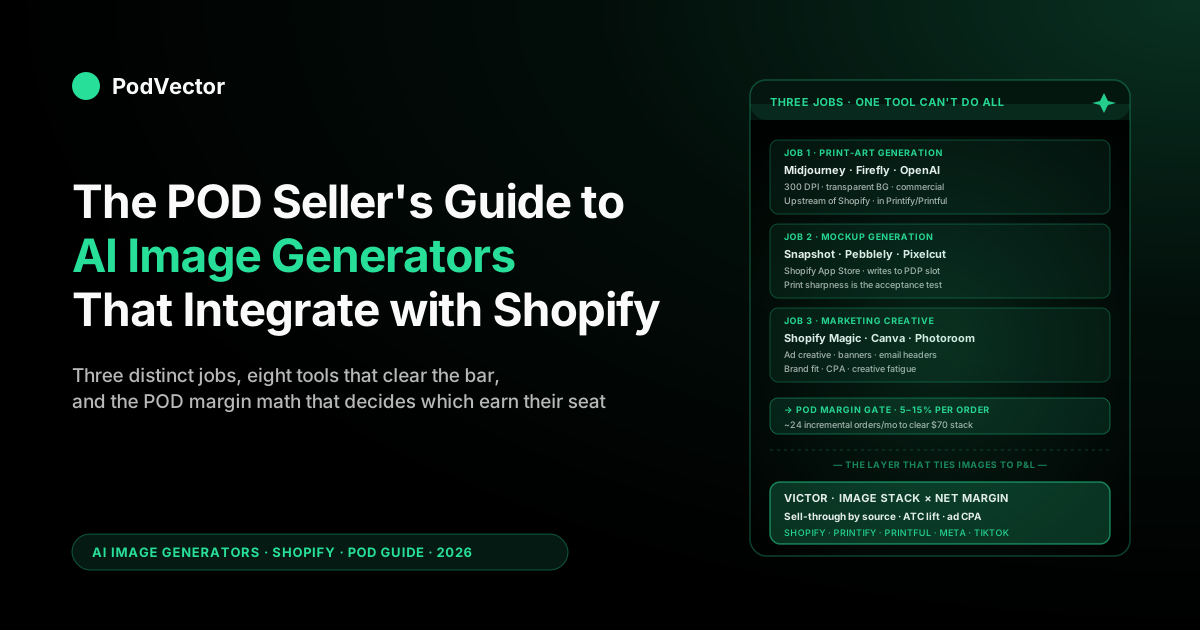
Quick Answer: The AI image generators that truly integrate with Shopify split into three jobs, and most "Shopify integration" lists collapse them into one. Print artwork for the shirt or mug (Midjourney, Adobe Firefly, and the modern hosted models — OpenAI's GPT-4o image generation, Google's Gemini/Imagen); product mockups when the Printify or Printful catalog lacks the angle you want (Snapshot, Pebblely, Pixelcut, and newer Shopify-native apps like ImageDream); and lifestyle and ad creative for PDPs and paid social (Photoroom, Shopify Magic, Canva AI).
For Shopify specifically, the integration that matters is "writes back to a product image slot," not "renders a JPEG you download." Shopify Magic, Snapshot, Pebblely, and Adobe Express live inside the admin; Midjourney and Firefly run upstream of Shopify on the Printify or Printful design step.
The POD gating constraints nobody else names: print-art tools need 300 DPI plus transparent-background output, mockup tools must not muddy the print so the variant photo still sells the design, and storefront images should land near Shopify's recommended 2048 × 2048 px for square product shots. This guide ranks the eight tools that clear those bars — and flags where the newest Shopify-native apps (ImageDream, Super AI Image & Video) now bundle short product-video generation alongside stills.
The three jobs an AI image generator does for a POD store
Most roundups of AI image generators for Shopify treat the category as one thing. For a print-on-demand operator it isn't.
There are three distinct jobs, three different sets of acceptance criteria, and three different tools that win each job. Conflating them is how operators end up paying for a Canva subscription, a Midjourney subscription, a Photoroom subscription, and a Pebblely subscription before they realize each one is doing a different piece of work.
Job 1: print-art generation. The actual graphic that gets printed on the tee, the hoodie, the mug, the poster. This is the highest-stakes image in the workflow because if the design doesn't sell, nothing downstream matters.
Print-art tools need to output at print resolution (300 DPI at the final printed size, which for a 12-inch chest print means roughly 3,600 × 4,800 pixels), they need transparent background support so Printify or Printful can composite the design onto the garment, and they need to give you commercial-use rights cleanly. Midjourney, Adobe Firefly, and the modern hosted models — OpenAI's GPT-4o image generation (the engine behind DALL·E in ChatGPT), Google's Gemini and Imagen line — are the serious tools for this job. Canva and Shopify Magic are not — Shopify Magic caps output at roughly one megapixel, far too small for a print decoration, and Canva's exports are too compressed.
Job 2: product mockup generation. The image of the shirt or mug on a hanger, on a model, on a desk. Printify and Printful both ship default mockups with every product, but the defaults are generic, repeated across thousands of stores, and don't carry any of your brand or niche signal. AI mockup generators take your design plus a prompt ("a young woman wearing this shirt at an outdoor coffee shop in autumn") and output a brand-feeling lifestyle shot.
The acceptance criterion is whether the print stays sharp and unmodified — a mockup tool that smudges your design has destroyed the image's primary job. Snapshot, Pebblely, and Pixelcut are the serious tools here. Photoroom is the cleanup workhorse that pairs with any of them.
Job 3: marketing creative. Hero images for the homepage, banner art for collection pages, ad creative for Meta and TikTok, email-header images, social-post visuals. The acceptance criterion is brand fit and conversion lift, not print-readiness, and the tools that win are the ones with built-in templates, brand-kit memory, and direct push-to-Shopify or push-to-Meta integrations.
Shopify Magic, Canva AI, Adobe Express (Firefly), and Photoroom dominate here. Midjourney can do this work but loses on time-to-published because every output needs a manual download-edit-upload cycle.
Once you frame the three jobs separately, the question "which AI image generator integrates with Shopify" becomes three sharper questions. Which one fits which job for your specific POD workflow is what the rest of this guide unpacks. If you want the broader category overview that includes non-image AI tooling, the POD seller's guide to generative AI for ecommerce is the lateral read.
What "integrates with Shopify" actually means
The phrase "integrates with Shopify" hides a tier system. From most-integrated to least, the levels are:
Level 1 — native Shopify Magic features. Built into the admin UI, no app install, no auth handshake, no per-image API call to a third party. This is the baseline. Everything Shopify Magic does is one click from a product page or a campaign builder.
Level 2 — Shopify App Store apps with embedded UI. Snapshot, Pebblely, Fulfily, Pixelcut, Adobe Express, and a wave of 2026 entrants — ImageDream (which markets itself on preserving fine details, packaging text, and brand integrity, the failure mode older mockup tools had), Super AI Image & Video (which generates product video and promo posters as well as stills), Caimera, Claid, and Kive (the last built around brand-consistent catalog output). You install the app, authorize it, then generate images inside an iframe that lives in the Shopify admin.
The output writes directly to a product image slot or a media library. No download-and-reupload step. This is the level most POD operators should be optimizing toward — friction kills batch workflows and the Shopify App Store level removes most of it.
Level 3 — third-party tools with Shopify exporters. Photoroom, Canva, Adobe Express in standalone mode. The tool runs in a browser tab outside Shopify; it has a "publish to Shopify" or "send to Shopify" button that pushes the finished image into your store via the Shopify API. One click, but you've left the Shopify admin to do the work.
Level 4 — manual download-and-upload tools. Midjourney, raw hosted image APIs, raw Stable Diffusion. No Shopify integration of any kind.
You generate, you download, you upload. For batch design work this is fine because the design step is upstream of Shopify anyway — the design lives on Printify or Printful, not in Shopify directly. For mockup or marketing work this level adds 60–90 seconds of manual handoff per image and stops being viable past about 20 images.
The mistake POD operators make is using a Level-4 tool for a Level-2 job. If you're generating 50 mockups for a new collection drop, the right tool is Snapshot or Pebblely (Level 2), not Midjourney plus Photoshop plus manual upload (Level 4).
The hours saved compound across collections. We've covered the friction-cost analysis behind tool selection in the complete guide to AI tools for POD sellers.
1. Shopify Magic — the native zero-friction option
Job fit: marketing creative (Job 3). Background fills, scene generation for product photos, hero images for collection pages.
What it does: Shopify Magic is the AI feature suite Shopify ships in the admin UI. The image side covers background generation (drop your product cutout into an AI-generated scene), background removal, image editing (resize, crop, recolor), and template-based creative generation for emails and social posts. Output writes directly to your media library or to a product image slot.
POD-specific take: Shopify Magic is the right starting point for the marketing-creative job because it costs nothing extra (it's bundled with your Shopify plan) and the integration is friction-zero. For a POD store at $0–10K/month in revenue, it covers the marketing-creative tier well enough that paying for a separate tool is overkill.
Where it falls short is the print-art tier (output caps at roughly one megapixel, well below print-decoration thresholds) and the high-volume mockup tier (it's not built for "generate 50 lifestyle shots in 20 minutes"). Use it for hero images, banner refreshes, and ad-creative drafts.
Watch out for: the rights language is permissive but generic — Shopify Magic outputs are usable commercially by you on your store, but if you're trying to use the same image as ad creative across paid Meta or TikTok campaigns, double-check the license terms in your plan tier. We unpack the broader Shopify Magic feature set in the POD seller's guide to Shopify Magic AI features.
Pricing: bundled with all Shopify plans (Basic and up).
2. Photoroom — the workhorse for mockup cleanup
Job fit: mockup generation (Job 2) and marketing creative (Job 3).
What it does: Photoroom is a focused product-photography tool — background removal, AI background generation, batch editing, retouching. The Shopify integration is solid (Level 3 with a Shopify exporter), and the API tier means you can wire it into a custom workflow if you're at the volume where that pays back.
POD-specific take: Photoroom is the tool to reach for when you have a Printify or Printful default mockup that's almost right but the background is wrong, the lighting is off, or the composition needs a retouch. It's also the workhorse for cleaning up AI-generated mockups from Snapshot or Pebblely before they go live — the print on the shirt occasionally needs a sharpen pass, the model's hand needs a small fix, the background needs a tint adjustment to match your brand palette. The batch-edit feature is where it pays for itself: cleaning up 80 product shots with a consistent edit takes minutes, not hours.
Where it loses: Photoroom is a cleanup tool, not a from-scratch generator. If you don't have a starting product image — say, for a brand-new product type Printify just added that doesn't have your design on it yet — you need a tool that mocks-up from scratch (Snapshot, Pebblely). Photoroom can refine; it can't always invent.
Pricing: Free tier with watermark; Pro at ~$13/month; Enterprise/API plans for higher volume.
3. Pebblely — the lifestyle scene generator
Job fit: mockup generation (Job 2), with strong lifestyle-shot output.
What it does: Pebblely takes a product image and generates lifestyle scenes from prompts ("on a marble countertop with morning light," "held by a person at a music festival," "stacked on a desk in a minimalist home office"). The Shopify App Store integration (Level 2) means the output writes back to your product images directly. Themes and presets cover most ecommerce use cases — apparel, accessories, drinkware, home goods.
POD-specific take: Pebblely earns a slot in the POD stack for a specific reason — Printify and Printful default mockups are mannequin-style flat shots that everyone selling the same product is also using. Pebblely's lifestyle generation breaks the visual sameness without needing a photo studio.
The acceptance criterion you have to enforce is print sharpness: generate a few test shots with a high-detail design (intricate line art, small text) and verify the print stays crisp across the lifestyle render. Pebblely usually clears the bar for medium-detail designs; it can soften very fine line work if the model has to integrate the shirt at an oblique angle.
Workflow tip: use Pebblely for the secondary product images (positions 2–6 on a Shopify PDP) where the lifestyle shot earns the click-through. Keep position 1 as a clean mannequin or flat-lay shot so the buyer can see the design itself. Most POD stores get more conversion lift from "primary clean shot + secondary lifestyle shots" than from going all-lifestyle.
Pricing: Free tier with limited generations; paid plans from ~$19/month with batch generation.
4. Midjourney — the design-art workhorse
Job fit: print-art generation (Job 1). Actual artwork that goes on the printed product.
What it does: Midjourney is the design-art generator for everything from t-shirt graphics to poster art to mug illustrations. Output is high-resolution (high-detail upscales clear print-decoration thresholds for most apparel positions), the style range is broad, and the prompt-engineering surface is mature.
POD-specific take: Midjourney does not "integrate with Shopify" in any meaningful sense — there's no Shopify app, no API connector, no embedded UI. That's fine, because the design step happens upstream of Shopify.
You generate the artwork in Midjourney, you upload it to Printify or Printful as the print file, you publish the resulting product to Shopify. Shopify never touches the Midjourney file directly. The "Shopify integration" that matters here is Printify's or Printful's design-upload pipeline, and Midjourney's PNG export plays nicely with both.
The skill that decides whether Midjourney pays back for your store is prompt engineering for printable art. The patterns that work for POD are: explicit specification of "vector-style line art on transparent background," "isolated subject, no environment," "high-contrast monochrome for single-color decoration," and the style references that match your niche aesthetic. Generic Midjourney prompts produce generic Midjourney output, which sells like generic Midjourney output.
Watch out for: upscaling for print decoration. The default Midjourney resolution is below 300 DPI at typical apparel print sizes.
Use the upscale features (or run an external upscaler like Topaz) to clear the threshold. Designs that look sharp on screen but ship pixelated on a hoodie are the most expensive QA mistake in the POD stack — refunds, chargebacks, and review damage all stack at once. The deeper review of POD design generators is in best AI art generator for print on demand (compared).
Pricing: $10/month basic, $30/month standard, $60/month pro.
5. Adobe Firefly — the commercially safe option
Job fit: print-art generation (Job 1) and marketing creative (Job 3). Available inside Adobe Express, which has a Shopify App Store integration (Level 2).
What it does: Firefly is Adobe's generative-AI image model, trained on Adobe Stock content and licensed for commercial use under a clean indemnification policy. It runs inside Photoshop, Illustrator, and Adobe Express, the last of which has a direct Shopify App Store presence. Output covers raster art, vector-friendly compositions, and template-based marketing creative.
POD-specific take: Firefly's distinguishing feature for POD is the commercial-safety story. Adobe explicitly indemnifies enterprise users against IP claims arising from Firefly output (the consumer terms are slightly less favorable but still cleaner than several alternatives).
For a POD store selling at scale where a chargeback or DMCA-style takedown would hurt, this matters. Output quality is competitive with Midjourney for most styles, slightly behind for highly stylized illustrative work.
Where Firefly shines for POD is the integration with Adobe Illustrator's vector workflow. POD designs that need vector cleanup (single-color screen-print, embroidery, sticker cutting) can move from Firefly raster output to Illustrator vector trace inside one workflow. The Adobe Express side handles the marketing-creative job (templates push to Shopify and to Meta directly).
Watch out for: Creative Cloud subscription pricing makes Firefly meaningfully more expensive than Midjourney as a standalone tool. The math only works if you're already on Creative Cloud or if your IP-risk profile justifies the premium. For a hobby-tier POD store that needs design-art and nothing else, Midjourney is the cheaper option.
Pricing: bundled with Creative Cloud subscriptions; Adobe Express free tier with paid upgrades from $10/month.
6. Snapshot — the dedicated Shopify product-photo app
Job fit: mockup generation (Job 2).
What it does: Snapshot is a Shopify App Store native app (Level 2) focused on AI product-photo generation. Pick a product, pick a scene, generate. Output writes directly to product images. The interface lives entirely inside the Shopify admin so there's no tool-switching cost.
POD-specific take: Snapshot is in the same competitive bracket as Pebblely with a slightly more Shopify-native feel. The decision between them usually comes down to which scene library matches your niche better and which preview workflow you find faster. Both clear the print-sharpness bar for medium-detail designs, both struggle slightly on very fine line work, and both write back to Shopify cleanly.
Workflow tip: when evaluating Snapshot vs. Pebblely vs. Fulfily, generate the same five products through all three and put the outputs side-by-side. The differences are real but subtle — model diversity, background variety, prop styling, lighting. Pick the one that produces the look closest to your brand without prompt tuning.
Pricing: Free tier with limited generations; paid plans typically $20–50/month depending on volume.
7. Canva AI — the all-rounder for non-designers
Job fit: marketing creative (Job 3), with limited print-art capability.
What it does: Canva ships generative-image features (Magic Media, Magic Edit, Magic Expand) plus the broader Canva template ecosystem and a Shopify integration that publishes designs into product image slots, social posts, and emails. It's the general-purpose creative tool for the operator who isn't a designer and doesn't want to be.
POD-specific take: Canva wins on time-to-decent-output for a non-designer. Templates are thoroughly POD-relevant — apparel mockups, IG ad creative, product launch banners, email headers. The AI image features are solid but not best-in-class for any one job; they're best-in-class for "covers most jobs at acceptable quality from one tool." For a single-operator store, that's often the right tradeoff.
Where it loses: Canva's output isn't print-ready for apparel decoration in most cases. Use it for marketing and PDP secondary images; pair it with Midjourney or Firefly for the print-art tier. The integration with Shopify (push-to-store, publish-to-products) is smooth and saves real time on the marketing side.
Pricing: Free tier; Pro at ~$15/month per user; Teams plans from $30/month.
8. Pixelcut — the batch-edit mobile-first option
Job fit: marketing creative (Job 3) and lightweight mockup work (Job 2).
What it does: Pixelcut is the mobile-first image generator and editor with a Shopify integration. Strong on background removal, batch processing, and template-driven product photo generation. The mobile workflow is genuinely useful for POD operators running their store from a phone — generate-and-publish from the same device.
POD-specific take: Pixelcut is the choice for the operator who wants batch processing without the overhead of a Photoroom subscription or the price of an Adobe stack. The batch workflow handles the high-volume case (generate 30 product photos in 5 minutes) better than most desktop-first tools.
The integration with Shopify covers the publish step cleanly. Where it loses is depth — for custom retouching, complex composites, or vector workflows, Photoshop or Photoroom plus Illustrator earn back their subscription.
Pricing: Free tier; Pro at ~$10/month; Team plans available.
Picking the tool that fits your POD workflow
The tool selection that makes sense for a POD store depends on revenue stage and design volume more than on any feature comparison. Three patterns cover most cases.
Stage 1 — pre-revenue or under $5K/month. Use Shopify Magic for marketing creative (free with your plan), Canva free tier for additional design work, and Midjourney $10/month for print-art generation. Mockup generation can wait — Printify or Printful default mockups are good enough at this volume.
Total monthly tool cost: ~$10. The leverage move at this stage isn't tools, it's nailing a niche-and-occasion angle that compounds.
Stage 2 — $5–25K/month. Add Pebblely or Snapshot at ~$20/month for lifestyle mockups (the conversion lift on PDP secondary images justifies the spend), upgrade Midjourney to standard at $30/month for the higher generation cap and concurrent slots, and add Photoroom Pro at $13/month for batch cleanup. Keep Shopify Magic and Canva for marketing creative.
Total monthly tool cost: ~$70. The leverage move at this stage is volume — turning a working niche into 200+ designs across product types.
Stage 3 — $25K/month and up. Decide between Adobe Creative Cloud (commercial-safety story, vector workflow, ~$60/month) and the standalone stack (Midjourney pro $60 + Photoroom API + Pebblely batch). Both work; the choice usually comes down to whether you need vector or whether you need print-art volume. Add an analytics layer at this stage so the tool spend is justifiable against the conversion lift it produces — not against design output as a vanity metric.
For the cross-cutting view of how AI fits the broader POD store, the POD seller's guide to AI for print on demand walks through the tool-stack decision in the context of the full POD operating loop.
The POD cost math behind your tool stack
POD margins force a specific cost discipline that DTC operators with 40–60% gross margins don't have to do. A POD store on Printify or Printful through Shopify nets roughly 5–15% per order after the base, the print, the shipping, the payment fee, and refund slippage.
At a $30 average order value with 10% net margin, that's $3 net per order. A $70/month tool stack needs to drive 24 incremental orders/month to break even — about one extra order per day attributable to the tools.
The discipline question worth asking each tool: which job is this tool doing, what's the conversion-lift hypothesis, and how do I know whether the lift showed up? Three patterns:
- Print-art tools (Midjourney, Firefly): the test is whether new designs convert at or above the baseline of your existing catalog. Track 30-day sell-through rate by design source. If AI-generated designs underperform hand-illustrated ones consistently, the prompt approach needs work, not the tool.
- Mockup tools (Pebblely, Snapshot): the test is whether PDPs with AI-generated lifestyle shots have a higher add-to-cart rate than PDPs with default mannequin shots. Set up the A/B on five products, run it for two weeks, look at the lift.
- Marketing-creative tools (Shopify Magic, Canva): the test is whether ad creative from these tools has a lower CPA than from your previous workflow. Run two ad creatives in parallel for a week, compare CPA.
The operators who get the tool stack right treat it the way a paid-ads team treats ad spend — measured against incremental net margin, attributed to a specific tool, refreshed quarterly. The operators who get it wrong subscribe to everything, never measure, and discover six months later they're spending $200/month on tools that don't tie to a single SKU's performance. The discipline is the harder part; the tool selection is straightforward once the discipline is in place.
This is where Victor earns its slot — not as a dashboard but as an employee. Victor runs the mockup A/B on your PDPs, watches which lifestyle shots lift add-to-cart, then reallocates ad spend toward the creative that converts — pausing the losers and scaling the winners, asking for your approval before each material change.
Victor looks at your Shopify sales, your Printify and Printful costs, and your ad spend together, so every suggestion is based on real profit, not vanity metrics like how many images you made. You approve; Victor executes.
Print-resolution and licensing pitfalls
Two POD-specific failure modes catch operators who treat AI image generators as generic ecommerce tools.
Pitfall 1: print resolution. Most AI image generators output at screen resolutions (72–150 DPI). Print decoration on apparel needs 300 DPI at the printed size — roughly 3,600 × 4,800 pixels for a standard 12-inch chest print.
Tools that look high-resolution on a website preview can be unprintable. The verification step every POD operator needs in their workflow: open the AI-generated print file at 100% in Photoshop or Preview at the actual printed dimensions and check whether it stays sharp. If pixels are visible at 100%, the design will print pixelated on the garment, refunds and review damage follow, and the cost of those compounds beyond the tool's subscription savings.
The storefront-facing image is a separate spec from the print file, and operators conflate the two. Shopify recommends roughly 2048 × 2048 px for square product images so the buyer can zoom on the PDP without the shot going soft — well below print resolution but well above what a default mockup or a compressed Canva export often delivers. The two acceptance criteria are independent: a print file can clear 300 DPI and still produce a storefront image that looks low-res on a retina display, and vice versa. Check both.
Pitfall 2: commercial-use licensing. Most AI image generators allow commercial use of outputs under their paid tiers, but the specifics matter. Midjourney's commercial-use clause kicks in on paid tiers and there's a revenue threshold above which a higher-tier subscription is required.
The modern hosted models permit commercial use of outputs on their paid tiers, but the specifics vary by provider — OpenAI grants you the rights to GPT-4o image output on paid plans, Google's Gemini terms differ again, and each updates them on its own cadence. Adobe Firefly's enterprise tier ships a clean indemnification clause; the consumer tier doesn't have the same teeth.
Stable Diffusion's licensing depends on the model checkpoint you're using (some are CreativeML, some are stricter). The operator move is: read the licensing terms before you build a catalog around a tool's output, and re-read them quarterly because they change.
The third pitfall worth naming: derivative work and trademark exposure. AI image generators can produce work that resembles trademarked characters, brands, or distinctive styles closely enough that a takedown request follows.
The legal exposure for a POD seller selling 100 units of an infringing design is meaningful — Printify and Printful both have DMCA workflows that suspend listings on takedown requests, and chargebacks plus account-suspension risk stack quickly. The discipline is to prompt away from named brands and characters, run a reverse-image search on questionable outputs before listing, and lean toward Adobe Firefly's indemnification policy for high-volume operators who need the legal floor. Shopify's editorial guide to AI image generators for ecommerce covers the broader IP framing.
How to measure whether the tool actually paid back
The measurement question for AI image generators is the one most POD operators skip and the one that decides whether the tool stack is a cost or an investment. Three metrics matter, and all three need to be tracked at the SKU level — not the store level — for the answer to mean anything.
Metric 1: design sell-through by source. Tag every new design with the tool that generated it (Midjourney, Firefly, hand-illustrated, licensed art). Track 30-day and 90-day sell-through rate by source. The hypothesis to falsify is "AI-generated designs convert as well as our baseline." If they don't, the issue is usually the prompt approach rather than the tool — feed the AI tool the same niche-and-occasion specificity that goes into your hand-illustrated work.
Metric 2: PDP add-to-cart rate by mockup source. A/B the default Printify or Printful mockup against an AI-generated lifestyle mockup on the same product. Run it for two weeks at meaningful traffic (~500 PDP visits per variant) and compare add-to-cart.
The lift is usually 8–20% on apparel and lower on accessories. If your test shows no lift, the issue is mockup quality or prompt — switch tools or refine the prompt before scaling the spend.
Metric 3: ad CPA by creative source. When you push AI-generated creative to Meta or TikTok, run it against your control creative for a week minimum. Track CPA, click-through rate, and creative fatigue (how fast the ROAS decays). AI-generated creative usually has a faster fatigue curve, which means you need higher refresh velocity to maintain ROAS — feasible only if your tool stack supports the velocity.
The metric that doesn't matter: total images generated. The vanity metric every AI image generator tries to sell you on.
A thousand mockups that don't tie to a sell-through lift are a thousand mockups of cost. Measuring against incremental net margin, not against output volume, is what separates the operators who run profitable POD stores from the ones who churn through tool subscriptions.
For the broader framing of how to instrument a POD store so an AI employee can act on these questions in seconds rather than hours, best AI for ecommerce (compared) covers the category. If you want to see the same workflow applied to demand planning, AI inventory forecasting for Shopify shows what agent-run ops look like for POD sellers. The cluster overview lives at the AI Overview cluster hub, and the broader topic at the AI Analytics topic hub.
FAQs
What's the cheapest AI image generator that integrates with Shopify?
Shopify Magic is the cheapest because it's bundled with your Shopify plan at no extra cost. For features Shopify Magic doesn't cover, Canva's free tier and Pebblely's free tier cover most starter use cases without a paid subscription.
Can I use Midjourney designs commercially on my Shopify store?
Yes, on Midjourney's paid tiers. The basic plan ($10/month) and above grant commercial-use rights to your generated images, with a higher-tier subscription required above a revenue threshold. Read the current Midjourney terms before scaling — they update them periodically.
Will AI mockups muddy my print designs?
Sometimes. Tools like Pebblely and Snapshot occasionally soften fine line work or small text when integrating the design into a lifestyle render. The mitigation is to test with your most detail-heavy designs before committing the workflow, and to keep your primary product image as a clean flat-lay or mannequin shot so the design's actual fidelity is preserved somewhere on the PDP.
Do AI image generators work with Printify and Printful directly?
The integration pattern that matters is design-art generation upstream of Printify or Printful. You generate the artwork in Midjourney, Firefly, or similar, then upload the print file into Printify or Printful's design library. The mockup tools (Pebblely, Snapshot) work downstream — they take your finished POD product and generate lifestyle scenes for the Shopify storefront, not new variants on the Printify side.
Which AI image generator is best for ad creative on Meta and TikTok?
Shopify Magic and Canva AI both handle the ad-creative job well, with Canva winning on template variety and Shopify Magic winning on integration friction (zero clicks to publish). For higher-end creative requiring brand-specific styling, Adobe Express with Firefly is worth the Creative Cloud subscription if you're already on it.
Do any of these tools generate product video for Shopify, not just images?
Yes, and it's the fastest-moving part of the category in 2026. Shopify-native apps like Super AI Image & Video and ImageDream now generate short product clips and promo videos from a still or a prompt, and the output writes back to the product media gallery the same way an image does. For POD the use is PDP motion (a slow rotate or a model-in-scene loop) and paid-social hooks, not print — video doesn't touch the Printify or Printful print file. Treat it as a Job 3 (marketing creative) extension and hold it to the same test: does the clip lift add-to-cart or lower CPA, or is it motion for its own sake?
Is there an all-in-one AI image generator for Shopify POD?
Not really. The three jobs (print-art, mockup, marketing creative) have different acceptance criteria and different best-in-class tools. The closest to all-in-one is Canva AI plus Shopify Magic, which covers Jobs 2 and 3 acceptably but loses on print-art quality. Most POD operators end up with a two-tool or three-tool stack.
Can I use GPT-4o, DALL·E, or Google Gemini images on my Shopify store?
Yes, on the paid tiers, and they've become serious print-art options — OpenAI's GPT-4o image generation (the model behind DALL·E in ChatGPT) and Google's Gemini and Imagen models render print-grade artwork with strong prompt adherence. None of them integrate natively with Shopify, so they sit at Level 4: generate, download, upload to Printify or Printful as your print file. Verify the output clears 300 DPI at your printed size before listing, and read each provider's current commercial-use terms because they change.
How do I avoid trademark issues with AI-generated designs?
Three habits cover most of the risk. First, prompt away from named brands, characters, and distinctive trademarked styles.
Second, run a reverse-image search on any output that feels close to a known IP before listing it. Third, prefer Adobe Firefly for high-volume commercial work because Adobe's indemnification policy is the cleanest legal floor among the major tools.
Let Victor run the ads behind your best images
The tools above generate the images. Victor acts on them. It runs your Meta and Google ads, A/B-tests the lifestyle mockups on your PDPs, and reallocates spend toward the creative that converts — pausing losers, scaling winners, updating Shopify and Printify/Printful listings with your approval before each move. You stay in control; Victor does the operating.
Try Victor free