
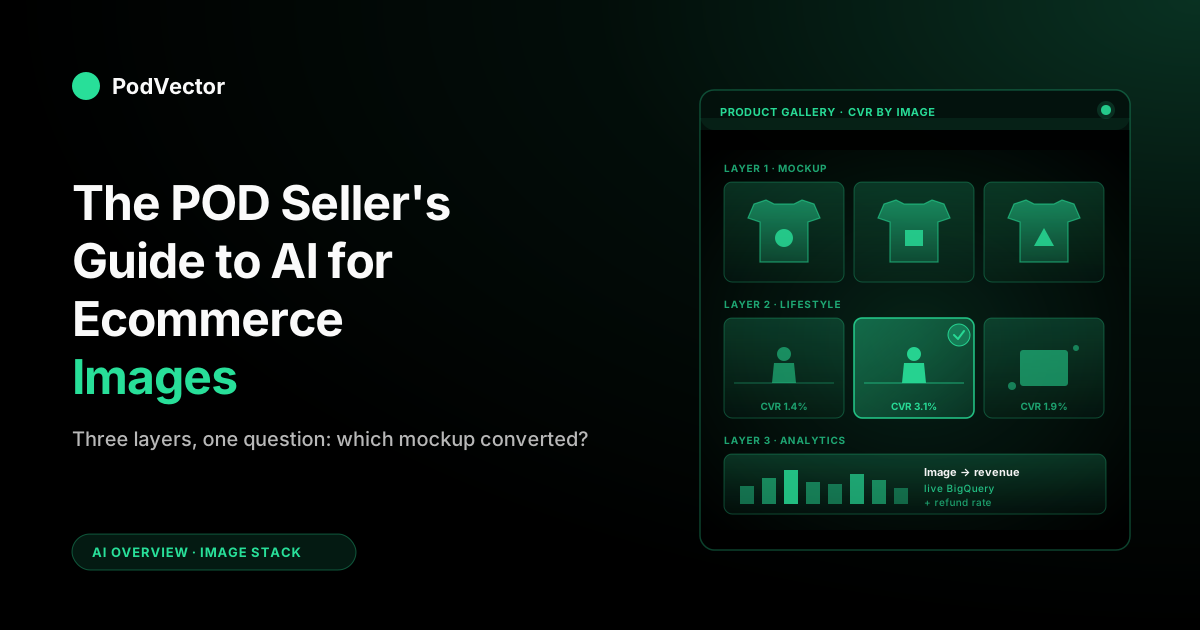
Quick Answer: Yes — AI can generate compliant product images and lifestyle mockups for ecommerce listings, but for print-on-demand sellers the stack splits into three distinct jobs: mockup generation (rendering your design onto a garment or hard good at scale), lifestyle scene generation (placing the product in context with models, flat-lays, or styled scenes), and image performance analytics (knowing which mockup actually converts). Most generic roundups cover only the second job, because they assume you have a physical product to photograph.
POD sellers need a different approach: Printify and Printful's native mockup generators handle job one for free; tools like Photoroom, Pebblely, Claid.ai, and WeShop AI handle job two; and the analytics layer — tying image variants back to revenue — is where most stores have no system at all. This guide walks through each layer with the POD-specific decisions that don't appear in generic ecommerce content.
What "AI for ecommerce images" actually means for POD
If you read the top articles currently ranking for "AI for ecommerce images," they're written for a different ecommerce business than yours. They assume you have a physical product to photograph — a candle, a sneaker, a leather wallet — and the AI's job is to remove the background, drop the product into a marble countertop scene, and ship a marketplace-ready hero shot. That's a real workflow, but it's not the print-on-demand workflow.
For a POD seller, the "product" is a design file applied to a Printify or Printful blueprint. You don't photograph anything. The image stack you actually need is:
- Mockup generation — taking a design (PNG or SVG) and rendering it onto a garment, mug, poster, or phone case. This is the catalog-fill workhorse.
- Lifestyle scene generation — taking that mockup and placing it in a setting (a model wearing it, a coffee table, a styled flat-lay). This is the conversion workhorse.
- Image performance analytics — knowing which of your hundreds of variant images is actually moving units, and where in the funnel images cause drop-off.
General AI image tool roundups cover the second layer well. Printify and Printful's native generators cover the first layer for free. The third layer — analytics — is where most POD stores have no system at all. They generate images, ship them to Shopify, and never close the loop on which mockup the buyer actually clicked. That gap is what differentiates POD imagery from generic ecommerce imagery, and it's what this guide is built around.
One thing the current top results all agree on: according to the Claid blog, AI image tools are "only as accurate as the structured data and visual rules you feed into the system" — meaning audit your SKU data and set a visual rules document before generating at scale. That applies to POD sellers just as much as to brands with physical inventory.
For the broader picture of how image tooling fits into the AI stack for a POD store, see the PodVector AI platform overview and the CRO techniques for POD stores guide.
The three layers of POD product imagery
Every product page on a POD store has three image jobs, and a useful AI image stack solves all three:
| Layer | Job | Image count per SKU | Where AI helps |
|---|---|---|---|
| Mockup | Show the design on the blueprint | 1 per color × variant | Auto-rendering hundreds of variants from a single design file |
| Lifestyle | Show the product in context | 2–4 per design | Generating model, scene, and flat-lay shots without a photo studio |
| Analytics | Tell you which images converted | — | Tying image variants to add-to-cart, checkout, and revenue events |
According to Rewarx's 2026 roundup, the top AI tools for ecommerce product imagery fall into three categories that map almost exactly to these layers: AI product photography studios that retouch and enhance hero shots, AI mockup generators that place products in lifestyle contexts, and AI background removers that produce marketplace-compliant cutouts. POD sellers are already ahead of most ecommerce merchants on layer one — the native mockup generators mean you skip the photography-and-background-removal step entirely.
Layer 1 — Mockup generation
Mockup generation is the easy layer for POD sellers because Printify and Printful both ship a native mockup generator with every blueprint. Upload a design, pick the blueprint (Bella+Canvas 3001, Gildan 18000, AOP3D-style cut-and-sew), and the platform renders front, back, side, and folded shots across every color variant. Both generators use a mix of 3D rendering and AI compositing; the output quality is good enough for a Shopify catalog, an Etsy listing, or an Amazon Merch on Demand upload.
Where the native generators stop being enough:
- Style consistency across blueprints — the default Printify mockup for a Bella+Canvas 3001 looks different from the default Gildan 5000, even when the design is identical. Sellers running both want a unified look. According to Tolstoy's guide to AI product images, creating a visual rules document covering lighting direction, background style, camera angle, and cropping ratios before generating at scale is the fix.
- Custom backgrounds — the default mockup is a flat product on a neutral background. Lifestyle backdrops are a paid add-on or a separate tool entirely.
- Branded collateral — sellers building a brand want consistent typography, color framing, and watermarking layered onto the mockup. Native generators don't do that.
- Multi-supplier portfolios — if you're sourcing from both Printify and Printful (common when chasing margin or shipping zone coverage), you have two completely separate mockup libraries to keep in sync.
For sellers who outgrow the native tools, the upgrade path is usually one of three:
- Placeit (Envato) — large template library, AI-assisted design dropping. Best for stores wanting a unified visual brand across blueprints from multiple suppliers.
- Smartmockups — lighter-weight, integrates with Canva, designer-friendly. Free tier exists.
- Mockey — AI-first, generous free tier.
The trade-off with all three is that you're now maintaining a mockup library outside your supplier's catalog, which means every new blueprint or variant needs a manual update. For most POD stores under 200 designs, the native Printify or Printful mockup generator is genuinely enough — the time saved on layer 2 (lifestyle) and layer 3 (analytics) returns far more revenue than upgrading layer 1.
Layer 2 — Lifestyle scene generation
Lifestyle imagery is where most POD sellers feel the pain: the mockup shows the shirt, but the buyer wants to see the shirt on a person, in a setting, with the energy that makes them imagine wearing it. This is the layer the generic AI ecommerce image tools all target, and it's a genuine value-add over Printify's basic lifestyle templates.
The tools in this space are mature as of mid-2026. Across the top SERP results, the names that appear repeatedly are:
- Photoroom — strong on the apparel and product-on-model use cases. According to Claid's 2026 comparison, Photoroom is "an AI photo editor built for ecommerce listings and marketplace workflows: the kind where you need clean, consistent images fast." Good Shopify integration, mobile-friendly. Free tier with watermark; paid plans from around $5/month.
- Pebblely — focused on AI-generated product backgrounds. According to Fibbl's 2026 roundup, Pebblely "excels at placing products in lifestyle settings and thematic environments that align with brand aesthetics." Best for non-apparel POD (mugs, posters, phone cases).
- Claid.ai — API-first, designed for catalogs. According to Dreamina's tool comparison, "Claid.ai's strength is this scalability and its orientation toward measurable ecommerce outcomes like conversion and approval rates on platforms that have strict imagery rules." Added a ghost-mannequin/flat-lay → on-model conversion that preserves fabric texture and printed logos — useful for turning a Printify mockup into an on-model shot without a photo shoot.
- Flair.ai — creative-control oriented, scene composition with drag-and-drop. According to Fibbl, Flair "generates entire scenes around products, creating the emotional context that drives purchase decisions."
- SellerPic — fashion-model-swap and virtual try-on focused. Strong for apparel POD where you want diverse model representation without a photo shoot.
- WeShop AI — according to Fibbl, WeShop AI "specializes in fashion and apparel visuals" with "AI-generated models and outfit visualization tools tailored to clothing brands." Plans from around $12.99/month.
- Caspa.ai — according to Fibbl, Caspa.ai "specializes in generating AI-powered human models showcasing products," enabling brands to "create lifestyle imagery without booking models or organizing photoshoots."
- Nightjar — catalog-consistency specialist. Reusable "photography styles" keep lighting, camera feel, and brand look identical across every new SKU — the answer to the cross-blueprint inconsistency problem POD stores hit.
- CreatorKit — Shopify-native, image and short-form video.
- Adobe Firefly + Photoshop — manual control for complex composites. Commercially-safe model, generation records kept — important for provenance compliance.
For POD specifically, the decisions usually come down to:
1. Apparel vs. non-apparel
If your catalog is 80% t-shirts and hoodies, you need a tool that handles fabric drape, model fit, and avoids the uncanny-valley look that breaks trust on product pages. Photoroom and SellerPic handle this well. Pebblely struggles with garments on models — it's stronger for product flat-lays and styled scenes. If your catalog is mostly mugs, posters, and phone cases, Pebblely is the better default. According to PixelPanda's POD guide, for print-on-demand items like mugs, t-shirts, and phone cases, clean studio and modern scene styles create professional mockup-style photos that hold up across marketplaces.
2. Marketplace compliance
If you sell on Amazon Merch on Demand, Etsy, or Redbubble, the marketplaces have specific rules about what counts as a real product image versus a render. According to Rewarx, "AI-generated and AI-enhanced product images are allowed on both Amazon and Shopify as long as the images are not misleading, do not contain prohibited content, and meet the platform's technical requirements." Critically, according to Rewarx, "Amazon requires the main image to use a pure white background" — and listings that violate this rule can be suppressed. Etsy generally allows AI-generated lifestyle imagery as long as it's labeled accurately. Check each platform's current policy before you publish a fully AI-generated lifestyle catalog; these rules change regularly.
3. Volume and batching
If you're producing 10–50 lifestyle images a month, any of the tools above work fine in a manual workflow. If you're producing 200+ images a month across a growing catalog, you want API access. According to Claid's blog, Claid "offers speed and scale for marketplaces and brands using thousands of SKUs via API automations." Photoroom also exposes an API that lets you trigger lifestyle generation as part of a Shopify product creation pipeline.
4. Compliance, provenance, and commercially-safe models
The deeper buying criterion the 2026 top roundups now lead with is provenance: which model generated the image, whether that model was trained on commercially licensed data, and whether the tool keeps a generation log you can audit. This matters more for POD than for a store shooting its own product, because your "product" is itself a design — if an AI lifestyle generator hallucinates a recognizable logo, a celebrity-adjacent face, or a trademarked prop into the scene, you own that liability on a marketplace listing. Favor tools that advertise commercially-safe models and retain generation records (Adobe Firefly and Claid lead here); treat a tool that won't say what its model was trained on as a risk on anything you publish at scale.
For brands selling into the EU, AI Act content authentication requirements are now in effect as of August 2026. Lifestyle images generated entirely by AI need to be labeled, and most tools above are adding metadata-based (C2PA-style) watermarking — verify your tool of choice has this on the roadmap before going all-in on AI-generated catalog imagery for European customers.
5. Virtual try-on and on-model swaps
Virtual try-on is the most significant shift in the 2026 SERP for this topic. Tools like SellerPic, WeShop AI, and Caspa.ai now generate diverse AI models wearing your design and let the buyer visualize fit before purchase. For apparel POD this is a real conversion lever — it answers the "will this hang right on me?" objection that a flat mockup can't. According to Claid's 2026 comparison, Claid's AI fashion tool can "turn ghost mannequin or flatlay images into on-model shots, while preserving fabric texture and logos" — so you can turn a single Printify mockup into a believable on-model shot without a photo shoot.
The POD-specific caution: an AI model that visually overstates fit or drape can lift add-to-cart but raise refunds. Treat try-on imagery as something to measure, not just generate — which is exactly what layer 3 is for. See our average checkout completion rate benchmarks to understand what a realistic conversion baseline looks like before you attribute gains to imagery alone.
6. 3D, 360° views, and short-form video
Interactive imagery is the other subtopic the current top results lean into. 360° spins, 3D digital twins and AR configurators (tools like Fibbl, Zakeke), and short-form product video (CreatorKit, SellerPic) are credited with measurable add-to-cart lifts and return-rate reductions in vendor case studies. Zakeke in particular overlaps POD because it doubles as a live product personalizer — useful if you sell customizable blueprints rather than fixed designs.
For most POD stores, though, this is a nice-to-have rather than a must — a t-shirt doesn't need a 360° spin the way a watch or a shoe does. Hard goods (mugs, sculptural prints, 3D-printed items) are where 3D and 360° earn their keep. Don't invest in 3D before you've nailed the basic model-shot/flat-lay/styled-scene trio and have analytics telling you it's worth the spend.
7. SKU data quality before you generate at scale
This subtopic now leads the top-ranking results and was missing from earlier versions of this guide. According to Tolstoy's AI image guide, "AI-generated images are only as accurate as the structured data and visual rules you feed into the system." Before batch-generating lifestyle shots, audit your SKU data for missing attributes (color, material, size, finish) and normalize naming conventions across variants. For POD, that means confirming your blueprint names, color slugs, and design-file dimensions are consistent across Printify and Printful before you push anything into a lifestyle tool. Garbage-in produces uncanny-out — and a misrepresented product color is a refund waiting to happen. According to Tolstoy, it helps to "maintain at least one 'ground truth' studio reference image per product line to guide AI outputs" — for POD, that ground truth is the highest-resolution native mockup from Printify or Printful.
Layer 3 — Image performance analytics
This is the layer almost nobody covers, and it's where POD sellers leak the most money. You can generate lifestyle images quickly with any of the tools above. You cannot, with any of those tools, answer the question that actually matters: which of those images converted?
Image performance analytics is the practice of tying every image variant on a product page to the downstream conversion events — pageview, add-to-cart, checkout, refund. For a POD store, image performance is highly variant-specific in ways that don't apply to a unique-product store:
- The same design on a black hoodie and a heather grey hoodie can have a significant conversion gap depending on which lifestyle shot the buyer landed on first.
- The order of images in the product gallery matters more for POD than for traditional ecommerce, because POD buyers are specifically trying to imagine the design's "vibe" — and the first image they see frames everything that follows.
- Mockup-only listings convert worse than mockup + at-least-one-lifestyle-shot listings, but past 3–4 lifestyle shots the marginal conversion lift tends to flatten as buyers lose focus.
- A design that performs well on Shopify with a lifestyle shot may perform differently on Etsy with only a mockup — the marketplace context matters and the right image stack is platform-specific.
To run image performance analytics on a POD store you need three data streams joined together: your storefront's image asset metadata (which image is on which product, in which gallery position), the page-level engagement events (which image was viewed, scrolled to, clicked-to-zoom), and the order-level outcome (did this session convert, at what AOV, with what refund rate). None of the AI image tools above join those three streams. Shopify's native analytics doesn't, either — it tells you product-level conversion but not image-variant-level conversion.
This is the gap Victor, PodVector AI's AI employee, closes for POD sellers. Victor keeps track of your Shopify, Printify, Printful, Meta Ads, Google Ads, and Klaviyo data in one place, so he can answer questions like "which of my recent lifestyle shots brought in the highest-profit orders?" With your approval, he can also move the winning lifestyle photo to the front of your product gallery and push the weaker photos to the back. Victor never makes a change on his own; every update waits for you to approve it, and he shows you the old and new version side by side before anything goes live.
For a wider view of how analytics fits across the POD AI stack, see the PodVector AI platform overview and the net profit margin benchmark for POD stores to frame what "image performance" actually contributes to your bottom line.
Tool comparison for POD sellers
Here's how the tool landscape maps to the three layers above. The first column is the layer the tool primarily addresses; tools that span multiple layers are listed in the layer where they're strongest.
| Tool | Layer | POD strength | Pricing (monthly) |
|---|---|---|---|
| Printify Mockup Generator | Mockup | Free, native, all blueprints | $0 |
| Printful Mockup Generator | Mockup | Free, native, photoreal output | $0 |
| Placeit | Mockup | Large template library, branded mockups | Paid |
| Smartmockups | Mockup | Canva integration, lightweight | Free tier + paid |
| Mockey | Mockup | AI-first, generous free tier | Free tier + paid |
| Photoroom | Lifestyle | Apparel-on-model, Shopify integration, API | Free tier + paid |
| Pebblely | Lifestyle | Mug/poster/case backgrounds | Free tier + paid |
| Claid.ai | Lifestyle | API + ghost-mannequin→on-model, catalog-scale, commercially-safe | Paid (API-based) |
| Flair.ai | Lifestyle | Creative scene composition | Paid |
| SellerPic | Lifestyle | Fashion model swaps, virtual try-on, diversity | Paid |
| WeShop AI | Lifestyle | AI models + outfit visualization for apparel | From ~$12.99/month |
| Caspa.ai | Lifestyle | AI-powered human models without photo shoots | Paid |
| Nightjar | Lifestyle | Catalog consistency across SKUs | Paid |
| CreatorKit | Lifestyle | Shopify-native, image + short-form video | Paid |
| Adobe Firefly + Photoshop | Lifestyle | Manual control, complex composites, commercially-safe model | Paid |
| PodVector AI (Victor) | Analytics | Which photos drive sales, all your data in one place, changes you approve first | Free during beta |
The mistake most POD sellers make reading a table like this is to pick one tool from each row and stop. The right move is to pick one mockup tool (usually the native Printify or Printful generator), one lifestyle tool that matches your catalog (Photoroom for apparel, Pebblely for hard goods), and one analytics layer that ties the result back to revenue. Three tools, three jobs, no overlap. Adding a fourth lifestyle tool because it had a flashier landing page is how you end up with tool-stack bloat and no idea which lifestyle shot actually converts. See the guide to increasing AOV with AI for the same discipline applied to the ad and pricing layer.
A 5-step image workflow for a POD store
Here's the workflow this stack supports end-to-end, from a new design idea to a product page that earns its catalog slot:
- Generate the design — using Midjourney, Adobe Firefly, Ideogram, or your in-house design process. The output is a transparent PNG sized for the largest blueprint you plan to print on. Before uploading, audit your SKU data: confirm color slugs, blueprint names, and design-file dimensions are consistent — because according to Tolstoy's guide, AI-generated images downstream are only as accurate as the structured data you feed in.
- Render mockups — upload the design to Printify or Printful, select your blueprint and color variants, and let the native generator produce front and back shots for every variant. This is layer 1, and it's free.
- Generate lifestyle shots — push the mockup or the design into Photoroom, Pebblely, or your tool of choice and produce 2–4 lifestyle scenes per design. Aim for variety (model + flat-lay + styled scene) rather than five versions of the same shot. This is layer 2.
- Publish to Shopify with discipline — gallery position one is the conversion driver. For apparel, lead with a model shot; for hard goods, lead with a styled scene. Mockup goes second. Save the catalog-only mockup for later in the gallery. If you sell on Amazon, ensure your primary image meets the white-background requirement before publishing.
- Measure and reorder — wait for a meaningful number of product pageviews per design (typically 2–4 weeks for a healthy SKU). Pull image-variant conversion data through your analytics layer. Promote winners, demote losers, and rotate in fresh lifestyle shots for the bottom quartile. This is layer 3, and it's where the catalog stops being an art project and starts being an asset.
For an end-to-end view of how this fits with the rest of the AI workflow, see the Klaviyo browse abandonment flow setup guide — because the buyer who scrolled your product gallery without converting is often the highest-intent segment in your email list.
Mistakes to avoid
- Skipping SKU data cleanup before generating at scale. According to Tolstoy's guide, a visual rules document covering lighting direction, background style, camera angle, and cropping ratios needs to exist before you batch-generate. Without it, you'll have 200 lifestyle shots with inconsistent lighting and mismatched color renderings — a brand-consistency problem that's expensive to fix after the fact.
- Skipping lifestyle imagery on hard goods. "It's just a mug, the mockup is enough" is a conversion leak. A styled lifestyle shot on a mug listing answers what it feels like to own one — the mockup only answers what it looks like.
- Generating too many lifestyle variants. Past four images per product, you're adding decision fatigue, not conversion. If you've got 12 lifestyle shots for a single design, the right move is to ship the best four and archive the rest.
- Treating the catalog as static. Most POD stores generate images at launch and never touch them again. Rotating lifestyle shots based on conversion data is how a catalog compounds instead of stagnating.
- Buying tools without a measurement layer. Multiple lifestyle tools without conversion tracking is worse than one lifestyle tool with conversion tracking. The differentiating investment is at layer 3, not layer 2.
- Ignoring marketplace policy differences. A lifestyle image that converts beautifully on Shopify can get an Etsy listing flagged or an Amazon Merch upload rejected. According to Rewarx, Amazon listings that violate the white-background rule for primary images "are routinely suppressed and lose ranking until corrected, which can take weeks to recover." Read the policy for every channel before you publish a fully AI-generated catalog. See also the dropshipping from Etsy to Shopify guide for the broader cross-channel compliance picture.
- Forgetting refund signals. A lifestyle shot can have great click-through and add-to-cart numbers but a higher refund rate if it visually overstates the product (saturated colors, idealized fabric drape). Layer 3 analytics has to include refund tracking, not just revenue, or you'll optimize toward returns. Check the net profit margin benchmark to understand what refund rates do to your real margin.
- Publishing AI imagery you can't vouch for. An AI lifestyle generator that quietly renders a recognizable logo, face, or trademarked prop into your scene puts the liability on your listing, not the tool's. Use commercially-safe models, keep the generation record, and spot-check scenes before they go live — especially on marketplaces that action IP complaints fast.
FAQs
Can AI generate compliant product images and lifestyle mockups for ecommerce listings?
Yes. According to Rewarx's 2026 roundup, AI-generated and AI-enhanced product images are allowed on both Amazon and Shopify "as long as the images are not misleading, do not contain prohibited content, and meet the platform's technical requirements." The compliance requirements differ by channel: Amazon mandates a pure white background for primary images; Shopify gives sellers more freedom; Etsy requires accurate representation. According to Tolstoy's guide, tools like AI image studios "generate lifestyle scenes, on-model shots, and marketplace-ready mockups from a single product photo while keeping the product itself pixel-accurate — the key compliance requirement on Amazon and Shopify." Always review output against each channel's image policy before publishing at scale.
What's the cheapest AI image stack a POD seller can run?
Free, if you stay disciplined. Use Printify or Printful's native mockup generator for layer 1. Use Photoroom's free tier (watermarked) or Pebblely's free-images-per-month tier for layer 2 while your catalog is small. Pair with PodVector AI's free beta for layer 3 analytics. Total monthly cost: $0. The cost shows up at scale, where you'll want at least one paid lifestyle tool to remove watermarks and increase volume.
Are AI-generated lifestyle images allowed on Etsy and Amazon?
Etsy currently allows them as long as the listing accurately represents the product. According to Rewarx, Amazon requires the main image to use a pure white background, while Shopify gives sellers more freedom for branding. Amazon's Merch on Demand prefers mockup-style primary images and is more restrictive about fully AI-generated lifestyle scenes; the secondary gallery slots are more permissive. Always check each platform's current policy before bulk-publishing — these rules change regularly.
How many lifestyle images per product should a POD store have?
3–5 in the gallery, plus the mockups for each color variant. Past five lifestyle shots, conversion typically flattens or declines as the gallery becomes a wall of similar-looking scenes. Variety beats volume: one model shot, one flat-lay, one styled-context scene, one detail close-up is a strong default.
Can I use the same lifestyle shot across all color variants of a single design?
Technically yes, but it leaves money on the table. Different colors photograph differently in different settings — a black hoodie shot in low-key lighting and a heather hoodie shot in soft daylight will both outperform their counterpart. If you only have time for one lifestyle shot per design, start with the bestselling color and work down the variant list as the design proves itself in sales data.
Do I need to clean up my SKU data before generating AI lifestyle images?
Yes — this is the step most guides skip. According to Tolstoy's guide, you should "audit your SKU data for missing attributes (color, material, size, finish) and normalize naming conventions across variants" before generating at scale. For POD specifically, confirm blueprint names and color slugs are consistent across Printify and Printful before pushing anything into a lifestyle tool. Inconsistent source data produces inconsistent imagery — and a misrepresented color is a refund waiting to happen.
Do AI lifestyle generators work for plus-size, diverse, or differently-abled models?
The tools have improved meaningfully. According to Fibbl's 2026 roundup, WeShop AI offers "AI-generated models and outfit visualization tools" across various poses and settings, and Caspa.ai "enables brands to create lifestyle imagery without booking models or organizing photoshoots" with diverse model options. SellerPic specifically markets model-swap functionality across body types and ethnicities. Quality is mixed — the higher-tier tools tend to handle representation better. If size and representation diversity is core to your brand, audit the model library of any tool before you commit.
Is AI virtual try-on worth it for a POD apparel store?
For apparel, yes — it's the 2026 feature with the clearest conversion case. SellerPic, WeShop AI, and Caspa.ai let buyers see the design on an AI model that approximates their body type, which answers the fit objection a flat mockup leaves open. The catch is the same as any lifestyle image: if the rendered fit is more flattering than reality, you lift add-to-cart but raise refunds. Roll it out on your bestselling designs first, keep refund tracking on, and let your analytics layer confirm the try-on shot actually nets out positive before you apply it catalog-wide. For hard goods (mugs, posters) try-on doesn't apply — a styled lifestyle scene does the same job.
Are AI-generated product images safe to use from a copyright standpoint?
Mostly, if you use tools that run commercially-safe models and keep a generation log — Adobe Firefly and Claid are the standard citations here. The real POD-specific risk isn't the base image, it's contamination: an AI scene that hallucinates a brand logo, a celebrity-adjacent face, or a trademarked prop into the background. That's your liability once it's on a listing, so spot-check generated scenes and avoid prompting toward recognizable brands. When a tool won't disclose what its model was trained on, treat its output as higher-risk for anything you publish at scale.
Should I use AI to generate the design itself, the mockup, and the lifestyle shot?
You can, and many POD stores in 2026 do. The risk isn't quality — it's homogenization. If everyone in your niche is using the same generative prompts, the same Printify mockups, and the same lifestyle templates, your storefront looks like everyone else's. AI is the floor; brand-specific deviation from the AI default is the ceiling. The stores winning in 2026 use AI for speed and humans for the decisions that make a catalog feel intentional. For how that connects to overall store strategy, see the PodVector AI platform overview and the CRO techniques for POD stores.
What's the difference between a mockup and a lifestyle shot, and does Google care?
A mockup is a render of the product on a neutral background — it answers "what is the product." A lifestyle shot places the product in context — it answers "what is owning this product like." Google Image Search and Google Shopping reward both, in different surfaces. For organic image search, alt text and image filename matter as much as the image itself. For Google Shopping, the primary image needs to be clean and product-focused (mockup territory). For Google Lens and visual discovery, lifestyle shots tend to surface more often because they have more visual context to match against. See the Printify Square integration guide for how multi-channel selling affects image requirements across storefronts.
How does AI image generation affect my POD margins?
The cost-per-image with AI tools is a fraction of traditional photography — and the margin question matters more on the analytics side than on the generation side. If a lifestyle tool produces images that lift conversion meaningfully, you've earned back the tool cost quickly on decent traffic. The bigger margin lever is layer 3: knowing which images are correlated with high-margin, low-refund orders versus images that generate returns. Track both sides. See our net profit margin benchmark to frame what image-driven conversion improvements are actually worth to your bottom line.
Close the loop on which images actually convert
Most POD stores stop after generating images. The store that knows which mockup, which lifestyle shot, and which gallery position drove revenue beats the static-catalog store on every margin and conversion metric. Victor, PodVector AI's AI employee, keeps your Shopify, Printify, Printful, Meta Ads, Google Ads, and Klaviyo data together, so the question "which lifestyle shot brought in the highest-profit orders this month?" gets a real answer instead of a guess. Victor suggests a change, shows you the old and new version, and only makes it live after you approve.
Try Victor free