
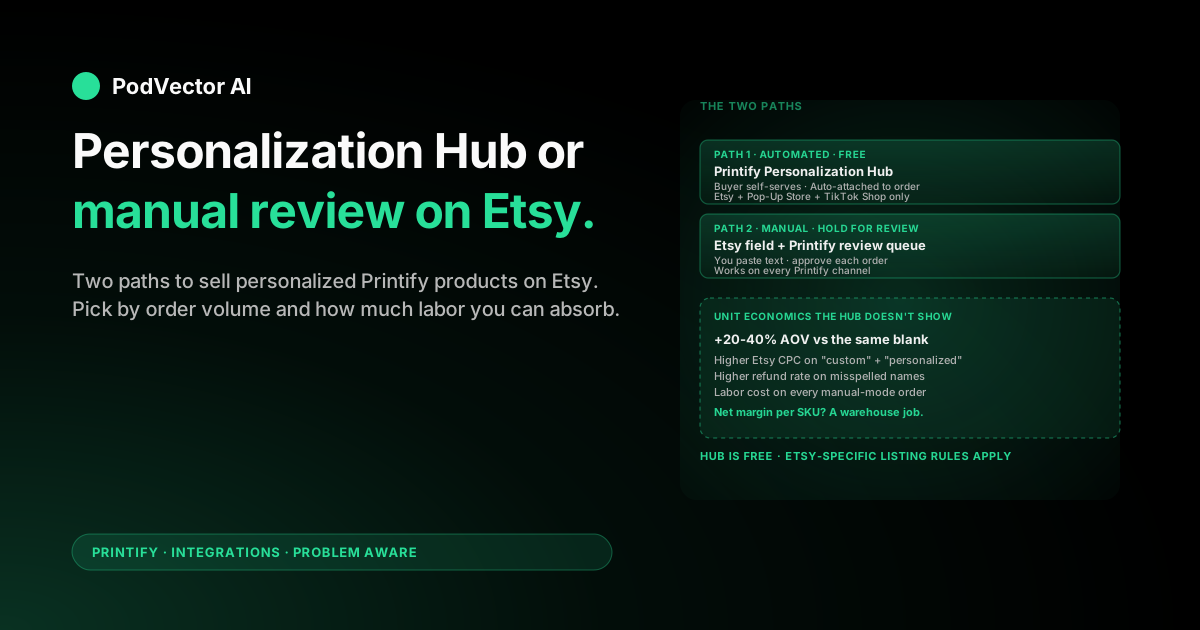
Quick Answer: Printify offers two ways to sell personalized products on Etsy. Automated personalization uses Printify's free Personalization Hub — buyers add their text or images on a hosted page linked from your Etsy listing, and the design auto-attaches to the Printify order.
Manual personalization uses Etsy's built-in personalization field, optionally with Printify's "hold for review" toggle so you can paste the buyer's input onto the design before fulfillment runs.
Both are real options. The Hub scales because it removes manual design work. Manual scales worse but lets you sell on Etsy plus any other channel without rebuilding the listing. Pick based on order volume and how much Etsy-specific lift you want.
The two paths: automated vs manual personalization
Printify supports personalization on Etsy through two distinct mechanisms. Knowing which one fits your shop is the most important decision in this guide — most setup pain comes from picking the wrong one and rebuilding.
Automated personalization runs through Printify's Personalization Hub. Your Etsy listing carries a custom link that opens a hosted page where the buyer types or uploads their personalization. They get a live preview, confirm, receive a code, and paste that code into Etsy's personalization field at checkout. Printify reads the code, attaches the saved design to the order, and pushes it to production with no further input from you.
The Hub is free. It currently works on Etsy, Pop-Up Store, and TikTok Shop — and a separate Manual mode covers every other channel.
Manual personalization uses Etsy's native "Personalization" field on the listing. The buyer types their request directly into Etsy. The order lands in Printify with the buyer's note attached, and either auto-fulfills (if you've baked in a generic personalization placeholder) or holds for your review — you open the order, edit the design, then submit it for production.
Both paths produce the same end product: a personalized item shipped to the buyer. The difference is how much human labor each order costs you and how much rework you'll do when something goes wrong.
Why this decision matters for POD margins
Personalized products carry a margin profile that looks very different from generic catalog items. The premium is real — Printify's own data and Etsy seller reports both put personalized listings at noticeably higher AOV than their non-personalized equivalents, often 20–40% higher on the same blank.
But the cost structure shifts too. Three line items move:
- Labor per order. Manual personalization spends 1–3 minutes of your time per order, every order, forever. At 30 orders/day, that's a part-time job.
- Production lead time. "Hold for review" orders pause until you approve them. Etsy's processing time clock keeps ticking. A backlog of 50 review-pending orders means a 50-order delay against your stated dispatch window.
- Return and refund rate. Misspelled names and wrong-format images cause more refunds than generic SKUs. Printify won't reprint a personalized order at no cost — the buyer's input is the authoritative source.
Automated personalization through the Hub eliminates the labor-per-order line by shifting design work onto the buyer's preview screen. It doesn't eliminate the return risk, but it reduces it because the buyer literally saw their personalized preview before paying.
This is why most sellers above ~20 personalized orders/day move to the Hub. Below that threshold, manual review is often fine — and lets you sell the same SKU on Etsy plus Shopify plus eBay without rebuilding the listing for each channel.
Step 1: Pick a personalizable product
Not every Printify blank supports the Personalization Hub. As of 2026, the Hub covers most of the Printify catalog (apparel, mugs, posters, drinkware, home decor, accessories), but a handful of products — certain embroidered items, some AOP products, and complex 3D items — remain off-limits.
The reliable check: inside Printify's product creator, look for the "Add personalization" or "Personalization Hub" toggle on the design layer. If it's not there, the product doesn't support automated personalization yet.
For first-time personalization sellers, start with a high-volume blank that has clean printable area: a unisex tee, a 11oz mug, or a poster. Save embroidery, all-over-print, and 3D-curved-surface products for after you've shipped your first 100 personalized orders. They have edge cases you don't want to learn through angry buyers.
If you're still picking your first Etsy + Printify product, our Etsy + Printify setup walkthrough covers product selection and shop configuration end-to-end.
Step 2: Build the base design with personalization layers
Open the product in Printify's product creator. Add your base design — the artwork that stays the same on every order (the wreath, the heart frame, the dad-joke layout, whatever you're selling).
Then add the personalization layers on top of the base design. Each personalizable element is its own layer:
- Text layer for a name, date, message, or initials. Pick the font, size, color, and exact position. Buyers can change the content but not these styling defaults.
- Image layer for a photo, logo, or pet portrait. Set the bounding box. Buyers upload PNG, JPEG, or JPG up to 100 MB.
- Multiple layers if you want, say, a name plus a photo, or two names on a couples mug. The Hub composes them in the order you set.
Use realistic placeholder content while you design. "Sample Name" or "Your Text Here" works — the placeholder gets replaced by the buyer's actual input at checkout. It never ships unless you forget to enable the personalization toggle and Printify treats the layer as static (a common Step 3 mistake).
Step 3: Configure text and image fields
For each personalization layer, configure the buyer-facing field. This is what shows on the Personalization Hub page when a buyer clicks through from your Etsy listing.
Set the field label, the character limit on text fields, and whether the field is required or optional. A required field forces the buyer to enter something before they can generate a code; an optional field lets them skip the personalization and keep the placeholder.
Most sellers make at least one field required. Optional personalization usually means a buyer paid for a "Personalized Mug" and forgot to actually personalize it — which lands in your refund queue.
For text fields, set the character limit conservatively. A name field at 20 characters is fine. A 60-character "message" field is a recipe for buyers typing whole paragraphs that don't fit your design and complaining when the rendered text is microscopic.
For image fields, document the format requirements (PNG/JPEG/JPG, max 100 MB) in the field's help text. Buyers who upload PDFs or HEIC files at checkout will email you confused — better to head it off in the field hint.
Step 4: Publish to Etsy (and meet Etsy's mockup rules)
Once your product is built and personalization is configured, publish it to your connected Etsy shop. If you haven't connected Etsy to Printify yet, the Etsy-to-Printify connection guide walks through the OAuth flow.
Publishing pushes the product to Etsy as a draft listing. The Personalization Hub's custom link is automatically embedded in the listing — you'll see it in the listing description as a link buyers click to add their personalization.
The Etsy mockup rule that trips up most sellers: Etsy doesn't allow placeholder text in the main listing photo. If your mockup shows "YOUR NAME HERE" on the mug, Etsy can take the listing down for misleading buyers about what they'll receive.
Replace the placeholder mockup with a realistic example — "Sarah," "Emma," "Best Dad" — that demonstrates what a personalized version actually looks like. Add a secondary photo that shows the design without personalization so buyers see the base layout, but the lead image should always feature a real-looking personalized version.
Etsy also expects your listing's personalization field (Etsy's native one, separate from Printify's Hub) to be configured. For Hub-driven personalization, set Etsy's field instructions to something like: "Click the personalization link in this listing description, customize your design, then paste your code here at checkout."
Step 5: Handle the order review queue
This step looks different depending on which path you picked.
Automated (Hub) orders: when a buyer completes checkout with a valid code, Printify auto-attaches their personalized design and the order moves straight to production. No review queue. You only intervene if Printify flags a problem (low-resolution uploaded image, font fallback, character limit overflow).
Manual orders with hold-for-review enabled: every personalized order pauses in your Printify "My Orders" tab with status "Action required." You open each order, paste the buyer's note into the personalization layer (or upload their image), confirm the preview, and submit for production.
For the manual path, build a daily review rhythm: same time each morning, work the queue, then close it. Letting the queue grow beyond a single day causes Etsy "where's my order?" messages and erodes your shop's late-shipment metric.
Some sellers run a hybrid setup: Hub-automated for high-volume best sellers, manual review for low-volume premium SKUs where the personalization is complex (multi-line custom text, image color matching, multilingual orders). That's fine — Printify handles both modes inside the same shop.
Step 6: Track personalized orders and what they cost you
Once orders flow in, the operational question is which personalized SKUs are actually profitable.
Printify shows production cost. Etsy shows revenue and fees. Neither shows the combined picture, and personalized listings break the picture further because of the unit-economics shift in Step 0:
- The personalized variant of the same blank often has 30% higher revenue but the same Printify production cost — so the gross margin per order is meaningfully better.
- If you run the manual path, you're spending labor every order. If you cost your time at even minimum wage, the math can flip on slow-moving SKUs.
- If you run ads to personalized listings, Etsy's CPCs on personalization-heavy keywords ("personalized pet mug," "custom name shirt") run higher than generic equivalents — so your CAC moves too.
The honest answer is that no single dashboard inside Etsy or Printify will show you net margin per personalized SKU after fees, shipping, ad spend, and labor. You'll spend either a spreadsheet afternoon every Sunday rebuilding it, or pull all four sources into one data warehouse and query it. (Snowflake, BigQuery, Redshift, and Databricks all work; the choice matters less than the consolidation.)
What Printify's Personalization Hub still can't do
The Hub is the best automated personalization Printify has ever shipped, but it has limits worth knowing before you build your whole catalog around it:
- Only new products. You can't retrofit personalization onto an existing Etsy listing. To Hub-enable a product you already sell, you recreate the listing from scratch and re-acquire its reviews.
- Limited to three channels. Hub-driven automation works on Etsy, Pop-Up Store, and TikTok Shop today. Shopify, Amazon, eBay, and WooCommerce still require manual review.
- No conditional logic. You can't say "if buyer chooses pink, show this design layout; if blue, show this one." Variants and personalization layers are independent — buyers personalize within whichever variant they bought.
- No price-by-personalization. Adding a longer message or a second name doesn't increase the order price the way a third-party app like Customily or Teeinblue can. The Hub is single-price.
- No bulk personalization import. If a wholesale buyer wants 50 mugs with 50 different names, they have to place 50 separate Etsy orders. The Hub is built for one-by-one consumer purchases.
If any of these limits block your business model, the workaround is either Printify Manual mode (with your own spreadsheet for tracking variants) or a third-party app like Customily or Teeinblue layered on top of Printify. The third-party route adds another subscription cost on top of any Printify Premium discount you're already paying for — see our Premium coupon breakdown for the full unit math.
Troubleshooting common issues
The Personalization Hub link in my Etsy listing doesn't work
Two common causes. First, the product wasn't published to Etsy after personalization was added — go back to Printify, click "Publish" again, and check the Etsy listing renders the new description. Second, the listing description was overwritten manually in Etsy after publish — Printify only injects the link on publish, not on every edit.
Buyers are checking out without entering a code
Etsy doesn't enforce that the personalization field is non-empty unless you configure the listing's personalization to be "required." In your Etsy listing editor, set Personalization to "Yes — required" and add instructions that explicitly tell the buyer to enter the Hub code. Without that, buyers can hit checkout with the field blank.
The Hub preview shows a different font than my Printify design
The Hub uses a web-rendered preview, which can substitute a fallback font if the buyer's browser doesn't have your design font cached. The production file uses the actual Printify font — so the printed product is correct even if the preview looks slightly off. If you're getting buyer complaints about font mismatches, switch to a more web-safe font in your design (Helvetica, Open Sans, Roboto, Lato).
Hold-for-review orders are piling up
This is the manual-path failure mode. Either build a daily review habit, switch the SKU to Hub-automated personalization, or reduce the personalization options to the point where the manual work is trivial (one short text field, fixed font, fixed position). You can also temporarily disable the personalization feature on a SKU if you're going on vacation — the order will fulfill with the placeholder, which is better than shipping nothing for two weeks.
Etsy took down my listing for "misleading mockup"
Almost always caused by leaving "YOUR NAME HERE" or similar placeholder text in the lead listing photo. Replace with a realistic example (Sarah, Emma, John), update the listing, and appeal. Etsy usually restores the listing within 1–2 business days once the photo complies.
Buyer uploaded a low-resolution image
Printify's Hub will accept any image meeting the size cap (100 MB), but it warns at upload if resolution is below recommended DPI for the print area. Buyers ignore the warning routinely. Your options: reach out to the buyer for a higher-res file (slows the order), accept and ship knowing the print will be soft (refund risk), or cancel the order with a polite "we can't print at this quality" message. Most sellers default to the third option for anything below 1500x1500 pixels on apparel.
FAQs
Is Printify's Personalization Hub free?
Yes. The Hub is included in all Printify plans (Free, Premium, Enterprise) with no per-order charge for using it. The only ongoing cost is the Printify production fee on each order, same as any non-personalized product. Printify's overall Etsy integration is also free.
Can I use the Personalization Hub on listings I already have on Etsy?
No. The Hub only works on new products created after the personalization toggle is enabled. To Hub-enable an existing listing, you create a new Printify product with personalization, publish it as a new Etsy listing, and either deactivate the old listing or redirect buyers to the new one. You will lose the old listing's review count.
How long does Printify add to processing time for personalized orders?
For Hub-automated orders, Printify treats them like normal orders — no extra processing time. Production typically starts within hours of checkout. For manual hold-for-review orders, the clock pauses until you approve, so the buyer-visible processing time depends entirely on how fast you work the queue.
What happens if a buyer doesn't enter a Hub code on Etsy?
Printify falls back to the placeholder content in your design. If your placeholder was "YOUR NAME HERE," that's what ships. To avoid this, make Etsy's personalization field required and add a clear instruction telling buyers to enter the Hub code. Some sellers also build a generic-but-presentable design as the placeholder so a missed personalization still looks intentional (a heart, a wreath, the word "Family").
Can I sell the same personalized product on Etsy and Shopify?
Yes, but with different mechanisms. Etsy gets the Hub-automated flow. Shopify needs to use Printify's Manual mode (hold for review), since the Hub doesn't yet integrate with Shopify checkout. You can run both from the same Printify product as long as you accept the operational asymmetry.
Does Etsy charge extra fees for personalized listings?
No. Etsy's listing fees ($0.20 per listing), transaction fees (6.5%), and payment processing fees apply identically to personalized and non-personalized listings. The personalization feature itself is free on Etsy's side.
Can buyers upload their own pet photos for personalization?
Yes. The image upload layer accepts PNG, JPEG, and JPG up to 100 MB. Resolution should be at least 1500x1500 pixels for apparel and 2000x2000 for larger products like blankets or posters. Lower resolution will still upload but prints soft.
What's the difference between Printify's Hub and apps like Customily or Teeinblue?
The Hub is free and built directly into Printify, but offers single-price personalization with no conditional logic. Customily and Teeinblue are paid third-party apps with conditional pricing (charge $5 extra for a second name, $3 for a longer message), advanced design composition, and broader marketplace support. For most sellers, the Hub is sufficient. Sellers running complex multi-tier personalization or doing >$10k/mo in personalized revenue typically benefit from the paid apps.
What if I want to sell personalized embroidery on Etsy?
Personalized embroidery is supported on a subset of Printify's embroidered products through Printify's premium-personalization integration. The Hub flow is the same — check the product page for the "Personalization" toggle. Embroidery production time is longer (5–10 business days vs 2–5 for printed apparel), so set your Etsy processing time accordingly.
Can I personalize products without holding orders for review?
Yes — that's the entire point of the Hub. Hub orders auto-fulfill with the buyer's saved design attached. The "hold for review" toggle is only relevant in Manual mode. Hub and Manual are mutually exclusive per SKU: a product is either Hub-enabled or it isn't.
Related reading
For the rest of the Etsy + Printify operational picture, see our Printify integrations hub and the Printify topic page. The other Etsy-side setup guides this article assumes you've already read are Etsy + Printify setup, connecting Etsy to Printify, and how Printify works with Etsy step by step. If you're sizing the Premium discount that affects your personalization-order unit economics, see our Premium coupon code breakdown and the broader Premium coupon math. External references that informed this guide include Printify's personalization product page, the Teeinblue Printify-on-Etsy walkthrough, and the eRank guide to enabling Printify personalization on Etsy.
Let Victor run the ops your Hub orders don't surface
You wired up the Personalization Hub. Orders flow in. Revenue is up. But somewhere in the queue, a personalized mug SKU is netting $2/order after Etsy fees, Printify cost, and the ad spend that drove the click — and you can't see it.
Victor is an AI employee built for POD sellers. He pulls Etsy, Printify, Meta, and Google into one live data warehouse, answers questions like "which personalized SKUs are losing money this month?" in plain English, and — with your approval — pauses unprofitable ad sets, adjusts Printify prices, and flags listings to retire. You stay in control. He does the reconciliation.
Stop spreadsheet-Sunday for personalized listings.
Try Victor free