
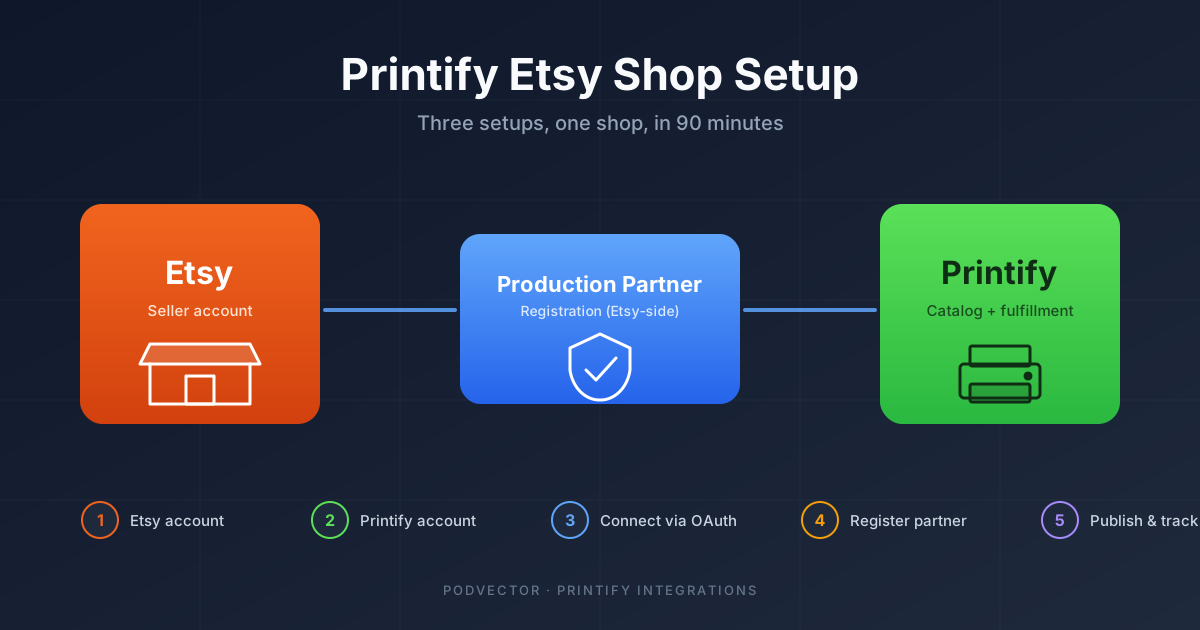
Quick Answer: A "Printify Etsy shop" is three setups, not one. You need an active Etsy seller account, a Printify account, and Printify registered as a production partner inside Etsy.
Skip the production-partner step and Etsy can suspend your shop the first time a buyer reports a quality issue. Skip the post-launch tracking and you'll price your first 100 orders at a loss without knowing.
End-to-end setup takes about 90 minutes. The walkthrough below covers every step plus the metrics worth watching once orders start landing.
Why a "Printify Etsy shop" is three setups, not one
Most guides treat "Printify Etsy shop" as a single workflow. It is not. You are signing up for two separate platforms and then satisfying a third compliance step that lives inside Etsy.
The three setups are: an Etsy seller account (with payment verification), a Printify account (with billing on file for production), and the production-partner registration inside Etsy. Each can be done in 15–30 minutes. Missing the third one is what gets first-time sellers suspended.
Etsy and Printify are otherwise excellent at making the rest feel seamless. Once these three are wired up, every Printify product you create pushes to Etsy as a draft, and every Etsy order routes to Printify for fulfillment automatically.
Step 1: Create your Etsy seller account
Go to etsy.com/sell and click Get started. If you already have an Etsy buyer account, sign in with that — Etsy will upgrade it to a seller account in the same flow.
Etsy charges a one-time $15 setup fee in most regions (some new sellers see $0–$29 depending on country). It is billed to the card you add at the payment step, not at signup.
You will be asked language, country, and currency. Set these to whatever matches your business banking — not where you plan to sell. Etsy reaches buyers globally regardless of your shop's home currency.
Step 2: Name and brand your shop
Etsy requires a shop name of 4–20 characters, no spaces, no special characters. Once chosen, you can change it once for free; subsequent changes require contacting support.
The name does not have to match your domain or social handles, but matching them later is a pain. Run your candidate name through a domain checker and Instagram before you commit.
Etsy's built-in name generator is fine for inspiration but biases toward cute/twee names that age badly. If you are building a category-defining POD brand, pick something searchable and pronounceable instead of a portmanteau nobody can spell.
Step 3: Set up payment and Plaid verification
Etsy uses Etsy Payments for almost all sellers — you do not get to opt out. You'll connect a bank account for payouts and a credit/debit card for fees (the $0.20 listing fee, transaction fee, and any monthly bills).
US sellers verify their bank via Plaid, which means logging into your bank's online portal through a popup. If your bank does not support Plaid, Etsy falls back to micro-deposit verification — two small deposits to your account that you confirm within 7 days.
Etsy may also ask for a government ID upload via a service called Persona. This is identity verification, not credit checking. It usually approves within 24 hours.
The $15 setup fee bills here. Until it clears, your shop will appear in your Etsy dashboard but won't be discoverable in search.
Step 4: Open a Printify account
Go to printify.com and sign up with email or Google. There is no signup fee and no card required at this step. The free tier is enough to launch — Printify Premium ($24.99/mo) only matters once you're doing 30+ orders per month and want the 20% product-cost discount.
Pick a primary print provider during onboarding. For US-based shops, Monster Digital, SwiftPOD, and Sensaria are the high-rated defaults; for EU shops, Print Geek and The Pod Print. You can change providers per product later, so this is not a permanent decision.
Before you push a single product to Etsy, order a sample of your top design from your chosen provider. Print quality varies by 20–40% between providers on the same garment, and your first Etsy reviews will haunt you for a year.
Step 5: Connect Printify to your Etsy shop
In Printify, click My Stores → Add New Store → Etsy → Connect. A popup opens to Etsy's OAuth screen. Sign in and click Allow Access.
Printify gets four scopes on your Etsy shop: read shop info, manage listings, read orders, and read transactions. It cannot issue refunds, message buyers, or change your shop policies — those stay manual inside Etsy.
The connection takes about 10 seconds. Your Etsy shop name should appear in My Stores. If the popup never opens, your browser is blocking it — retry in Chrome or Firefox with extensions off. We have a longer breakdown of the connection step and common OAuth failures if this stalls.
Step 6: Register Printify as a production partner
This is the step most setup guides bury or skip. Etsy requires you to declare any third party that physically makes your product. Printify counts, and the registration is manual.
In Etsy, go to Shop Manager → Settings → Production Partners → Add a Production Partner. Fill in:
- Production partner name: Printify
- Location: United States (or your chosen provider's region — pick the country your primary provider prints in)
- About the partner: "Print-on-demand fulfillment partner; prints and ships custom apparel and merchandise on a per-order basis."
- Why I work with them: "On-demand production with no inventory; allows me to offer a wide variant range without minimum order quantities."
Save the partner. Then on every Printify-created listing, you will have to tick the box for Printify as the production partner. Printify cannot do this via its API — Etsy does not expose the production-partner field for writes.
Skip this and Etsy can suspend your shop without warning the first time a buyer reports a defect, because your listings appear to claim handmade-by-seller production. This is the single most common reason new POD shops get pulled in the first 90 days.
Step 7: Design and push your first product
In Printify, click Catalog, pick a product (a Gildan 5000 t-shirt or Bella+Canvas 3001 is the typical starter), and click Start Designing.
Upload your design at a minimum of 300 DPI. Printify's mockup generator renders the product on a model — these mockups become your Etsy listing photos. Use at least 3 variants per listing (flat lay, on-model, close-up) so your gallery does not look thin.
Set your retail price using Printify's profit calculator. The calculator shows base cost, shipping, and your margin in one view. Default to a 40–60% profit margin on apparel; lower margins struggle to absorb Etsy's fees and ad spend.
Click Publish. Printify pushes the product to Etsy as a draft listing, not a live one. You still have to publish it on Etsy.
Step 8: Publish the draft listing to live
Go to Etsy → Shop Manager → Listings → Drafts. Open the draft Printify pushed.
Three things to check before you click Publish:
- Production partner ticked. Scroll to the production section and select Printify. The publish button stays grayed out if this is empty.
- Tags maxed out. Etsy gives you 13 tags. Use all 13 — every empty slot is a missed search match. Pair short and long-tail (e.g., "t-shirt" + "vintage style t-shirt unisex").
- Personalization off (for now). Personalized listings have a separate fulfillment flow Printify doesn't fully support yet. Turn it on later once you've shipped 20+ standard orders.
Click Publish. Etsy bills the $0.20 listing fee to your card on file. The listing goes live within 5 minutes and is searchable within 24 hours.
If the publish button fails silently, the cause is almost always a missing production partner or a duplicate variant SKU. The Printify-published step-by-step guide covers the SKU side in detail.
The real cost stack per sale
Most "set up your Etsy shop" guides stop at "you're live!" without showing what you actually keep per sale. Here is the math on a $24.99 t-shirt sold through a US-based Printify + Etsy setup.
Etsy fees:
- Transaction fee (6.5%): $1.62
- Listing fee: $0.20
- Payment processing (3% + $0.25): $1.00
- Offsite Ads (if eligible, 12% on first $10K/yr): $3.00
Printify fees:
- Base cost (Gildan 5000, single-color print): $7.99
- Shipping (US first item): $4.45
Take-home: $24.99 − $10.82 (Etsy) − $12.44 (Printify) = $1.73, or 7% net margin if Offsite Ads triggered.
Without Offsite Ads (most sellers under $10K/yr opt out), the same shirt nets $4.73, or 19% margin. That is the math your retail price has to respect. Selling the same shirt at $19.99 puts you underwater the moment Etsy bills its share.
If you're stacking Etsy promos with Printify sample coupon codes during launch, recalculate before each campaign — the discount stacking math is non-obvious and easy to lose money on.
What to track once your shop is live
Most new sellers track revenue and not much else for the first three months. By the time they notice their margins are negative, they've already shipped 80 orders at a loss.
These are the metrics worth watching from day one:
True margin per order. Not gross revenue, not Etsy's "estimated profit" (which excludes Printify base cost). The number after Etsy fees, Printify cost, shipping, and any ad spend. If this is negative for any product, pause the listing.
Cost-of-goods variance. Printify base costs change. A garment that cost $7.99 last month might be $8.49 this month after a provider price update. If you don't catch this, your "40% margin" silently drops to 35%.
Production-time SLA. Etsy buyers expect ship-by dates. Printify gives you a production-time estimate per provider, but actuals vary. Track the median time from order-paid to label-printed; if it creeps past your Etsy ship-by promise, your reviews tank.
Conversion rate by listing. Etsy shows views and visits per listing. A listing with 500 views and 1 sale needs better photos or a different price point. A listing with 50 views and 1 sale needs better SEO.
Refund rate by variant. If your XL navy shirt gets returned twice as often as the M black, there's a quality or sizing issue specific to that variant. Pause the variant and order a sample.
Tracking these by hand inside Etsy + Printify takes about 90 minutes a week and gets harder as your catalog grows. This is the slice POD operators usually outsource to either a bookkeeper, a spreadsheet, or — if your store runs on Shopify — an AI employee like Victor that pulls Shopify + Printify + ad-platform data into one warehouse and watches it for you.
Once your shop is past 10 orders a day, the next move is usually to plug in a second channel. We cover that in our guides on Zapier for Printify automation and connecting Printify to Amazon. The full Printify integrations playbook and our broader Printify guides cover the rest of the stack.
FAQs
Do I need a business license to sell on Etsy with Printify?
Not to open the shop. Etsy lets individuals sell without one. Whether you need one to operate legally depends on your country, state, and revenue — most US sellers register an LLC once they cross $10K/year, partly for tax reasons and partly to separate liability.
How long does end-to-end Printify + Etsy setup take?
About 90 minutes if your bank verification clears on the first try via Plaid. Add a day if you need to wait for Etsy's identity verification via Persona, and another 2–7 days if you fall back to micro-deposit bank verification.
Can I run the same Printify product on Etsy and Shopify?
Yes. Printify lets you push the same product to multiple connected stores. Each store has independent pricing, descriptions, and SKUs. Inventory is managed centrally on Printify's side.
What happens if I forget to register Printify as a production partner?
Etsy blocks the publish on each individual listing. The listing stays in draft and the error message ("missing required information") doesn't name the production-partner field as the cause. Sellers often spend an hour debugging this before finding the right setting.
How much does it cost to start a Printify Etsy shop?
Etsy's setup fee is typically $15 (varies by country). Printify is free to start. Per listing, Etsy charges $0.20. If you order a sample t-shirt before launching (recommended), budget ~$15 for the product plus $4–6 shipping. Total to be live: $35–40.
Does Printify automatically add Etsy fees to my retail price?
No. Printify's profit calculator only shows Printify's base cost and shipping. Etsy's 6.5% transaction fee, $0.20 listing fee, and payment processing are on you to model. Plan for ~11–13% in Etsy fees on top of Printify's costs.
Can I cancel an Etsy order before Printify produces it?
Yes, if you have the order-approval window set to 24-hour delay or manual. Instant approval sends the order to production within minutes, and once Printify has started printing, the order cannot be cancelled and Etsy refunds come out of your pocket.
Let Victor watch your POD margins while you sleep
Setup is the easy part. The hard part is tracking true margin, cost variance, production SLA, and refund-by-variant across two platforms — every day, forever.
Victor is the AI employee built for Shopify-based POD sellers. He pulls your Shopify and Printify data into one warehouse, watches every order's real margin, and flags variants that are losing money before you ship the next 50. When something needs action — pause a variant, reprice a listing, switch a provider — he asks your approval first.
Try Victor free