
Quick Answer: To connect Printify to Etsy, open Printify → My Stores → Add a new store → pick Etsy → click Connect, then authorize on Etsy. The handshake takes about five minutes.
What takes longer is the work that comes after: stripping Printify's default title, filling all 13 Etsy tags, adding multiple mockups, and watching margins survive Etsy's 6.5% + $0.20 + payment processing once orders start flowing.
This guide walks the click-by-click setup, then the post-connection ops most POD sellers skip.
Before you start: 4 prerequisites
You can click Connect on a half-set-up Etsy account. The integration will technically work — and you'll trip over the missing pieces 24 hours later.
Get these four squared away first:
- An Etsy seller account in good standing. Shop name picked, currency set, payment processing verified (bank account + ID). Etsy will reject draft listings if any of these are pending.
- A Printify account. The free plan is enough to start — no card required. Premium ($29/mo) cuts product costs ~20% but isn't needed until you have repeat orders.
- At least one shop policy filled out on Etsy. Returns, shipping origin, and processing time. Printify orders need a processing time of at least 5–7 business days; set it now so you don't tank star-seller scores later.
- A test design ready to upload. Even a placeholder PNG. You'll want to push one product through end-to-end before adding 50.
One more thing Etsy doesn't warn you about: new shops can only list 5 items in their first 24 hours after opening. Plan your first publish accordingly.
The 5-step Printify–Etsy connection
Time from clicking Connect to seeing your Etsy shop in Printify: roughly five minutes if both accounts are ready.
Step 1 — Open the Printify store manager
Log into Printify. Top-right avatar → My Stores. You'll land on a screen listing any existing stores (or empty, if this is your first).
Click the green Add a new store button in the upper-right.
Step 2 — Pick Etsy from the channel list
Printify shows a grid of sales channels: Etsy, Shopify, eBay, Amazon, Walmart, TikTok Shop, and a few others. Click the Etsy tile, then the Connect button beneath it.
Printify will redirect you to Etsy's OAuth screen.
Step 3 — Authorize on Etsy
If you're not logged into Etsy in the same browser, sign in first. Etsy will show a permissions screen listing what Printify is requesting: listing management, transaction read access, shop info, and shipping profile access.
Click Allow Access. Etsy bounces you back to Printify with a green "connected" banner.
Step 4 — Pick your shipping profiles
This step trips up roughly half of new sellers. Printify asks which Etsy shipping profile to use for each product type.
If you've never set up an Etsy shipping profile, you'll see one default profile that Etsy creates automatically. Use it for now — you'll refine it once you know which products you're actually selling.
You can change shipping profiles per product later, so don't agonize over the choice here.
Step 5 — Verify the connection in both directions
Back in Printify, you should see your Etsy shop name listed under My Stores. In Etsy's Shop Manager → Settings → Integrations, Printify should appear as a connected app.
If either side is missing the connection, disconnect from Printify and redo Step 2 — most failures here are stale OAuth tokens, not real config problems.
Creating and publishing your first product
The connection by itself does nothing for revenue. You need at least one product flowing through it before the integration earns its keep.
Pick a blueprint and provider
In Printify, click Create Product. The catalog opens — 1,300+ blueprints across apparel, drinkware, home goods, and accessories.
Start with a high-volume blueprint: a Bella+Canvas 3001 unisex tee or a Gildan 18000 sweatshirt. These have multiple print providers, so you can comparison-shop on price, production time, and shipping cost.
Click into the blueprint. You'll see a list of providers with side-by-side pricing. Pick one with a production time under 4 business days and a shipping cost that doesn't eat your margin.
Upload your design and configure variants
Upload your design PNG (transparent background, 300 DPI minimum). Printify's mockup generator drops it onto the product preview.
Toggle which size and color variants you want to sell. Every variant adds to your listing — start with 3–5 colors and the standard size range (S–2XL).
Set retail prices
Printify shows you the production cost per variant. Add your margin on top.
For a Bella+Canvas 3001 tee with a base cost around $8.50, retail prices in the $24–$28 range are common on Etsy. Anything under $22 and you're working for Etsy's algorithm, not yourself.
Publish to Etsy
Click Publish. Printify creates a draft listing on Etsy with the product title, description, mockup images, and variants.
It is not done. The draft is generic and will not rank.
Fix Printify's defaults before going live
Open the draft on Etsy. Three things to fix before you publish:
- Title. Printify pushes something like "Unisex Heavy Cotton Tee." Replace it with a 130–140 character Etsy SEO title leading with your primary keyword: "Vintage Mountain T-Shirt | Hiking Gift for Dad | Retro Outdoor Apparel | Mens Womens Unisex Tee".
- Tags. Printify fills zero. Etsy gives you 13 slots. Use all 13. Each tag should be a 2–3 word phrase covering niche, product type, gift intent, and adjective variants.
- Mockups. Add at least 5 images. Lifestyle shots outperform flat product shots by a wide margin in Etsy's click-through tests.
Then click Publish on Etsy. The listing is live.
What Etsy + Printify actually take per sale
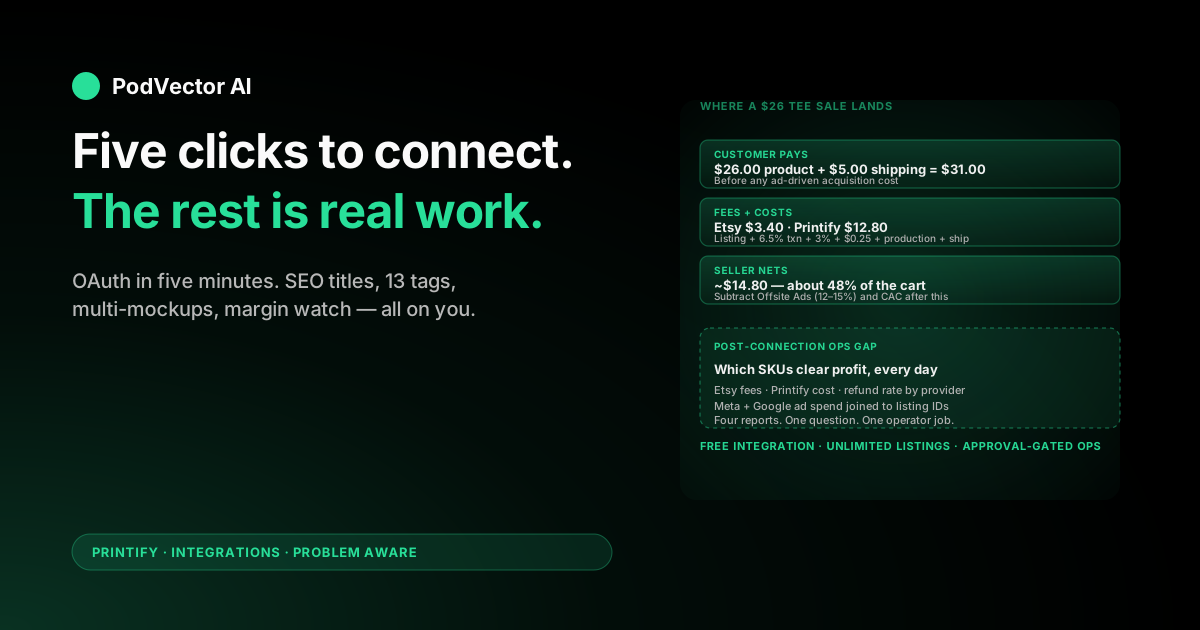
This is the part the brand pages don't show in dollars. Here's the arithmetic on a single $26 t-shirt sale:
- Customer pays: $26.00 + $5.00 shipping = $31.00
- Etsy listing fee: $0.20 (charged when you list, but amortized per sale)
- Etsy transaction fee: 6.5% of $31.00 = $2.02
- Etsy payment processing: 3% + $0.25 of $31.00 = $1.18
- Printify production cost: ~$8.50
- Printify shipping cost to customer: ~$4.30
- Your net per sale: $14.80
Roughly 48% of the customer's payment lands in your account. That's before Etsy ads (12–15% of sales if you opt in), Offsite Ads (12–15% on attributed orders over the threshold), and any sales tax handling.
Two implications:
First, products under $20 retail rarely clear $5 net after fees and production. Anchor your catalog above that price floor.
Second, Etsy's percentage fees compound on shipping income. Build shipping into the product price where possible — a $26 + free shipping listing keeps more in your pocket than $20 + $6 shipping.
For a deeper breakdown of Printify's plan pricing and whether Premium is worth it, see our full breakdown of the Printify Premium plan and the benefits analysis.
Post-connection setup most sellers skip
The integration runs. Orders sync. But most POD sellers leave revenue on the table by skipping these five jobs after Day 1.
1. Save a Printify upload template
If you're going to list 50 t-shirts from the same blueprint, configure variants, shipping profile, and pricing once — then save the template. Every future product clones from it. Saves about 8 minutes per listing.
2. Set up Etsy shop sections
Shop sections are essentially internal categories. A buyer who clicks "Hiking Apparel" sees a curated subset of your shop. Etsy's algorithm rewards shops that organize listings into 3+ sections.
Create sections before you publish 20 products, not after.
3. Connect a profit-margin tracker before listings stack up
Etsy's seller dashboard shows revenue. It does not show net profit per listing — Printify cost, Etsy fees, ad spend, and refund rate live in four different reports.
You can wire those reports into a spreadsheet manually (about 2 hours per month, error-prone), or run them through a unified data warehouse that joins Etsy transactions, Printify production receipts, and ad attribution into one profit-per-SKU view. Either way, decide before you have 50 listings to untangle.
4. Add a personalization workflow
Etsy buyers expect personalization on roughly 30% of POD product categories — names, dates, custom text. Printify supports personalization fields, but you have to enable them per-product and decide your turnaround SLA.
Don't enable personalization on every listing by default. It increases support load and missed-SLA risk.
5. Plan ad spend before launching paid traffic
Etsy Ads charge a flat daily budget you set. Offsite Ads kick in automatically for shops over $10K/yr and charge 12–15% per attributed sale.
If you also run Meta or Google ads pointing to Etsy listings, attribution gets tangled fast. Build a single view that pulls Etsy on-site impressions, Etsy Offsite Ads cost, Meta ad spend, and Google ad spend against the same listing IDs before you scale spend past $50/day.
Troubleshooting sync issues
Etsy listing didn't appear after publishing. Check Printify's My Products tab — listings sometimes get stuck on "Pending" if Etsy is rate-limiting. Wait 10 minutes, then retry. If still stuck, disconnect/reconnect Etsy in Printify settings.
Order didn't auto-fulfill. Printify auto-orders only when payment status is "Paid" on Etsy and the product is mapped correctly. If a customer used an Etsy gift card or there's an active dispute, the order will sit in "Action Required" status in Printify.
Variants out of sync. If you change variants in Printify after the listing is live on Etsy, the changes don't always propagate. Re-publish the product from Printify to force a refresh — Etsy will overwrite the listing's variants but keep your custom title and tags intact.
Shipping cost mismatch. If Printify's calculated shipping doesn't match what you charged on Etsy, you eat the difference. Set Etsy shipping prices slightly above Printify's worst-case quote (heavy variant to remote ZIP), or use Etsy's "free shipping" guarantee with the cost baked into product price.
What to track once orders start flowing
The integration is connected. Products are live. Now the question is which numbers tell you whether to scale, kill, or iterate.
Five metrics matter more than the rest:
- Net profit per SKU. Revenue minus Etsy fees minus Printify production minus shipping. Sort by this monthly. Kill listings under $3 net.
- Click-to-favorite rate. Etsy gives you this in the listing stats. Below 5% means weak mockups or wrong tags.
- Favorite-to-purchase rate. Below 5% means price or reviews aren't earning trust.
- Refund/return rate per print provider. Some providers run 4–6% return rates on apparel; switching providers on a single SKU can recover 3+ points of margin.
- Ad-attributed revenue vs. organic. If Offsite Ads are eating 15% of attributed orders that would've happened organically, you're paying for sales you'd have gotten free.
Once you have 20+ listings, this becomes a daily-decision problem rather than a monthly-review problem. Many POD operators end up handing off the watch-and-act loop to an AI employee that runs ads, updates listings, and pings them with "ready to act" notes — though the right time to delegate is after you've watched it manually long enough to know what good looks like.
If you're integrating other channels alongside Etsy, see our setup guides for Printify + Amazon, the Printify Amazon setup, and the Printify and Amazon combined setup. The full Printify Integrations cluster sits inside the broader Printify topic hub. For an external walkthrough with slightly different emphasis, Skup's 2026 connection guide is worth a skim.
FAQs
Does the Printify–Etsy integration cost anything?
The integration itself is free. Printify's free plan supports unlimited Etsy listings. You pay Etsy's standard fees (listing, transaction, payment processing) and Printify's per-order production cost when sales happen.
How long does the connection take?
Five minutes for the OAuth handshake. Plan another 20–30 minutes per first listing for SEO title, tags, and mockup work — that's where the actual selling happens.
Can I connect more than one Etsy shop to Printify?
Yes. Each Etsy shop is a separate store in Printify. You manage them independently from the My Stores screen. Useful if you run a primary niche shop and a personalization test shop.
What happens if I disconnect Printify from Etsy?
Your existing Etsy listings stay live — they don't disappear. But orders stop auto-syncing, so any new sale becomes a manual fulfillment job in Printify. Avoid disconnecting unless you're switching providers.
Why is my Printify product not publishing to Etsy?
Three common causes: Etsy listing limit hit (5 listings/24h for new shops), missing shipping profile mapping in Printify, or stale OAuth token. Disconnect/reconnect resolves most cases.
Does Printify handle Etsy returns?
Printify only accepts returns for damaged/defective items, not buyer's remorse. Your Etsy return policy needs to mirror this — most POD sellers use a "no returns, exchanges for damage only" policy that aligns with Printify's defect coverage.
Can I sell personalized products through the integration?
Yes — Printify supports per-product personalization fields, and orders flow with the buyer's custom text included. Just don't enable it on every listing; it materially increases support workload and SLA risk.
Want an AI employee running the post-connection work?
Connecting Printify to Etsy takes five minutes. Watching margin per SKU, reallocating ad spend, and flagging weak listings every day takes the rest of your week.
Victor is an AI employee built for POD sellers. He runs your Meta + Google ads, updates Shopify/Etsy listings, and reconciles Printify costs against marketplace fees — and asks for your approval before each material action.
Try Victor free