
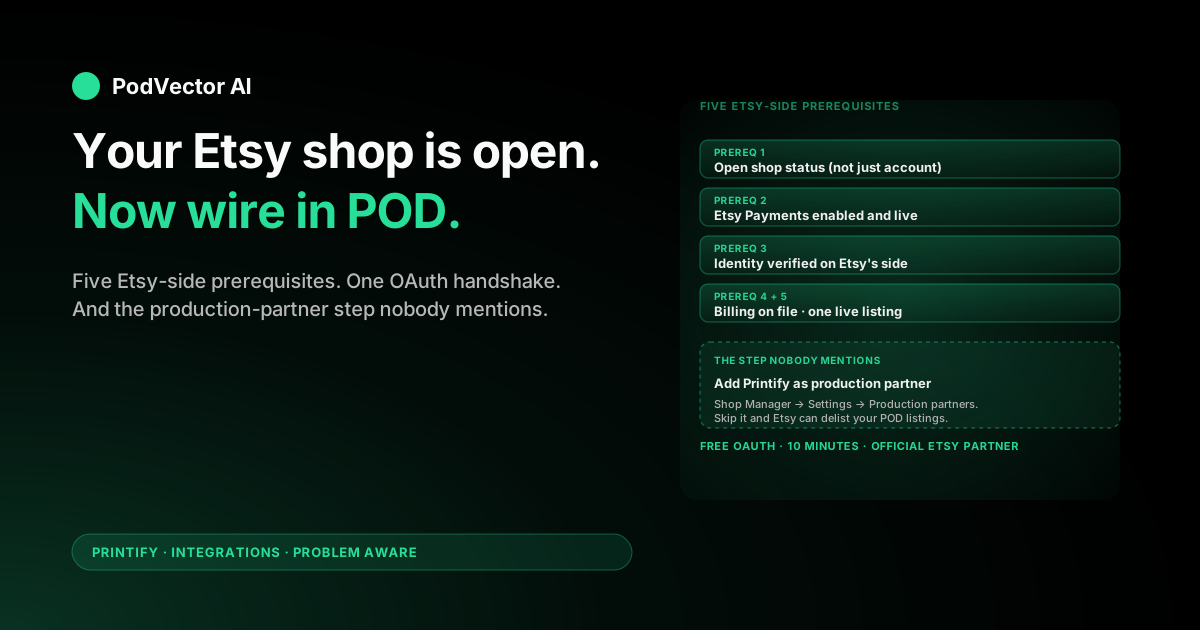
Quick Answer: If your Etsy shop is already open, connecting it to Printify takes about 10 minutes. Sign up for Printify, open Manage my stores, click Add new store, pick Etsy, log in, and click Allow Access on Etsy's permissions screen.
The catch most sellers miss: Etsy requires you to disclose Printify as a production partner inside Shop Manager before any new POD listing goes live. Skip that and Etsy can delist your products under its handmade-disclosure policy.
This guide walks the connection from the Etsy seller's side — what Etsy needs in place first, the OAuth permissions Printify actually requests, the production-partner record, and how your daily Etsy workflow changes once orders start flowing.
Why Add Printify to an Etsy Shop You Already Run
If you're reading this, you probably already sell something on Etsy — handmade, vintage, or supplies — and you want to layer print-on-demand on top without opening a second shop. The connection is built exactly for that case.
Once linked, Printify pushes new POD listings into your existing Etsy storefront and pulls orders back automatically. Your existing listings, reviews, shop policies, and shipping profiles stay intact. The POD products live alongside whatever you already sell.
Two practical wins matter on day one. First, Printify is an authorized Etsy Partner, so the OAuth handshake is approved by Etsy directly. No risk of a third-party integration getting flagged. Second, Etsy's handmade-disclosure rules require you to name your production partner — Printify's listing template fills that in for you once you set the partner record up.
What Etsy Needs in Place Before You Connect
Printify can only connect to a fully opened Etsy shop. "Account" is not enough — a shop that's gone through Etsy's onboarding flow and has at least one listing is the minimum.
Walk through this checklist on the Etsy side before opening Printify:
- Open shop status. Go to your dashboard. If you see a shop dashboard with stats, you're good. If you see "Open your Etsy shop," finish onboarding first.
- Etsy Payments enabled. Open Shop Manager → Finances → Payment settings. Without Etsy Payments, customers can't check out and Printify never sees an order.
- Identity verified. Same payment-settings page. Etsy requires a verified ID on file for shops in most regions. Unverified shops get held in review and orders sit unfulfilled.
- A payment method on file. Under Finances → Billing. Etsy bills you monthly for listing fees and transaction fees — separately from the customer's payments to you.
- At least one live listing. Even a placeholder. Etsy's API exposes shop-level data only once a listing exists.
If your shop is in vacation mode, take it off before connecting — Etsy's API rejects writes to shops in vacation mode, and Printify reads it as a failed sync.
Sign Up for Printify (Free)
Skip this if you already have a Printify account. If not, go to printify.com and click Sign Up in the top right. Email, Google, or Facebook all work. The free plan covers one or more connected stores (up to five total across all platforms) and unlimited POD products.
You'll be prompted to add a payment method. This is for Printify to charge you per order once production starts — not a subscription. Skip the Premium upsell. The free plan is enough until you're moving 30+ units per month.
Once you're in the Printify dashboard, you'll see a sample store called My new store. That's a placeholder. The actual connection happens next.
The Connect Flow, Click by Click
The connection itself is OAuth, so you authorize once and Printify keeps the token until you revoke it. Three minutes start to finish if both accounts are ready.
Step 1: Open Manage my stores in Printify
From the Printify dashboard, click the store name in the top-left corner. A dropdown shows your stores (just My new store for a new account). Click Manage my stores at the bottom of the dropdown.
You'll land on a page titled My stores. New accounts see an empty state with a green + Add new store button.
Step 2: Pick Etsy from the platform tiles
Click + Add new store. Printify shows ten platform tiles: Etsy, Shopify, eBay, TikTok Shop, Wix, WooCommerce, Squarespace, BigCommerce, Walmart, and PrestaShop, plus a generic Custom Integration for everything else.
Click the Etsy tile. The page updates to show a single button: Connect. Click it.
Step 3: Sign in on Etsy's OAuth page
Printify redirects you to Etsy's login page on etsy.com — not a Printify page styled to look like Etsy. The URL bar should read etsy.com/oauth/.... If it doesn't, close the tab and start over from Printify.
Sign in with your Etsy credentials. If you originally signed up with Google, Facebook, or Apple, use that button — Etsy remembers which.
If two-factor authentication is on (and it should be), Etsy texts a verification code to the phone number on file. Have your phone open.
Step 4: Click Allow Access
Etsy displays a permissions screen titled "Printify is requesting access to your Etsy account." It lists the specific scopes Printify is asking for — covered in the next section. Click Allow Access.
Etsy redirects back to Printify automatically. If the redirect hangs for more than 15 seconds, click the Printify tab manually — the connection completed in most cases.
Step 5: Confirm the connection
The My stores page in Printify now lists your Etsy shop name with a green Connected badge. The store dropdown in the top-left switches to your Etsy shop's name automatically.
That's the technical connection done. Before publishing anything, set up the production-partner record on the Etsy side — covered below.
What Printify Can and Cannot Do on Your Etsy Account
Etsy's permissions screen lists what Printify is asking for. Worth understanding before you click Allow Access — these scopes are broad.
Printify requests:
- Read shop info. Shop name, region, currency, payment status. Used to populate the connection metadata.
- Manage listings. Create, edit, and delete listings. This is the scope that lets Printify publish products. It also means a misclick in Printify can delete a live listing — be careful with bulk actions.
- Read transactions. Read order details for any sale Printify needs to fulfill (item, variant, buyer address).
- Manage receipts. Update shipping/tracking on the order once Printify ships. This is how the buyer gets a tracking number.
- Read profile info. Username and shop owner email. Used for account-recovery emails from Printify.
Printify cannot:
- Read or write your Etsy Payments balance, payouts, or bank account.
- Change your shop's currency, region, vacation status, or policies.
- Access listings or orders for products that aren't Printify-managed (your handmade or vintage inventory stays untouched).
- Issue refunds. Refunds happen on Etsy's side; Printify just sees them after the fact.
The scope is real — broader than most Etsy integrations. The trade-off is that Printify can fully run the POD half of your shop without you switching tabs.
Add Printify as a Production Partner on Etsy
Etsy's seller policy requires every shop using a print-on-demand fulfillment service to disclose the partner on the listing. The OAuth connection doesn't do this for you — you have to add the production-partner record by hand, once, in Shop Manager.
Open Shop Manager on Etsy in a new tab. Click Settings in the left sidebar, then Production partners. Click Add a production partner.
Fill the form like this:
- Production partner name: Printify
- Location: Pick the country of the print provider you'll route the most orders through. US sellers shipping mainly to US customers pick United States; EU sellers usually pick Germany, the Netherlands, or the UK.
- About: "Printify is a print-on-demand platform that connects my shop with print providers worldwide. They print and ship products on demand when a customer places an order." Etsy accepts this verbatim.
- How was the partner found: "Online search" or "Recommended by another seller" — either is fine.
- Production process: Tick every production method you might use: direct-to-garment, sublimation, embroidery, all-over print. Add methods later if you expand; Etsy doesn't penalize over-disclosure.
- I designed it / I made it: Mark every Printify product as "I designed it. It was made by another company or person." This is the legally accurate answer — you designed it, Printify's provider made it.
Click Save changes. Etsy now displays "Designed by [your shop name]" on every Printify listing — that's the disclosure that keeps you compliant.
You only need one Printify production-partner record even if you use multiple Printify providers across different countries. The record is at the partner level, not the provider level.
What Happens to Your Existing Etsy Listings
Nothing automatic. Your existing handmade, vintage, or supplies listings stay exactly as they were. Printify doesn't touch listings it didn't create.
Printify-published listings get a unique SKU prefix and are tagged with the production-partner attribution. Etsy treats them as a separate set inside your shop — search, filter, and stats still aggregate at the shop level, but you can sort by production partner in Shop Manager if you need to.
If you want to migrate existing handmade listings to Printify fulfillment (because demand outgrew your hand-production capacity), you have to recreate the listing in Printify and publish it as a new listing. Etsy doesn't have a way to swap fulfillment on a listing that's already live.
Most sellers leave the existing listings alone and treat Printify as additive. The shop benefits from the existing review count and Etsy SEO history without putting any of that at risk.
How Your Daily Etsy Workflow Changes
The biggest behavioral shift after connecting is what you stop doing — not what you start. Three changes worth knowing on day one.
You stop fulfilling POD orders manually
For every Printify-managed listing, Etsy routes the order to Printify within 30 seconds of checkout. Printify holds it for 24 hours (configurable), then sends it to your chosen print provider, charges your card for the base cost plus shipping, and pushes tracking back to Etsy once the provider ships.
From your side, the order goes from Open to Shipped on Etsy without you touching it. The buyer gets the standard Etsy shipping notification with the tracking number.
You shift from fulfillment work to listing work
Time freed up from packing orders gets reinvested in listing quality — more SKUs, better mockups, sharper Etsy SEO. The bottleneck on POD-only Etsy shops is usually catalog breadth and listing depth, not fulfillment speed.
For sellers running both handmade and Printify, the practical split is: handmade gets your craft attention (one-of-one quality, photography, packaging touches), Printify gets your operations attention (designs, listing copy, ad spend).
Your bookkeeping gets two layers of cost
Existing handmade sellers had one cost line: materials. POD adds two: Printify base cost, and Printify shipping. Both are charged to your card per order, not deducted from Etsy payouts.
Etsy still bills you monthly for listing fees, transaction fees, and payment processing. Printify bills your card per order in real time. Etsy pays you out on your normal schedule (daily, weekly, or monthly depending on your settings).
The accounting reality is that money flows through three places — Etsy in, Printify out, your bank in/out — and reconciling the two systems is on you. The numbers that matter (real margin per SKU, real cost per Etsy sale, real return-on-ad-spend if you run Etsy Ads or external traffic) require pulling data from both platforms and joining them. For the first 50 orders a spreadsheet works; beyond that, the spreadsheet breaks on volume and multi-provider orders.
This is the gap Victor — PodVector's AI employee — was built to close. Victor plugs into Etsy and Printify (plus Google Ads, Meta Ads, Shopify, and TikTok Shop if you sell across channels), unifies the data into a single live warehouse, and lets you ask plain-English questions about your real margins. Beyond answering, Victor runs the day-to-day decisions with your approval — pausing money-losing listings, reallocating ad budget, flagging providers slipping on lead time. You set the approval rules; he proposes and waits for your okay.
Disconnecting and Reconnecting
Two scenarios for breaking the connection: you're switching POD providers, or you want to revoke Printify's access temporarily.
Disconnect from the Printify side
Open Manage my stores, click the three-dot menu next to your Etsy shop, and pick Disconnect. Printify keeps your products in its catalog but stops pushing them to Etsy and stops pulling orders. Existing Etsy listings stay live — Printify just no longer fulfills new orders for them.
Revoke from the Etsy side
Open Shop Manager → Account → Apps and integrations. You'll see Printify listed. Click Revoke access. The token dies immediately and any new Etsy orders will fail to sync to Printify.
Both methods are reversible. To reconnect, repeat the connect flow from the top — Etsy's OAuth flow accepts re-authorization without breaking anything else in your shop.
OAuth token expiration
Even without an explicit disconnect, Etsy invalidates OAuth tokens on password changes, security events, and after long inactivity (usually 12+ months). When this happens, orders show in Etsy but never appear in Printify. Reconnect from Manage my stores to restore sync. New orders backfill within 60 seconds; very old orders may need manual import.
FAQs
Will connecting Printify affect my existing handmade or vintage listings?
No. Printify only touches listings it created. Your handmade and vintage products, reviews, shop policies, and shipping profiles all stay intact. Printify lives alongside the rest of your shop.
Do I need to pay for the Etsy-Printify connection?
The connection itself is free. You pay Etsy's standard fees (listing fee, transaction fee, payment processing, optional Offsite Ads) and Printify's per-order base cost plus shipping. Neither side charges a subscription for the integration.
Can I connect Printify to a brand-new Etsy shop on the same day?
Yes, if Etsy's onboarding finished and the shop is live. The shop needs an open status, Etsy Payments enabled, identity verified, and at least one listing. Most sellers can hit all four in the same hour they open the shop.
What if my Etsy shop is suspended?
Printify cannot connect to a suspended shop — Etsy blocks the OAuth handshake. Resolve the suspension with Etsy's support first (it's usually identity verification, a billing issue, or a policy violation), then run the connect flow. Trying to reconnect a suspended shop won't unsuspend it.
Can I connect one Etsy shop to two Printify accounts?
No. Each Etsy shop links to one Printify account. Trying to connect a second Printify account to an already-linked Etsy shop revokes the first connection silently. Don't do this accidentally — you'll break order sync on every live Printify listing in the shop.
Can I connect one Printify account to multiple Etsy shops?
Yes, up to five connected stores total on the free plan (across Etsy, Shopify, TikTok Shop, etc.). Premium unlocks unlimited. To add a second Etsy shop, log out of the first Etsy account in your browser, log into the second, then run the connect flow again from Printify.
Will Etsy treat Printify products differently in search?
Etsy's search algorithm doesn't penalize POD listings as a category. What does matter is the listing quality — title, tags, photos, conversion rate, review velocity — which works the same for Printify products as for any other listing. Some sellers see lower search visibility on POD listings, but that's a quality and saturation issue, not a POD-specific penalty.
How does this compare to Printify on other platforms?
The Etsy connection is one of Printify's most mature integrations. Other options have different trade-offs: the standard Printify Etsy setup guide covers the inverse flow (starting from a fresh Printify account), the Printify Etsy shop setup guide walks the shop-creation side, and Printify for Etsy covers the platform fit. The Printify integrations hub lists every supported platform.
Should I be using Etsy or move to my own Shopify store?
Different business model. Etsy gives you traffic; Shopify gives you control. Most POD sellers run both. The comparison guides at Printify vs Etsy and Printify vs Amazon Merch walk the trade-offs at the channel level. For the broader Printify platform reference, see the Printify topic hub.
Where can I learn more about the official Etsy partnership?
Printify's Etsy partner page documents the official integration. The Bootstrapping Ecommerce walkthrough covers the same flow from a third-party perspective if you want a second reference.
Once the connection is live, hand the ops to Victor
Connecting Etsy and Printify takes 10 minutes. Knowing whether you're actually making money — across Etsy fees, Printify costs, Offsite Ads, and refunds — takes hours of reconciliation every week.
Victor is PodVector's AI employee. He plugs into Etsy, Printify, Google Ads, Meta Ads, and Shopify; unifies the data into a single live warehouse; and runs the day-to-day decisions with your approval. Ask "which Printify listings are net profitable after Etsy fees and Offsite Ads this month?" and he answers in plain English — then proposes the pauses, repricing, and ad shifts and waits for your okay before executing.
Try Victor free