
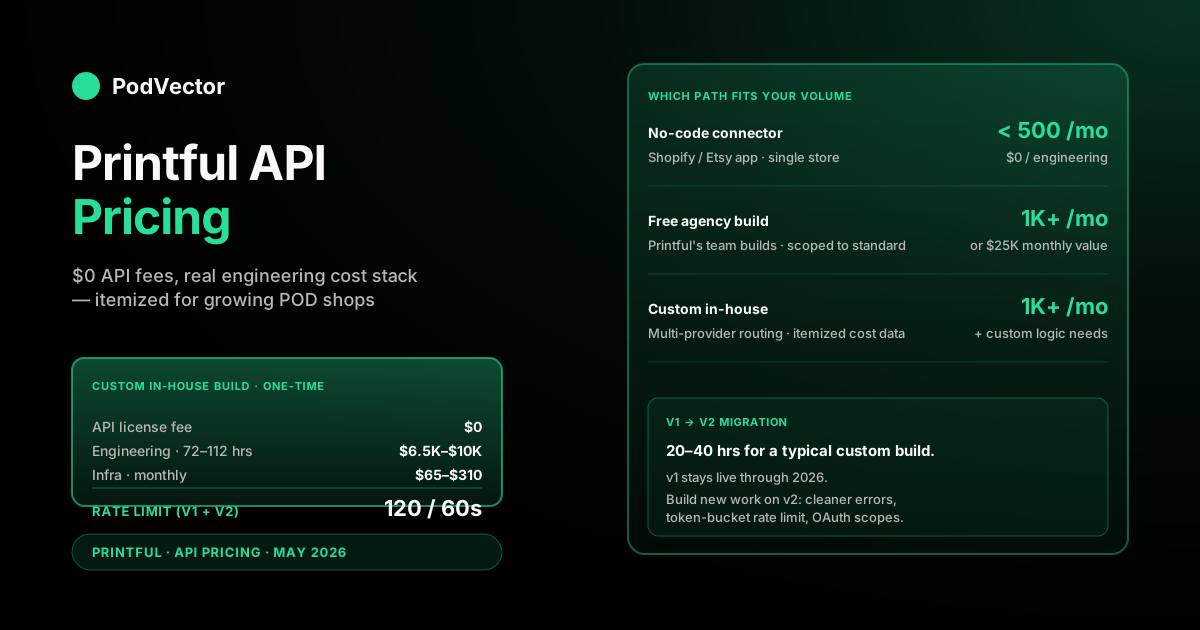
Quick Answer: Printful's API is free to use. There is no subscription fee, no per-call charge, and no token license. Order-level costs — product, print, shipping — are identical whether you place orders through the dashboard or the API.
The real "API price" is everything around it: engineering hours to build the integration, infrastructure to host webhook listeners and retry queues, and the ongoing cost of keeping your code in sync as Printful's v2 API moves through Open Beta. For most POD operators that lands somewhere between $0 (using a no-code connector) and the cost of a full custom build over one quarter.
Printful's own engineering team will build your integration for free if you clear a published volume threshold. Above that threshold, custom API integration usually pays for itself through the itemized cost data it unlocks. Every line of that math is below.
What the Printful API actually costs
There is no Printful "API pricing page" because Printful doesn't charge for API access. You generate a private token in your dashboard, make calls against api.printful.com, and the only thing you pay is what you'd pay anyway when an order ships — product cost, print cost, shipping. According to Printful's own v2 documentation, you can create or reuse an existing private token for authorization, and that same token works across both v1 and v2 endpoints — so there's no separate credentialing cost as you migrate between API versions.
That's the headline. The follow-up question is the one that decides whether the API is a real cost center for your business: what does it cost to make the API useful?
That answer breaks into five buckets. Engineering time to build the integration. Infrastructure to host the moving parts. Ongoing maintenance as the API evolves. The opportunity cost of routing orders through your own code instead of Printful's hosted Shopify connector. And, depending on how you build, a share of revenue Printful takes from your public app.
Each bucket is laid out below with a real number range.
Rate limits and what they cost you in throughput
According to Printful's developer documentation and third-party tooling that wraps the API, the general rate limit is 120 API calls per minute, surfaced through X-Ratelimit-Limit, X-Ratelimit-Remaining, and X-Ratelimit-Reset response headers. Hit the cap and you get a 429 response; the correct response is to back off and retry after the reset time indicated in those headers.
One important caveat: according to a detailed analysis by SudoMock of Printful's mockup API (July 2026), "resource-heavy endpoints like the mockup generator carry a lower limit than the general rate." Plan separately for mockup-generation throughput — naive serial calls will queue you against a tighter cap than you'd see on the order or catalog endpoints.
The v2 API (currently in Open Beta, all endpoints usable in a live environment) replaces the hard per-minute reset with a leaky-bucket algorithm. According to Printful's v2 developer documentation, v2 "implements uniform pagination parameters and adopts a leaky bucket algorithm for rate limiting" — the reset mechanism is more dynamic, smoothing burst traffic rather than cutting it off at a hard wall. The response headers give you live counter state: X-Ratelimit-Limit, X-Ratelimit-Remaining, X-Ratelimit-Reset, X-Ratelimit-Policy.
For most POD shops the general ceiling is generous for order automation. Where the rate limit starts to bite is bulk product and mockup sync — if you're rebuilding thousands of mockups after a catalog refresh, batch the mockup-generation endpoint (it accepts arrays) and respect the Retry-After header on 429s rather than hammering the lockout window.
Engineering cost: hours, roles, what you're really paying for
This is the actual price tag. Here's the rough envelope for a custom Printful integration built from scratch by a competent backend engineer.
- Discovery and scoping: 8–12 hours. Mapping which endpoints you need, designing your order-state model, deciding what to store on your side vs. fetch live.
- Authentication and order pipeline: 16–24 hours. Token storage, request signing, the create-order flow, error handling, sandbox testing.
- Webhook handling: 8–16 hours. Listener service, signature verification, idempotency keys, retry/dead-letter logic.
- Product and mockup sync: 12–20 hours. Catalog pulls, mockup generation, image storage, sync scheduling — with extra time now if you're targeting v2's expanded image and pricing endpoint data.
- Cost ingestion and reconciliation: 16–24 hours. Pulling itemized fulfillment costs, matching them back to your orders, reconciling against Printful invoices.
- Testing, observability, deploy: 12–16 hours. Sandbox runs, production canary, logging, alerting on failed orders.
That's roughly 72–112 engineering hours for the build, before any feature drift. Multiply by your blended engineering rate for the one-time cost, plus ongoing maintenance once the API evolves underneath you.
If you outsource to a contractor or agency, scope and calendar time increase meaningfully. Agencies amortize discovery across fewer hours, so the line items move but the total range holds. Ongoing maintenance — endpoint re-pathing, error-format changes, new webhook event types — is a recurring cost regardless of who builds the initial integration.
Hidden infra: webhooks, retries, storage, monitoring
The API itself is free. The stuff you need around it isn't always.
Webhook receiver. Printful pushes order-status events (created, processed, shipped, returned) to a URL you provide. That URL must be hosted somewhere with HTTPS enforced — which Printful requires on v2 — with a reasonable uptime SLA and enough compute headroom to absorb a launch-day spike. A small managed function (Cloudflare Workers, Lambda, Cloud Run) handles this for a few dollars to tens of dollars per month at typical POD volume.
Retry and dead-letter queue. Webhooks fail. You missed one because your service was deploying, the signature didn't verify due to clock skew, or your downstream wrote to a stale row. You need a queue that retries failed messages with backoff and a dead-letter sink for exhausted retries. V2 adds request signing with optional expiration dates, so your verification logic needs to handle that too.
Storage. If you're storing Printful's per-order itemized costs, mockup images, and webhook event logs for reconciliation, you need a place to put them. A small managed database plus an object store covers it at typical volume.
Monitoring. When a webhook silently fails for three days, you want to know within hours, not when a customer complains. A basic observability stack on a starter tier catches this. The cost is small relative to the risk of undetected order failures.
All in, ongoing infra for a typical Printful API integration is a real but not dominant cost — well below the engineering cost of the initial build.
The free Printful agency tier (and who actually qualifies)
This one's underdocumented and worth knowing about. Printful will build your API integration for you, free, if you clear a volume threshold.
The published cutoff: an existing online store with either 1,000+ orders per month through Printful or $25,000 in monthly fulfilled order value. Below that line, you're on your own (or you hire it out).
The catch is that Printful's free build is scoped to standard order automation — pushing orders from your storefront into their fulfillment queue. If you want custom logic — split routing between Printful and another provider, custom cost ingestion for your data warehouse, exotic webhook fan-out — that's still on you.
For a shop sitting at 800–900 orders/month and growing, the right play is often to push past the threshold using a no-code connector (Shopify's native Printful app), then hand off to Printful's team once you qualify for the free build. You don't pay twice and you don't burn engineering on a moving threshold.
v1 vs v2 migration cost
Printful's v2 API is currently in Open Beta. According to Printful's v2 developer documentation, "all presented endpoints can be used in a production environment" and no breaking changes are expected before the final release — meaning v2 is a safe build target today, not just a preview. The docs note that "the final form of each endpoint might slightly vary from the current version," so pin your integration to versioned schemas where possible.
V2 brings meaningful changes beyond cleaner rate-limit behavior. According to Printful's v2 documentation, new features include: flexible order creation with itemized order building, auto thread color detection for embroidery, new webhooks for real-time stock and price updates, standardized ISO 8601 timestamps replacing UNIX integers, RFC 9457-formatted error responses, and uniform pagination. There's also a minor but real difference in placement pricing handling between v1 and v2 that affects how you display per-placement costs to customers.
If you're building today, v2 is the right target. Use v1 only for the handful of endpoints that haven't been fully ported yet.
If you built on v1 already, the migration is real but not catastrophic. Key areas to budget: re-pathing endpoints to the /v2 prefix, swapping timestamp parsers (UNIX → ISO 8601), updating error parsers to handle RFC 9457 format, refitting the order payload shape for itemized order building, and updating webhook signature verification to handle v2's optional request signing with expiration. Auth migrates cleanly — according to Printful's v2 docs, the same private token works on both versions.
One additional item worth budgeting for: v2's mockup generator returns assets in a different shape than v1's. If you cache mockups, plan to re-run the cache after migration.
OAuth app vs private token — pricing and revenue share
There are two ways to authenticate to the Printful API, and they have very different commercial implications.
Private token. According to Printful's v2 documentation, you create or reuse an existing private token for authorization, and v2 endpoints work with the same token as v1. Cost: zero. Use case: your own store, your own integration. This is what the vast majority of POD operators want.
OAuth public app. You build an application that other Printful merchants install, and your app makes calls on their behalf using OAuth 2.0 scopes (a v2 capability). The OAuth flow itself is free, but if you list your app in the Printful App Store and monetize it, Printful negotiates a revenue share on monetized installs. That's a different commercial relationship than the private-token route.
If you're a single-shop operator, you want a private token. If you're building tooling for other Printful sellers — a dedicated mockup generator, an order-routing service, a multi-store merchandiser — that's the OAuth path, and the revenue-share conversation matters more than the API cost itself.
How the Growth Plan discount interacts with API orders
According to G2's Printful pricing data, Printful's Growth Plan starts at $24.99/month (or is available free once you reach $12K/year in sales). According to apis.io's machine-readable Printful plan profile, the Growth plan also includes a 14-day free trial and unlocks product discounts of up to 33%. That discount applies to every order, regardless of how the order was placed — dashboard, integration, or direct API call.
Worth stating clearly because operators sometimes assume API orders bypass account-level pricing tiers. They don't. If your account is on Growth and you push an order through the API, that order ships at the Growth tier price.
The exception is sample orders, which have their own discount tier with separate monthly quota math. See our no-monthly-fee Printful pricing breakdown for how the pay-per-order model works alongside Growth, our Printful pricing plan walkthrough for the tier-by-tier comparison, and our multi-plan comparison for the deeper side-by-side. The cluster hub at Printful costs and charges indexes every cost-related article we maintain.
Printful and Printify under Fyul: what it means for API builders
One development worth flagging for anyone building long-term on the Printful API: as reported by Traksource in July 2026, Printful and Printify now operate under a shared parent group called Fyul, following a merger announced in late 2024. As of mid-2026 both platforms still run separately — separate accounts, separate catalogs, separate APIs and pricing — and no seller migration has been forced.
For API builders, the practical implication today is nil: the Printful API endpoints, authentication model, and rate limits are unchanged by the corporate structure. The longer-term question is whether Fyul eventually unifies API surfaces or shared catalog data across brands. Nothing has been announced on that front as of this writing, and both APIs continue to be maintained independently.
If you're evaluating both providers side by side for a multi-supplier routing integration, see our dropshipping and supplier routing guide and our breakdown of net profit margin benchmarks to model the cost delta between suppliers at your volume.
When custom API is worth it and when it's not
The 80/20 cut for POD operators:
Use the API directly when: you're doing 1,000+ orders/month, you operate across multiple fulfillment providers and need centralized routing logic, you ingest itemized costs into a unified data warehouse for true-margin reporting, or you offer customer-facing product customization beyond what Printful's stock UI supports. For how margin math shifts when you split volume between providers, see our net profit margin benchmark guide.
Use a no-code connector when: you're under 500 orders/month on a single storefront, you don't need split routing, and Printful's hosted Shopify app handles your order flow without daily intervention.
In between, the choice usually comes down to whether you need to pull itemized per-order costs into your own analytics. The hosted connectors do not surface line-by-line fulfillment cost in a way that an analyst can model against. Custom API integration does.
If you're evaluating API-driven Shopify automation more broadly — repricing, discounts, collection management — see our guide to how PodVector's AI employee Victor handles Shopify-side automation for how live data ingestion and approval-based execution work without building a custom integration.
For conversion rate lift that compounds your margin gains, see our CRO techniques guide and our piece on increasing AOV with AI — ad efficiency and fulfillment cost move your net margin together.
What API integration does to your true margin
The case for going direct on the API is rarely about the API itself. It's about the cost data flowing through it.
POD margins live or die on per-SKU fulfillment cost. Printful itemizes multiple cost lines per order — base product, add-ons, branding, shipping, and applicable surcharges. A flat-COGS approach collapses all of these into a single percentage, which means a silent catalog price adjustment goes undetected until it shows up as margin compression at month-end.
Printful makes periodic base-cost adjustments. According to Ecommerce CEO's pricing tracking, as of February 26, 2026, Printful rolled out a targeted price increase affecting Cotton Heritage products — hoodies, heavyweight tees, sweatshirts, and sweatpants — with base prices rising on affected items. Because Printful does not auto-update your storefront retail prices, your gross margin compresses by exactly the increase amount the day the update lands. A static spreadsheet won't catch it. A weekly Shopify export won't either.
What does catch it is itemized cost ingestion through the API, written into a single source of truth your team can query. The question "which SKUs dropped below my margin floor after the last catalog update" should take one query, not a forensic audit at month-end. For a deeper look at how to model this correctly, see our average checkout completion rate benchmarks alongside your fulfillment cost data — checkout drop-off and margin compression often surface together as the same underlying profitability problem.
This is the angle that justifies the engineering investment for most growing POD shops — not the automation of order pushes (the hosted connectors do that fine), but the live ingestion of cost data that makes accurate margin reporting possible. And accurate margin reporting is the foundation for everything downstream: knowing when to reprice, when to cut a SKU, and where ad spend is actually profitable. For social reach that amplifies the efficiency gains from tighter margin data, see our social media marketing tips for POD sellers.
For PodVector users, Victor reads your itemized Printful costs from the live data warehouse and answers margin questions in plain English — "which SKUs are losing money this week," "which fulfillment region just got more expensive," "where did my margin go after the catalog update." He's an AI employee: he proposes a next move as an approval card showing old and new values, and executes Shopify-side actions — repricing SKUs, adjusting your free-shipping threshold, bulk-updating prices — after you approve. Same cost data the API exposes, no custom engineering required to build the pipeline yourself.
FAQs
Does Printful charge for API access?
No. The API is free. You generate a private token in your dashboard and call it without per-request charges or subscription fees. The only costs are order-level (product, print, shipping), which are the same whether you place orders manually or through the API.
What are the Printful API rate limits?
According to Printful's developer documentation, the general rate limit is 120 API calls per minute, with resource-intensive endpoints like the mockup generator carrying a lower limit. V1 uses a hard per-minute reset; v2 uses a leaky-bucket algorithm that refills gradually and exposes live state through X-Ratelimit-* headers. On a 429, back off and retry after the reset time indicated in the response headers.
How much does it cost to build a custom Printful integration?
Expect 72–112 hours for an in-house build by a competent backend engineer, covering discovery, authentication, order pipeline, webhook handling, cost ingestion, and testing. Ongoing maintenance — endpoint re-pathing, error-format changes, new webhook event types — is a recurring cost regardless of who builds the initial integration.
Will Printful build my API integration for free?
Yes, if you have an existing online store and clear 1,000+ orders per month or $25,000 in monthly fulfilled order value through Printful. The free build is scoped to standard order automation. Custom logic — split routing, cost data warehousing, exotic webhooks — is not included and remains on you.
Should I use v1 or v2 of the Printful API?
V2 if you're building today. According to Printful's v2 developer documentation, all v2 endpoints are usable in a live production environment and no breaking changes are expected before the final release. Use v1 only for the handful of endpoints that haven't been fully ported yet. Key v2 differences to account for in your build: ISO 8601 timestamps instead of UNIX integers, leaky-bucket rate limiting, flexible itemized order creation, RFC 9457 error formatting, and optional request signing for webhooks.
Does Printful take a share of revenue from API integrations?
Not for private-token integrations (your own store calling your own integration). If you build a public OAuth app and list it in Printful's app marketplace, Printful negotiates a revenue share on monetized installs. That's a different commercial agreement than standard API use.
Does the Printful Growth Plan discount apply to API orders?
Yes. According to G2's Printful pricing data, the Growth Plan starts at $24.99/month (or is free after $12K/year in sales). The plan discount applies to every order on the account, regardless of how the order was placed — API-pushed orders, dashboard orders, and Shopify-integration orders all settle at the same Growth tier price.
How long does Printful API integration take to build?
Two to three weeks of focused engineering for an in-house build, including discovery, build, webhook handling, testing, and a production canary. If you're targeting v2 from the start, add time to account for ISO 8601 timestamp handling, v2 placement pricing semantics, RFC 9457 error parsing, and optional request signing — none of these are hard, but they're new surface area relative to a v1 build.
What's the cheapest way to automate a Printful store?
Under 500 orders/month, the cheapest path is Printful's hosted Shopify app. Above 1,000 orders/month, hand off to Printful's free agency-built integration. Custom API only beats both when you need itemized cost data for margin reporting or multi-provider routing.
Can I test Printful's API without placing real orders?
Yes. The v2 API supports sandbox-style testing through the interactive API explorer in Printful's developer documentation, and you can create draft orders that don't move to fulfillment until you confirm them. Use draft orders heavily during build, and use the feedback form in the docs to flag v2 behavior that doesn't match documentation.
What new webhook events does Printful v2 add?
According to Printful's v2 developer documentation, the new API version adds webhooks for real-time updates on events like stock changes — webhook types that didn't exist in v1. Price change webhooks are particularly valuable for POD margin management: if you're subscribed to them, your system can flag affected SKUs the moment Printful pushes a catalog cost update, rather than discovering the impact at month-end reconciliation.
Does the Printful and Printify merger affect the API?
Not today. As reported by Traksource (July 2026), both Printful and Printify now operate under parent group Fyul, but as of mid-2026 they remain entirely separate platforms with their own accounts, catalogs, and APIs. No seller migration has been forced and no API unification has been announced. Build against the Printful API as you would have before — nothing has changed on the technical surface.
The API gives you the data. You still need someone to read it.
Pulling itemized Printful costs through the API is the easy part. Keeping every fulfillment fee, shipping line, and catalog price change mapped against the right SKU across your P&L — every week, not once a quarter — is what actually protects margin.
Victor connects to your Printful account, reads itemized fulfillment costs from the live data warehouse, and answers questions like "which SKUs dropped below margin after the last catalog update?" in plain English. He's an AI employee that proposes and executes actions on your Shopify store with your approval — repricing your worst-margin SKUs, adjusting your free-shipping threshold, bulk-updating prices — not a static dashboard you have to interpret.
Try Victor free