
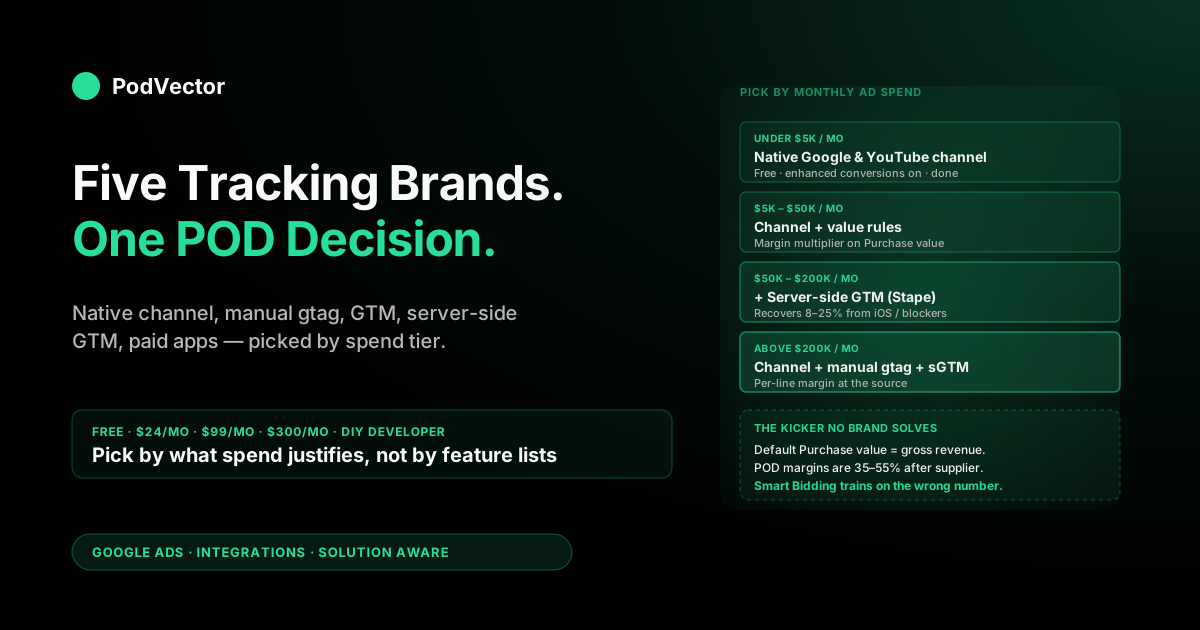
Quick Answer: The five "brands" of Shopify-to-Google-Ads conversion tracking that POD sellers realistically choose between are: (1) the native Google & YouTube channel (free, 95% solution, right answer for most stores under $200K monthly revenue), (2) manual gtag in Customer Events (free, control without GTM overhead), (3) Google Tag Manager (free, multi-platform governance), (4) server-side via Stape or similar sGTM hosting ($24–$300/month, recovers iOS/ad-blocker losses), and (5) paid Shopify apps like Conversios or Elevar ($29–$200/month, white-glove setup). This guide picks one per spend tier and explains why — including the POD-specific kicker (margin-adjusted Purchase value) that none of the brands solves out of the box.
Why "which brand" actually matters for POD
"Which conversion tracking solution should I use" is a different question on a print-on-demand store than on a wholesale ecommerce store, and the difference is margin. A general ecommerce shop with 60–75% gross margin can run any of the five tracking brands below, get conversion counts within ±10% of each other, and Smart Bidding will optimize fine.
A POD shop with 35–55% margin after Printify or Printful supplier costs and shipping cannot. The same ±10% conversion-count drift becomes a ±25–40% swing in contribution-margin ROAS — the only ROAS that matters once your supplier eats half the order.
So the "brand" you pick on a POD store isn't really about feature lists. It's about three things: how much conversion volume the brand recovers from iOS, ad-blockers, and cross-device journeys; how flexible it is at sending margin-adjusted Purchase values to Google Ads instead of gross revenue; and how much engineering or monthly fee you're willing to spend to get the gap closed. This guide walks through the five brands POD operators realistically choose between, ranked by what they cost and what they recover.
If you haven't yet installed any tracking, start with our setup conversion tracking on Google Ads + Shopify guide for POD sellers — it walks the install end-to-end, then come back here to decide whether you've outgrown the default.
The five tracking brands compared
Five categories. Within each, multiple specific products. The categories matter more than the specific products because the trade-offs cluster by category, not by brand.
- Native Google & YouTube sales channel. Free. Installed in 15 minutes. Built and maintained by Google. Handles 95% of what most POD stores need. Limitation: no native margin-adjusted value, mediocre cross-device recovery without enhanced conversions enabled.
- Manual gtag via Shopify Customer Events. Free. Same data layer as the channel, but you write the JavaScript. Right answer when you need a custom event the channel doesn't fire (e.g., a "view product detail" event for audience-building) or when you want explicit control over which orders get tracked.
- Google Tag Manager (client-side web container). Free. Adds an abstraction layer that pays back if you run 3+ ad platforms (Google, Meta, TikTok) and want centralized tag governance. Doesn't recover any iOS/ad-blocker losses by itself — adds operational power, not data recovery.
- Server-side GTM (sGTM). $24–$300/month for hosted services (Stape, Addingwell), or self-host on Google Cloud Run for $5–$50/month at small scale. Sends conversions from your server to Google's, bypassing browser-side ad blockers and iOS Intelligent Tracking Prevention. Recovers 8–25% additional conversions on top of enhanced conversions for typical POD stores.
- Paid Shopify apps (Conversios, Elevar, Analyzify, Littledata). $29–$300/month. Wraps either GTM or sGTM into a one-click Shopify install. Right answer when you don't have a developer and can pay $50–$150/month to skip the implementation work. Wrong answer when you do have a developer — the underlying tech is something you can run yourself for less.
Below, each brand gets its own section with what it actually costs, what it recovers, and the specific POD scenario where it's the right pick.
Brand 1: Native Google & YouTube channel
The default. Free. Installed via Shopify App Store, owned by Google, gets updated automatically as Google's pixel evolves. Auto-creates four conversion actions in Google Ads (Purchase, Begin Checkout, Add to Cart, Page View) and installs through Customer Events without theme edits.
What it does well
Setup time is 15–25 minutes from install to first verified pixel fire. Enhanced conversions is a one-click toggle that recovers 5–15% of cross-device conversions. Merchant Center connects in two clicks if you want to run Shopping or Performance Max. Google ships fixes when Chrome breaks something — you don't maintain anything yourself.
Where it falls short for POD
Three things. First, the Purchase action's value is gross revenue — Google Ads doesn't see your Printify or Printful supplier costs, so Smart Bidding's "value" target is the wrong number for POD. (Fixable with value rules; that's the kicker section below.) Second, no built-in server-side path means you're capped at whatever enhanced conversions can recover from the browser. Third, no custom event for "view product detail page" (which matters more on POD because the design is the product) — you have to add it via the manual-gtag brand below if you want it.
When it's the right pick
Default for POD stores under $200K monthly revenue. Default for any store where the operator isn't a developer and doesn't have one. The path of least resistance gets you 95% of the way there — the remaining 5% is value rules and server-side, both of which you can layer on later without changing the channel install.
Brand 2: Manual gtag via Customer Events
Customer Events is Shopify's pixel layer (introduced in 2022 to replace the deprecated checkout.liquid path). You can paste raw gtag JavaScript into a custom Customer Events handler that subscribes to events like checkout_completed or product_viewed and fires conversions to Google Ads exactly the way you want.
What it does well
Free. Surgical. You can fire events the channel doesn't (e.g., "View Product Detail Page" as a custom Google Ads conversion action, valuable for POD audience-building because design intent shows up earlier in the funnel than cart-add). You can pre-process the event payload — for example, multiply checkout.subtotal_price by your blended POD margin in JavaScript before passing it as value, which sends margin-adjusted conversion values to Google Ads at the source rather than via Google Ads value rules.
Where it falls short
You write the code. You maintain the code. When Shopify changes Customer Events APIs (it has happened), your handler breaks until you fix it. Most POD operators aren't developers, and even the ones who are usually have higher-leverage things to do than maintain pixel JavaScript.
When it's the right pick
Two scenarios. (a) You already have the channel installed but want to add one custom conversion action — fire just that one event from a manual gtag handler, leave everything else on the channel. (b) You have a developer on staff, you're running >$50K monthly Google Ads spend, and the precision of margin-adjusted Purchase values at the source is worth the maintenance overhead.
Brand 3: Google Tag Manager (web)
GTM is a tag-management abstraction. Instead of pasting individual tags (Google Ads pixel, Meta Pixel, TikTok pixel) into your store, you install one GTM container and configure all the tags inside GTM's UI. Same browser-side firing as the channel — no data recovery from server-side — but centralized governance.
What it does well
Multi-platform consolidation. If you run Google Ads + Meta + TikTok ads, GTM lets you fire all three pixels from one container, deduplicate events across platforms, and version-control changes. It's free, owned by Google, and well-documented (Stape's 2026 server-side guide has the most thorough GTM-on-Shopify walkthrough we've seen).
Where it falls short for POD
GTM by itself doesn't recover any iOS or ad-blocker losses — it's still browser-side. A pure-Google-Ads POD store running only Google Ads gets nothing extra from adding GTM that the native channel doesn't already provide. The setup overhead (1–2 days for someone who hasn't used GTM before) is wasted unless you have multiple ad platforms to centralize.
When it's the right pick
You're running 3+ ad platforms on the same Shopify store and tag governance is starting to hurt. Below that bar, GTM is overhead without payoff. Above it, GTM is the prerequisite to Brand 4 below.
Brand 4: Server-side GTM (Stape, Addingwell, Google Cloud)
Server-side tagging changes where the conversion event fires from. Instead of the browser sending the Purchase event to Google Ads (where iOS Intelligent Tracking Prevention, ad blockers, and cookie restrictions can drop the event), your store sends the event to your own server, and your server sends it to Google. The Google-Ads-side request comes from a server IP with first-party data, which Google trusts and counts.
What it does well
Recovers conversions browser-side tracking loses. Typical POD store sees 8–25% more recorded conversions after sGTM goes live, on top of enhanced conversions. The bigger the iOS-buyer share (POD apparel customers skew iOS-heavy on mobile commerce), the bigger the recovery. Three deployment options:
- Stape ($24–$200/month): managed sGTM hosting with one-click Shopify integration. Most popular among POD operators because the implementation overhead is genuinely small.
- Addingwell ($45–$300/month): similar to Stape, EU-headquartered, often cleaner GDPR posture for European POD stores.
- Self-hosted on Google Cloud Run ($5–$50/month at small scale): cheapest, you maintain the deployment. Right answer if you have a developer who's already comfortable with Google Cloud.
Where it falls short
Cost (monthly fee or engineering time). Operational complexity (one more thing that can break). Diminishing returns below $50K monthly Google Ads spend — the absolute dollar value of the recovered 8–25% has to exceed the monthly fee to be worth it.
When it's the right pick
Above ~$50K monthly Google Ads spend with iOS-skewed traffic (typical POD profile). The math: at $50K spend with a 3.0× ROAS, you're driving $150K monthly revenue.
Recovering 15% more attributed conversions tells Smart Bidding to bid more aggressively on the patterns that were already working — typically a 5–10% lift in actual conversions over time, which is $7,500–$15,000/month of recovered revenue. Stape at $99/month is an easy yes at that scale.
Brand 5: Paid Shopify apps (Conversios, Elevar, Analyzify)
This category is where the marketing gets loudest. Conversios, Elevar, Analyzify, Littledata, and a handful of others all sell themselves as "Shopify Google Ads tracking, fully managed, install in five minutes." All of them are wrappers — they install GTM or sGTM under the hood, configure the standard events, and hide the complexity behind a Shopify app UI.
What they do well
Implementation speed. If you've got a tracking problem, you don't have a developer, and you have $50–$200/month of spare budget, these apps are the fastest path to working sGTM. Most include support, dashboards, and handling of common Shopify-specific quirks (refund tracking, subscription orders, multi-currency value).
Where they fall short
You're paying for managed GTM/sGTM that you could run yourself for less. The dashboards are usually thinner than the marketing implies — the actual data still lives in Google Ads and GA4 reports. Lock-in: switching off the app later means re-implementing tracking from scratch, which discourages migrating even when you outgrow it.
When it's the right pick
Two specific scenarios. (a) Your store is between $50K and $300K monthly revenue, you don't have a developer, and Brand 1 (native channel) is leaving recovery on the table that's worth more than the app's monthly fee. (b) You're a marketing agency setting up tracking for multiple POD client stores and want one consistent stack across all of them — the apps' multi-store admin layers genuinely save time at agency scale. Outside those two scenarios, Brand 4 self-managed is usually a better long-term answer.
A decision tree for picking by spend tier
The least-bad way to choose is by monthly Google Ads spend, since that determines the dollar value of the conversions each brand recovers. Four tiers:
- Under $5K monthly ad spend. Brand 1 (native Google & YouTube channel). Don't pay for tracking; spend the money on better creative or product. Verify enhanced conversions is on. That's the entire decision.
- $5K–$50K monthly ad spend. Brand 1 plus Google Ads value rules for margin adjustment. Skip everything else. The recovery delta from sGTM at this spend level usually doesn't clear the $99/month threshold once you account for the engineering or app overhead.
- $50K–$200K monthly ad spend. Brand 1 + Brand 4 (Stape sGTM). The 8–25% recovery is now worth $4,000–$15,000/month at this spend level. Self-host on Cloud Run if you have a developer; pay Stape if you don't. Skip Brand 5 paid apps unless your store is on a very specific app ecosystem already (Elevar shines for stores already running Klaviyo and a heavy review-app stack).
- Above $200K monthly ad spend. Brand 4 (sGTM) is mandatory. Brand 2 (manual gtag for margin-adjusted Purchase value at the source) starts paying back. At this scale, the typical configuration is the native channel for the basic four events, manual gtag layered in for one custom margin-aware Purchase event, and sGTM for delivery — all three brands working together. Brand 5 paid apps are now a tax you don't need.
The lookalike for picking GTM (Brand 3) doesn't fit this spend-tier ladder cleanly because GTM is about platform count, not Google Ads spend. Add GTM when you cross 3 ad platforms, regardless of spend tier.
The POD-specific kicker no brand solves
Every brand above sends conversion events reliably. None of them, out of the box, sends the right conversion value.
The default value passed to Google Ads is gross revenue — checkout subtotal, sometimes including shipping. For a wholesale ecommerce store at 70% margin, the gap between gross revenue and contribution margin is small enough that Smart Bidding gets the right answer either way. For a POD store at 40% margin after Printify or Printful supplier costs and shipping, optimizing on gross revenue is optimizing on the wrong number — and Smart Bidding will happily pour budget into your highest-revenue, lowest-margin SKUs because it sees their conversion value as 2× higher than it actually is on a margin basis.
Three ways to fix it. None of the five tracking brands does this for you:
- Google Ads value rules — a flat-multiplier rule (multiply Purchase value by 0.42 for a 42% blended margin) takes 10 minutes to set up and works with any of Brands 1–5. This is the right answer for catalogs with consistent margins across products.
- Margin tiers via Merchant Center custom labels — tag products with a margin band in
custom_label_0, then create three value rules. Right answer for catalogs with high margin variance (apparel + accessories + drinkware all on one store). - Per-line-item value via manual gtag — Brand 2's killer use case. Replace the channel's default Purchase event with a custom one that calculates contribution margin per line item before sending it. Right answer above $50K monthly ad spend, where the precision is worth the engineering.
For the deeper walkthrough on each path, see our Shopify Google Ads conversion tracking setup guide for POD sellers. The broader integration architecture (Google Ads + Merchant Center + GA4 + Shopify) lives in the complete Google Ads + Shopify integration guide for POD. For campaign architecture once your tracking is solid, our complete Google Ads playbook for print-on-demand sellers covers scaling, seasonal patterns, and what to do once Smart Bidding has enough signal. Browse the rest of the cluster from the Google Ads integrations hub, or zoom out to the Google Ads topic hub.
FAQs
Which Shopify Google Ads conversion tracking "brand" is most accurate?
Brand 4 (server-side GTM) recovers the most conversions Google would otherwise miss — typically 8–25% more than Brand 1 alone, on top of enhanced conversions. But "most accurate" only matters if your spend justifies the cost. Below $50K monthly ad spend, Brand 1 plus enhanced conversions is accurate enough that the marginal recovery from Brand 4 doesn't clear its monthly fee.
Is the native Google & YouTube channel really enough for a POD store?
For most POD stores under $200K monthly revenue: yes, plus Google Ads value rules for margin adjustment. The channel handles enhanced conversions, the four core events, and Merchant Center connection — that's 95% of what tracking needs to do. The remaining 5% (margin-adjusted value, custom product-detail-view events, server-side recovery) you can layer on without uninstalling the channel.
Stape vs. Conversios vs. Elevar — which Shopify tracking app is best for POD?
Stape is the underlying tech (sGTM hosting); Conversios and Elevar are wrappers that add UI and support on top of GTM/sGTM. If you're comfortable with GTM, go directly to Stape — cheaper and more flexible.
If you're not, Elevar tends to be cleaner for stores already running Klaviyo and a heavy review-app stack; Conversios tends to be cheaper but with thinner support. Honest answer: at <$200K monthly revenue, none of the three is worth more than the native channel + value rules.
Do I need GTM if I'm only running Google Ads?
No. GTM's value is multi-platform tag governance. If your only ad platform is Google Ads, the native Google & YouTube channel does everything GTM would do for you, with zero maintenance overhead. Only add GTM if you cross 3+ ad platforms (Google + Meta + TikTok, typically) and want shared event firing.
Will server-side tracking actually recover lost conversions, or is that marketing?
It does, but the size depends on your traffic mix. iOS-heavy mobile traffic gains the most (Safari ITP and ad blockers drop the highest share of browser-side events). POD apparel buyers skew iOS-heavy, which is why server-side recovery on POD stores typically lands at the higher end (15–25%) of the published range. Test by running enhanced conversions for 30 days first, then sGTM for 30 days, and compare the conversion-count trend — most stores see a clear step-change.
Can any of these "brands" send Printify or Printful supplier costs to Google Ads?
None send supplier costs natively. The closest is Brand 2 (manual gtag) where you can multiply checkout value by your blended POD margin before sending it — that's a margin-adjusted Purchase value, not actual supplier costs.
The cleanest path is Brand 1 plus a Google Ads value rule that multiplies revenue by your margin. To answer "which Printify SKUs lost money on Google Ads this week after supplier costs," you need to join Google Ads spend, Shopify orders, and your Printify cost feed in one place — that's an analytics layer above the tracking layer, not the tracking layer itself.
How do I switch from one brand to another without losing Smart Bidding's training?
Don't switch the conversion action; switch the delivery. Smart Bidding optimizes against the conversion action ID.
If you migrate from Brand 1 to Brand 4, keep the same Google Ads conversion actions (Shopify Purchase, etc.) and just change which pixel/server fires them. Conversion-action IDs stay stable, Smart Bidding sees no break in signal, and you avoid the 14–30 day relearning period. Reinstalling from scratch creates new IDs and resets training — never the right move once you have history.
What's the difference between conversion tracking and audience tracking?
Conversion tracking feeds Smart Bidding (which clicks led to purchases). Audience tracking feeds remarketing (who visited but didn't buy, so you can show them ads later).
Both run on the same pixel, but they serve different goals. The five brands above are equivalent on conversion tracking; they differ slightly on audience-list quality (server-side brands have the cleanest first-party audience signal). For a POD store, conversion tracking quality matters first; audience tracking matters once you're spending enough on Performance Max for audience signals to drive bidding.
Tracking is the input — Victor turns it into POD-aware answers
Even the best tracking brand still hands you a Google Ads dashboard that doesn't know your Printify or Printful costs by SKU, your shipping margins by destination, or which Performance Max asset groups deserve more budget after actual contribution margin. Victor is an AI analytics agent built for POD sellers — connect Shopify, Google Ads, and Printify or Printful, then ask questions like "which products lost money on Google Ads this week after supplier costs?" or "what's our true ROAS on apparel vs. mugs after margin?" in plain English.
Try Victor free