
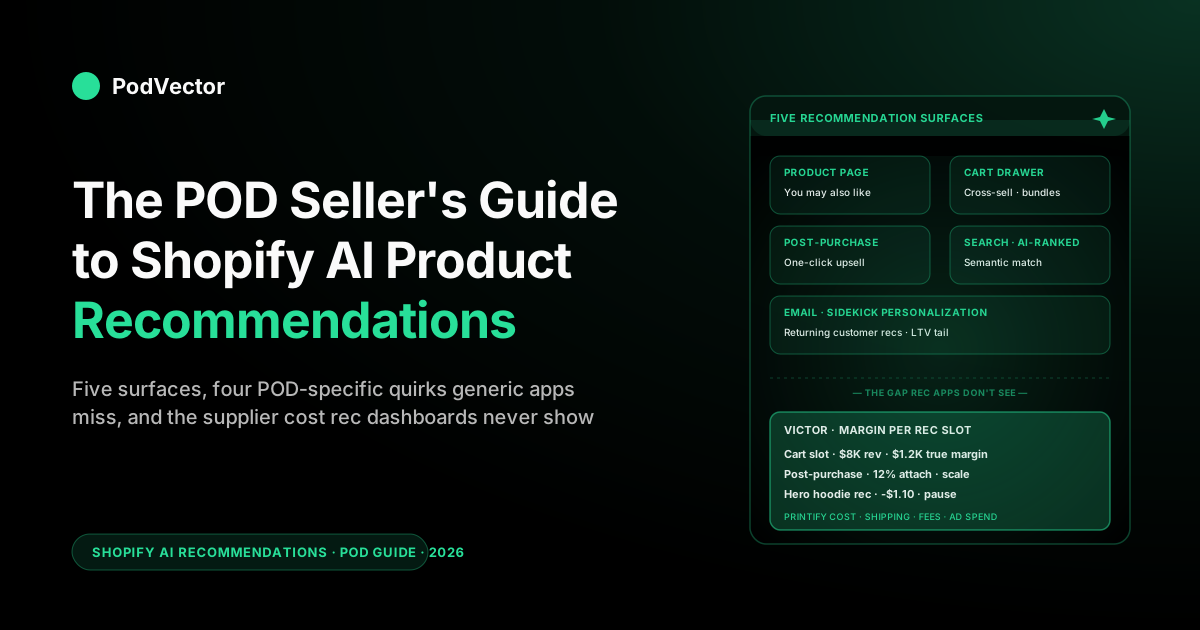
Quick Answer: Shopify AI product recommendations are the engines that decide which products to show on a product page, in the cart, at checkout, in the post-purchase upsell, and inside the search results. Shopify ships a free baseline through Search & Discovery and the Liquid product_recommendations object, and a paid tier of apps (Rebuy, LimeSpot, Glood, AiTrillion, Shopify's own Sidekick-driven merchandising) layers personalization on top.
For a print-on-demand store, the generic models miss four POD-specific quirks — variant explosion, design-cluster affinity, low absolute margin per item, and supplier-cost blind spots — that decide whether a recommendation actually makes you money or just adds another picked SKU at break-even. This guide walks the surfaces, the apps, the POD-specific tuning, and the one number Shopify can't give you on its own.
What Shopify AI product recommendations actually are in 2026
A "product recommendation" on Shopify is any block of suggested products that the store renders in response to either a viewer (anonymous browser, signed-in customer) or a context (the product currently being viewed, the cart contents, the search query, the time of day, the referring channel). The "AI" part is how the suggestion gets ranked.
There are three flavors of model that every recommendation engine collapses into, regardless of marketing: content-based (similar to this product on attributes — best when you have rich product data but thin behavior data), collaborative (people who bought this also bought — needs traffic and order history to fire), and hybrid (the previous two stitched together, often with deep-learning embeddings layered on top — the default for a growing or mature store). Shopify's storefront recommendations API ships a hybrid model out of the box, and most paid apps are some variation of hybrid with a personalization layer keyed off the visitor's browsing or purchase history.
The 2026 wrinkle is a fourth layer on top of the hybrid base: LLM-driven reranking. A wave of newer apps (Bitrecs, Wiser, the "AI Product Recommendations+" class of one-click installs) pass your catalog and the live session through a large language model that reranks the hybrid engine's shortlist on semantic fit — matching "gift for a new dad who likes cats" to the tiger-dad design even when no order-history signal connects them yet. For a POD store with a cold-start catalog (new designs added weekly, no purchase signal yet), this LLM rerank is the one genuinely new capability worth testing in 2026; it papers over the sparse-signal problem that hobbles pure collaborative filtering on small stores.
For a print-on-demand seller, the practical implication is that you do not need to choose a model — every credible app is hybrid in 2026 — you need to choose what data the model trains on and how it ranks output. That is where most POD stores leave money on the table: they install a generic engine, accept its defaults, and watch it recommend the same hoodie in three different colors as if those were three distinct products.
The model is doing what a generic ecommerce model is supposed to do. The store is just not generic ecommerce.
This guide is built around two arguments. First: if you are running a print-on-demand store on Shopify, the question is not whether to turn on AI recommendations — Shopify's free baseline is already running on most themes, you are not opting out.
The question is which surface to invest extra app spend on, and how to tune for the POD-specific shape of your catalog. Second: every recommendation that converts costs you money to fulfill, and that cost is invisible to the recommendation engine. The best engine in the world will happily recommend a product that loses you $1.10 per sale, and Shopify will count that as a win.
The five surfaces where Shopify shows recommendations
Before tuning anything, get clear on where the recommendations actually appear. Most stores have all five running, often without the operator realizing it.
Two display defaults hold across all five surfaces, and the generic guides are right about them: show three to five products per slot (more than that and click-through dilutes — the visitor scans past), and render the slot directly adjacent to the action you want (below the buy button, inside the cart drawer, on the thank-you page). Carousel, grid, or strip rarely moves the number much; placement and slot count do. The POD-specific layer sits on top of these defaults, which is what the rest of this guide is about.
1. Product page: "You may also like" / "Complete the look"
The most visible surface. Renders below the buy button on every product detail page, populated either by Shopify's native product_recommendations Liquid object (free) or by a paid app overlay.
For POD this surface is the one that decides whether a customer who came in for the tiger-dad tee leaves with a tiger-dad mug too. Default Shopify recommends "similar products" by collection and tag overlap; for POD that often returns variants of the same design across product types, which is exactly what you want — but only if your tagging is rigorous.
2. Cart drawer / cart page: cross-sell suggestions
The second-highest leverage surface. The visitor has already decided to buy at least one thing; the cart-page recommendation is asking them to add one more.
For POD this is where bundle-style recommendations earn their keep — "you've added the tiger-dad tee, here's the matching mug" — because the customer is already paying one round of shipping and any add-on rides on existing fulfillment overhead. Native Shopify supports cart recommendations through the same Liquid object; paid apps (Rebuy is the dominant one here) layer dynamic discounting and slot rotation on top.
3. Checkout and post-purchase upsells
The Shopify Plus and Shopify Checkout Extensibility surface. Recommendations here run inside the checkout itself ("add this to your order for $5") and on the thank-you page ("one-click add to your shipment").
For POD the post-purchase upsell is the most underused surface — customer has already paid, friction to add is near zero, and the supplier can typically batch the add-on into the same fulfillment run if you catch it inside a few minutes. Shopify Checkout Extensibility makes this available without dev work for most plans now; Rebuy, AfterSell, and Shopify's own Functions all serve this slot.
4. Search results: AI-ranked product matches
Shopify's Search & Discovery app — free, first-party, installed by default on most stores in 2026 — uses semantic search ranking. A shopper typing "warm sweater for hiking" gets matched not just on literal keyword overlap but on conceptual similarity to your product descriptions and tags. For POD this changes how you write product descriptions: vague evocative copy that wouldn't have ranked on keyword search now ranks on intent matching, which is why the Magic-generated descriptions (covered in the POD seller's guide to Shopify Magic AI) compound with this surface.
5. Email and on-site personalization (Sidekick & third-party)
The newest surface. Recommendations rendered inside Shopify Email campaigns ("based on your last order"), inside the on-site Shopify Inbox chat, and surfaced via Sidekick when a returning customer logs in.
For POD with a repeat-purchase tail (people who bought one tiger-dad design come back for the next drop in that family), this surface is what turns a one-off sale into a customer LTV story. The deeper treatment is in the POD seller's guide to AI for ecommerce personalization.
Native Shopify vs. paid apps: what ships free
The thing most "best AI recommendation app for Shopify" roundups skip is that Shopify's native engine is good. Not as good as the top paid apps for personalization, but good enough that the marginal lift from a paid app needs to clear the paid app's monthly cost plus any per-conversion fee before it makes sense.
What Shopify ships free in 2026:
- The
product_recommendationsLiquid object, which the storefront API populates with collaborative-filtering ranked results from your store's order history and a content-based fallback when the order signal is sparse - The Shopify Search & Discovery app, which adds semantic search ranking, synonyms management, boosts, and merchandising rules
- The Sidekick conversational layer, which can answer "what should I cross-sell with this product?" against live store data and execute the merchandising rule for you
- Cart recommendations, post-purchase upsells through Checkout Extensibility (free up to a slot count on most plans), and basic email recommendation blocks inside Shopify Email
Where the native engine falls short for a POD-shaped catalog is in three places. It does not personalize per-visitor — the same "you may also like" appears for every viewer of a given product page, which leaves visitor-specific affinity on the table.
It does not deduplicate variants — a six-color tee can show up as six recommendations, all variants of the same design, eating slots. And it does not handle bundles or dynamic discounting natively — for that you need Rebuy or Shopify Functions written by hand.
If those three gaps don't matter to your store yet (you're under ~$200K/yr GMV, your catalog is small, your repeat rate is low), the native engine is the right answer and you can save the $30-200/mo of app spend. Above those thresholds the paid apps start to clear their cost.
Four POD-specific quirks generic recommendation engines miss
Generic recommendation engines were built for stores selling discrete physical goods — Apple cases, water bottles, sneakers. Print-on-demand catalogs have a different shape, and four specific quirks decide whether the engine helps or hurts.
1. Variant explosion
A single design becomes six tee colors, three hoodie colors, a mug, a tote, a sticker pack — twelve to twenty SKUs that are all the same design but different products. A naive collaborative-filtering model treats each as independent and will happily recommend "tiger-dad tee in black" to someone already viewing "tiger-dad tee in red." The fix is design-level tagging plus product-type rules: tag every SKU with its design family (design:tiger-dad), then add a merchandising rule that suppresses same-design same-product-type variants from the recommendation slot. Shopify Search & Discovery supports this through merchandising rules; most paid apps do too if you configure them.
2. Design-cluster affinity beats category affinity
For a generic store, "people who bought running shoes also bought socks" is the high-signal pattern. For a POD store, the high-signal pattern is "people who bought the tiger-dad design also bought the cheetah-dad design" — because the visitor is buying into the design aesthetic, not the product type.
Standard collaborative filtering picks this up eventually if you have enough order volume, but for stores under ~5,000 lifetime orders the signal is sparse and the model defaults to category overlap. Force the issue by creating "design family" collections (tiger-dad-collection) and using collection-overlap rules in your recommendation app. This single change typically lifts cross-sell attach rate 15-30% on smaller POD stores.
3. Low absolute margin per item
A POD tee that retails for $24 with a Printify supplier cost of $11, $4 of shipping, and Shopify + payment processing fees nets you somewhere around $7-8 per unit before ad spend. A recommended add-on that adds a $4 sticker is great in conversion-rate terms and a meaningful percentage lift in AOV — but if the sticker has $2 of supplier cost and $1 of incremental fulfillment, you've added $1 of margin per converted visitor.
That's still positive, but it's not the "boost AOV by 25%" the app marketing implies. The question is not "does this recommendation convert" — the question is "does this recommendation clear its fulfillment cost." Generic apps can't answer the second question.
4. Supplier cost is invisible to the recommendation engine
The fourth quirk is the one that compounds with the previous three. Every recommendation engine ranks suggestions by predicted conversion probability or predicted revenue uplift, never by predicted profit uplift.
Because Shopify doesn't have your supplier cost layer, none of the rec apps do either. So when the engine recommends a hoodie at $42 and the customer adds it, the engine logs a $42 contribution; what it doesn't see is that the hoodie costs $26 from the supplier, ships at $7, runs $2 of fees — leaving $7 of margin, not $42.
Worse, if you're running paid acquisition on the front end and that hoodie's true GPAM (gross profit after marketing) is negative because of an aggressive Black Friday discount stacked on top, the engine has happily recommended a product that loses you money. This is the gap a POD-specific analytics layer fills, and it's why we built Victor (more on that under the cost-side blind spot).
The shortlist: five recommendation apps for POD stores
The Shopify App Store lists hundreds of recommendation apps. The shortlist that actually fits a POD operation in 2026 is narrower. Here's the honest read on five.
Shopify Search & Discovery (free, first-party)
The default starting point. Adds semantic search, synonyms, merchandising rules, and product boosts.
No personalization layer per visitor. Best fit: any POD store under ~$300K/yr GMV, or any store where "we just need recommendations to work without paying another $50/mo." Limitation: no bundle pricing, no per-visitor personalization, no post-purchase slot beyond what Shopify Functions gives you. Use this for at least the first 6-12 months of a new store.
Rebuy Personalization Engine
The dominant paid choice for stores doing seven figures and up. Strong on cart drawer recommendations, post-purchase upsells, and email-driven recs.
Pricing starts around $99/mo and scales on order volume. Best fit: POD stores with a real bundle motion (design-family bundles, cross-product bundles like tee + matching mug), repeat customers, and ad-spend volume that justifies the per-visitor personalization layer.
Configures cleanly with Shopify Checkout Extensibility for post-purchase. Worth the cost above ~$50K/mo revenue.
LimeSpot Personalizer
Strong personalization for product page and cart. Has a bundle builder that fits POD design-family merchandising well.
Pricing starts at $18/mo for the basic plan, scales with traffic. Best fit: POD stores in the $20K-$200K/mo range that want personalization but aren't ready for Rebuy's pricing. Setup is heavier than Search & Discovery; expect a few hours to configure properly.
Glood AI
Newer entrant, strong on the "manual control + AI suggestions" hybrid. Lets you pin specific recommendations for specific products while letting AI handle the long tail. Best fit: POD stores with a few hero designs that you want to control merchandising on, with AI handling the rest of the catalog. Free tier is generous; paid plans start around $30/mo.
AiTrillion
Bundles recommendations with loyalty, email, and reviews. Best fit: stores that want one suite covering several use cases rather than best-of-breed for each. The recommendation engine is solid but not Rebuy-class for personalization. Worth it if you're consolidating tools and the bundled price beats running three separate apps.
The LLM-rerank newcomers (Bitrecs, Wiser, AI Product Recommendations+)
The 2026 wave worth watching. These layer an LLM reranker on top of a hybrid base, so they fire on semantic fit before you have order-history signal — the cold-start case that matters most for a POD store adding new designs weekly. Most install in one click and price low (free tiers or ~$10-30/mo to start). Best fit: a newer or fast-rotating POD catalog where collaborative filtering stays sparse and you want the "gift for a cat-loving new dad → tiger-dad design" match to work on day one. Treat them as a complement to Search & Discovery, not a replacement for Rebuy's cart-and-post-purchase personalization. Worth a free-tier trial before you commit app spend to a heavier suite.
For the broader landscape of AI tools every POD seller should know about, see the complete guide to AI tools for POD sellers. For the AI-for-Shopify surface area more broadly, the POD seller's guide to Shopify AI covers the picture from Sidekick through Magic through the apps layer.
A POD-aware recommendation setup, end to end
This is the setup we'd run on a typical POD store doing $30K-$300K/mo. Adjust upward if you're past those thresholds.
Step 1: Tag every product at the design level. Every SKU gets a design: tag (e.g., design:tiger-dad, design:cheetah-dad) and a product-type: tag. Use Shopify Magic to bulk-generate these from your existing catalog if you haven't been disciplined. This is the foundation; nothing else works without it.
Step 2: Build design-family collections. One collection per design family, automated rule based on the design: tag. These power the "more from this design" recommendations and feed the collection-overlap signal to whichever recommendation app you run.
Step 3: Configure Shopify Search & Discovery. Add merchandising rules: suppress same-design same-product-type variants from recommendation slots, boost design-family overlap, add synonyms for niche audience terms ("nurse" → "RN", "ER", "ICU"). This is free and handles the first 80% of what you need.
Step 4: Decide on a paid app. Below $50K/mo, stay on free. Above that, default to Rebuy for the cart and post-purchase surfaces specifically — that's where the marginal lift over native is largest. LimeSpot if budget is a concern.
Step 5: Build at least one bundle. A design-family bundle (the tee + the mug + the sticker, 10% off) is the highest-converting POD bundle pattern. Either configure inside Rebuy/LimeSpot or build with Shopify Functions if you're staying on the free tier.
Step 6: Wire up the post-purchase slot. Even on the free tier, Checkout Extensibility lets you serve a post-purchase recommendation. For POD, default it to "another design from the same family at 10% off" — the conversion rate on post-purchase upsell of a same-family item runs 8-15% in our experience.
Step 7: Measure profit, not revenue. Cover this in detail under measuring what actually works — but the headline is that every recommendation needs a tagged source so you can compute its true GPAM, not just its converted revenue.
Measuring what actually works (and the attribution gap)
Most recommendation apps give you a dashboard that shows "recommendations drove $X in revenue this month." That number is almost always wrong, in two specific directions.
It overcounts, because it credits the recommendation for any sale where the customer clicked through a recommendation widget — even if the customer would have bought that product anyway via the menu, search, or a saved tab. Counterfactual attribution is the hard part of recommendation measurement, and very few apps do it well. Shopify's own dashboards take the same shortcut.
It undercounts the cost, because it shows revenue, not margin. A recommendation widget that drives $10K of revenue at a 35% margin produces $3,500 of contribution; the dashboard shows $10K. For a POD store where margins are tight, the difference between revenue and margin is the difference between a recommendation strategy that works and one that just feels like it works.
What to do about it:
- Tag recommendation-driven orders with a UTM-like parameter (
?rec_source=cart,?rec_source=post-purchase) and reconcile in your analytics layer to compute attach rate, attach revenue, and counterfactual lift versus a holdout - Run a holdout test: 5-10% of visitors see no recommendations for two weeks; compare AOV and conversion against the rest. The delta is your true counterfactual lift
- Compute margin per recommended SKU, not just revenue, by joining your supplier cost layer to the recommendation events
- Track which design families drive the most cross-cluster recommendations and which are dead weight — this is where a live-data analytics layer earns its keep
The deeper version of the attribution problem and how POD analytics differs from generic ecommerce analytics is in the complete guide to AI analytics for print-on-demand and the complete guide to AI agents for ecommerce analytics.
The cost-side blind spot: when a converted recommendation loses you money
This is the part of the recommendations conversation that almost no app or guide will tell you about, because it's bad for the apps' marketing. Every recommendation engine ranks by predicted revenue or conversion probability.
None of them rank by predicted profit. For a generic ecommerce store with 60-70% margins, that's fine — every converted recommendation is positive contribution. For a POD store with 25-35% margins after supplier cost, shipping, and fees, and often single-digit margins after ad spend, "the recommendation converted" is not the same as "the recommendation made money."
The concrete pattern we see most often: a store runs a paid recommendation app, the app's dashboard shows it driving an extra $8,000/mo of cart-add revenue, the operator is happy. Reconcile that revenue against supplier cost and incremental fulfillment, and the actual margin is $2,000.
Subtract the app's monthly fee ($199), subtract the per-conversion fee where applicable (~$300 at typical scale), subtract the additional support load from the higher AOV orders that have edge-case shipping, and the net is closer to $1,200. Still positive, but a fifth of the headline number — and that gap matters when you're deciding whether to scale ad spend, drop a product line, or push a discount.
What we recommend instead: keep the recommendation engine, but reconcile its output against your true cost layer in a separate analytics view. That means joining the recommendation event log against Printify or Printful supplier costs, Shopify shipping fees, payment processing, and any ad spend attributed to the source channel. Until your store does this reconciliation, every recommendation-app dashboard number is directionally useful but absolutely wrong.
This is the gap PodVector AI's Victor fills. Victor is an AI employee who sees your Shopify orders, your Printify or Printful supplier costs, your Shopify Payments fees, and your ad spend, all together. He uses this to act: he spots the recommendation slot that is losing you money on every sale and pauses it, shifts spend toward the design that actually makes more profit, and updates the merchandising rule behind it, asking for your approval before each move.
Every action runs through a confirmation gate with an audit log, so nothing changes the store without your sign-off. The recommendation engine stays in charge of what to suggest; Victor runs the cost side — flagging and fixing which suggestions clear their cost. Ask Victor "which slot is making money per design and variant," and it answers from live data, then offers to act.
FAQs
How do I add AI product recommendations to my Shopify store?
If you're on a recent Dawn-based theme, the native product_recommendations block is already rendering on your product pages — no install needed. To add the search and merchandising layer, install the free Shopify Search & Discovery app from the App Store.
For personalization, cart recommendations, and post-purchase upsells beyond what's native, install a paid app like Rebuy, LimeSpot, or Glood. Most POD stores under $50K/mo are best served by the native engine plus Search & Discovery; above that, the paid apps start clearing their cost.
What's the difference between Shopify's native recommendations and a paid app?
Native runs collaborative filtering plus content-based fallback against your store's order history, but does not personalize per visitor and does not deduplicate variants. Paid apps add per-visitor personalization (the same product page shows different recommendations to different visitors), bundle pricing, dynamic discounting, and richer merchandising rules. The marginal lift over native ranges from 8-25% on AOV in our experience, depending on store size and catalog shape — which has to clear $30-200/mo of app spend plus any per-conversion fee before it's a real win.
Do AI product recommendations actually increase sales for POD stores?
Yes, but the lift is smaller than the case studies imply for a POD-shaped catalog. Generic case studies showing 25-30% AOV lift come from stores with high-margin, high-variety catalogs.
POD stores typically see 8-18% AOV lift from a well-tuned recommendation setup, and the actual margin lift is 3-9% after supplier cost. Still worth it; just calibrate your expectations against your true cost structure, not the headline revenue number.
Which Shopify recommendation app is best for print-on-demand?
For most POD stores: start with native Shopify Search & Discovery (free). Add Rebuy when you cross $50K/mo and need real cart and post-purchase personalization.
Use LimeSpot if budget is tight and you need personalization sooner. Use Glood if you want manual pinning of hero-design recommendations with AI handling the long tail. Avoid bundling everything into a single suite (AiTrillion-style) unless tool consolidation matters more than best-of-breed.
How do I know if a recommendation is actually making me money?
Tag recommendation-driven orders with a source parameter, run a 5-10% holdout test for two weeks to measure counterfactual lift, then reconcile the lifted revenue against your supplier cost layer (Printify or Printful), shipping, and ad spend to compute true GPAM per recommendation slot. The recommendation app's dashboard will show revenue; the reconciled view shows margin. The two often differ by 3-5x for POD stores.
Will Sidekick replace recommendation apps?
Not in 2026, and not in the near roadmap. Sidekick is good at answering "what should I cross-sell with this product" and at executing merchandising rules, but it doesn't yet replace the per-visitor personalization layer that Rebuy and LimeSpot run.
Expect Sidekick to keep absorbing the merchandising-rule and reporting surface, while the personalization-engine layer stays in third-party apps. The strategic question is whether Shopify acquires one of those engines or builds it natively; either way, your tagging and design-family work compounds regardless.
See which recommendations actually clear their cost
Recommendation-app dashboards show you revenue. Victor shows you margin per recommended slot, joined live to your Printify or Printful supplier costs, Shopify fees, and ad spend — so you know which design families to scale, which to pause, and which slot is quietly burning your margin. Victor answers. Victor acts on those answers with your approval.
Try Victor free