
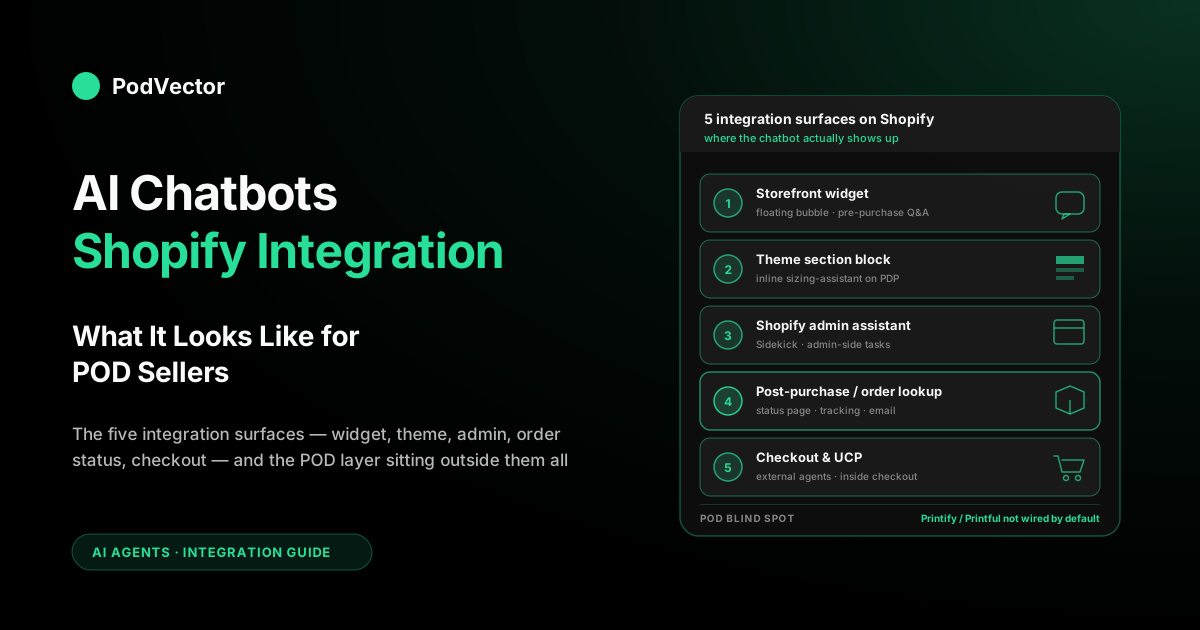
Quick Answer: AI chatbot Shopify integration is not one thing — it's five different integration surfaces, and most POD sellers only see one of them before they pick a tool. The storefront widget is the obvious one; the theme section block, the Shopify admin sidekick, the post-purchase order lookup, and the checkout agent extension all count too.
Which surfaces matter depends on whether you're trying to deflect support, lift conversion, or free up operator time. The POD-specific catch: every surface has a Printify or Printful blind spot by default, and closing it is what separates a chatbot that answers questions from one that answers the right ones.
What "Shopify integration" actually means for a chatbot
The phrase "AI chatbots Shopify integration" gets used loosely. On the App Store it usually means "we installed a chat widget via a script tag and read your product catalog through the Admin API." That's a connection, not an integration — and for a print-on-demand store it's about 20% of the job. Real Shopify chatbot integration is multi-surface and multi-data-source, and the gap between the demo and the live-on-POD-catalog version is where most implementations stall.
Think of integration as two axes. The first axis is surface: where in the Shopify experience does the chatbot appear?
The storefront widget is one surface; the theme section block, admin assistant, post-purchase page, and checkout agent extension are four more. The second axis is data: what state does the chatbot read and write?
Different chatbots see different parts of your store. Some only see your Shopify product pages. Others also see your product details, your help desk messages, and your profit numbers. A chatbot "integrated with Shopify" might touch just one of these, or all of them. For a print-on-demand store, the real test is simple: does it know what your supplier charges you? Most don't. Victor does — he reads your Printify, Printful and Gelato costs before you sell anything, so you always know your true margin.
Our four-layer integration stack breakdown walks through the data axis. This guide covers the surface axis — where the chatbot actually shows up in your Shopify operator's day — and why the surface you pick drives almost everything about ROI.
The five integration surfaces on Shopify in 2026
The way most App Store listings describe "integration" flattens the surface question. A Shopify chatbot integration in 2026 can land on any or all of five distinct places, and each one solves a different problem for a POD store.
- Storefront widget — the floating chat bubble that appears on every page of your theme. The default surface for customer-facing AI chatbots.
- Theme section block — an embedded chat or AI assistant sitting inside the page layout (usually on PDPs or collection pages) rather than as a floating widget.
- Shopify admin assistant — a chatbot that lives inside the admin UI. Sidekick is the native version; third-party admin apps add their own.
- Post-purchase / order lookup — integration into the thank-you page, order status page, shipping notification email, or a dedicated tracking page.
- Checkout and UCP — integration at checkout itself, including the new Universal Commerce Protocol path where external agents complete checkouts on your store.
POD stores under $30k/month usually need surfaces 1, 4, and sometimes 3. Mid-market POD brands ($50k–$500k/month) add surface 2 selectively and start thinking about 5. The mistake is treating surface 1 as the whole job — you'll pay for a chatbot that deflects tickets but leaves the shipping-window question on the order status page unanswered, which is where most of your support load lives.
Surface 1 — the storefront chat widget
The one everyone recognizes. A persistent chat bubble in the bottom-right of every storefront page, usually installed as a theme extension or a script tag. The integration is mostly cosmetic: the widget loads a script, the script authenticates against the chatbot vendor's API, and the vendor proxies calls back to Shopify through the Admin API on your behalf.
What the storefront widget is good at on a POD store:
- Pre-purchase pre-sale — answering sizing, material, and print-location questions while the shopper is on a product page. For POD, this is the single highest-value interaction; abandon rate on apparel PDPs with unanswered sizing questions is brutal.
- Product recommendation — "show me t-shirts with long sleeves in heather grey." Grounds on your live catalog. Works well if your variant metadata is clean.
- Policy deflection — returns, exchanges, shipping cutoffs, sizing charts. Any question whose answer lives on a policy page or a FAQ.
- Multilingual coverage — most 2026 widgets answer in 90–100+ languages off the same English catalog and policy content. For POD stores selling globally off a single English storefront, this is a quiet win: a German shopper gets a German sizing answer with no translated content to maintain.
What the storefront widget is bad at by default:
- "When will my order arrive?" — the widget reads Shopify's shipping rate table, which for POD is a generic estimate. Real production time lives in Printify or Printful, and unless you've pushed that data into Shopify metafields or the chatbot has a native supplier integration, the answer is wrong.
- Discount offers that respect margin — cart-abandonment widgets offer discount codes aggressively. If your catalog has mixed-base margin (a tee at 60% and a hoodie at 35%), a flat "10% off" offer will torch margin on the hoodie.
- Handoff quality — widgets vary hugely in how they pass context to a human. If the handoff goes to a shared inbox with no conversation transcript and no order lookup attached, you've optimized for deflection rate and hurt CSAT.
Install time for a clean widget: 30 minutes via the App Store. Install time for a widget tuned to a POD catalog with supplier integration and margin-safe discount rules: two to six weeks, per our integration stack guide.
Surface 2 — the theme section block
Less common, more valuable than most stores realize. Instead of a floating widget, the chatbot appears inline on the page — typically a sizing-assistant block on a PDP, a "help me pick" block on a collection page, or an AI-driven FAQ accordion. Installed as a theme app extension or a custom Liquid block calling the chatbot vendor's JS SDK.
Why this matters for POD: a floating chat widget has to compete with everything else on the page for attention. On a product page where the shopper is actively picking a size, an inline sizing block built right into the page — one that reads the product options and pulls up a size chart for that exact product — converts 3–8× more of the shoppers who need help than a floating widget does. Both need the same information behind the scenes — your product catalog, sizing details, and supplier info from Printify or Printful — but the one built into the page beats the floating widget for these high-intent moments.
The trade-off is that theme section blocks are theme-specific. If you switch themes, you reinstall. If you use a custom theme (common for mid-market POD brands), the integration is a Liquid development project, not a click. Budget one engineering day per block for a reasonably structured theme, more if your theme is a bespoke build.
Surface 3 — the Shopify admin assistant
Shopify's own Sidekick ships in the admin as of 2024 and has matured considerably. It's a chatbot that lives in your admin UI, answers questions about your store, edits metafields, drafts emails, configures shipping, and pulls Shopify reporting data.
It's free, it's native, and it's already installed — you just have to click the button in the admin header. For a POD operator, it's a legitimate productivity unlock on the Shopify-internal half of the job.
What Sidekick can answer on a POD store:
- Admin-navigation questions — "where do I change my checkout language settings," "how do I set up a metafield for production time per base."
- Shopify-native reporting — "what was my AOV last week," "which collection converted best," "what's my refund rate on hoodies."
- Content drafting — product descriptions, email subject lines, theme copy, blog drafts.
What Sidekick can't answer, and why you need a second admin-side chatbot if these questions matter to you:
- True margin per SKU or per campaign — Sidekick reports gross revenue and whatever COGS you have in the Shopify COGS field. For POD that field is either empty or stale; the real cost changes with Printify base updates, tier promotions, and multi-supplier routing.
- Printify or Printful production state — the supplier API isn't on Sidekick's tool list. Production-stage questions deflect.
- Ad-spend joined to fulfillment cost — Sidekick sees Shopify's ad Reports but it doesn't reconcile them against supplier per-line-item costs for net margin by campaign. That join is the entire point of an AI employee chatbot.
For the POD-specific side of admin chatbot integration, the category is "AI employee" — tools like Victor, Triple Whale Moby, and Polar. These aren't Shopify apps in the widget sense; they read from Shopify, Printify/Printful, your ad platforms, and your cost data, and the POD-built ones act on what they find — pausing a losing SKU or repricing a listing once you approve, not just charting it. Different integration shape entirely, covered in more detail in our AI agents for Shopify breakdown.
Surface 4 — post-purchase and order lookup
The most under-integrated surface in 2026. The order status page, shipping notification emails, and the tracking page are collectively the single highest-volume touchpoint in a POD customer journey — "where is my order" is 40–60% of every support team's inbox — and most storefront chatbot integrations barely cover it.
What post-purchase chatbot integration looks like when it's done right:
- The order status page (OrderStatus.js or Order Status Page widget slot) has an AI assistant that reads the order's Printify or Printful production state and says "your hoodie is in production at the Charlotte printer, expected to ship Tuesday — here's what you see in tracking then" — not "your order is unfulfilled."
- Shipping notification emails include an AI-drafted "everything you need to know" summary generated from the shipment's specifics, not a template.
- A dedicated tracking page at
/pages/trackpulls the supplier webhook data in real time. For stores using ParcelPanel, Aftership, or a Printify/Printful direct tracking component, the chatbot sits alongside the tracking widget and answers follow-up questions.
Why the gap matters: if your storefront widget answers pre-purchase but your order status page doesn't have AI coverage, shoppers open a support ticket at the exact moment when the supplier API already has the answer. You're paying for chatbot software that misses the highest-volume question category because of an integration surface gap.
Apps that cover surface 4 cleanly in 2026: Gorgias (with the order status page widget), ParcelPanel with AI, Aftership AI, and a small number of custom integrations built on Shopify's post-purchase page SDK. Tidio, Intercom, and most general-purpose chat widgets don't cover this surface natively — they'd need a theme injection or a custom extension.
Surface 5 — checkout and the Universal Commerce Protocol
The 2026 wrinkle. Shopify's Universal Commerce Protocol (UCP) and the Storefront MCP server opened a new integration surface: external AI assistants can now complete a purchase on your store without the shopper ever visiting your site. A shopper asks their AI assistant "find me a blue hoodie under $40 with 2XL sizing," the assistant queries Shopify's agentic storefront layer, your catalog shows up if it's structured correctly, and the checkout completes through the UCP pipe.
There are two chatbot integration implications for POD sellers:
- Inbound agent readiness — make your catalog legible to external AI agents. That means complete structured data: product type, variant attributes (size, color, material, print placement), production time metafields, clear imagery. If your PDPs are built for SEO text and your variant metadata is inconsistent, external agents will skip you for a competitor whose data is cleaner.
- Inside-checkout AI — Shopify checkout extensions (UI extensions) can host a lightweight AI assistant that handles the last-mile friction at checkout. "Will my order arrive before Mother's Day?" "Can I change the size after I submit?" These are high-intent, high-abandon-risk questions. An AI assistant embedded in the checkout extension block can close them.
Most POD stores aren't doing either in April 2026 — the tooling is still shipping and the integration pattern is unsettled. But the Shopify roadmap is explicit: UCP and checkout AI are the next twelve months.
Stores that structure their catalog for external agents now will benefit from the traffic shift. Stores that don't will feel it as a slow, unexplained decline in organic storefront sessions. See the UCP section of our AI agent for Shopify guide for the deeper breakdown.
The system that pulls your orders, costs and profit together, no matter where you work
Every surface above is a Shopify surface. A print-on-demand store has a second data source that none of them see natively: the fulfillment supplier. Printify and Printful each publish REST APIs that cover four categories of data the chatbot needs and Shopify can't provide:
- Base metadata — which supplier base is this SKU, what's the material, what's the weight, what's the production location.
- Production time — live production lead time per base, which changes by season and by supplier capacity. The difference between "2–3 business days" (quiet week) and "7–9 business days" (peak season) is the entire shipping-window answer.
- Order production status — is this in queue, in production, or shipped. Shopify sees "unfulfilled" for the whole pre-ship window; the supplier sees the four stages inside it.
- Claims and misprint workflow — Printify and Printful both expose a claims API. A chatbot that can file a misprint replacement via API closes the ticket in 30 seconds; one that can't routes it to a human queue.
Three ways to wire this data into your chatbot integration:
- Native supplier integration in the chatbot app. A small number of chatbot vendors have built direct Printify or Printful connectors. If yours does, use it.
- Metafield sync. Push critical supplier data (base, production time, claim URL) onto each Shopify product as metafields, refreshed nightly by a middleware job. The chatbot reads the metafields; the metafields stay current because a job updates them. Works with any chatbot that reads metafields, which most do.
- Zapier or custom middleware. A stopgap. Works for low-volume flows (misprint filing), doesn't scale to real-time production-state lookups.
The metafield approach is usually the right call for a POD store in the $10k–$200k/month range. Above that, a direct supplier connector or a custom middleware earns its keep. Below that, you can live with Layer-1-only integration and accept that production-state questions escalate to humans — just don't pay premium prices for a chatbot that you'll only use for 40% of its capability.
Three integration modes: native, App Store, custom
Orthogonal to surfaces, there are three modes of getting an AI chatbot into your Shopify store. Each comes with a different integration depth ceiling.
Native — Shopify Inbox and Shopify Magic
Free. Zero install.
Shopify Inbox is Shopify's first-party chat widget (surface 1, and loosely surface 4 via some order lookup features). Shopify Magic provides the AI layer — auto-responses grounded in your store content, suggested replies for the agent UI.
No Printify or Printful integration. No margin-aware discounting.
No custom flow building. For a POD store under $10k/month with a narrow catalog and a handful of FAQ questions dominating your inbox, this is the right starting point — it costs nothing and it covers the baseline.
App Store app — the default path
Where most POD stores land. Install from the Shopify App Store, configure through the app's dashboard, pay a monthly subscription.
Covers surfaces 1, 3 (sometimes), and 4 (sometimes). Most apps reach Layer 2 (supplier) only through custom work or a connector ecosystem; Layer 4 (margin) is almost always a manual configuration. Our ranked comparison of Shopify AI chatbot apps goes through the shortlist by POD suitability.
Custom — direct API integration
A small engineering project. You connect directly to an AI model, link it up to your Shopify store so it can read and update your products, add connections to Printify or Printful, and build the chat window into your store's theme or your admin dashboard.
Eight to sixteen weeks minimum for a capable team. Makes sense for: multi-store POD brands, stores with unusual integration requirements (custom PIM, multi-currency margin rules), or operators who want the chatbot to share memory with other AI surfaces in the business.
What the first thirty days of integration actually look like
For a Shopify + Printify POD store installing an App Store AI chatbot, a realistic thirty-day timeline:
Week 1 — data hygiene. Catalog cleanup. Make variant names consistent, audit product descriptions, audit policy pages, verify sizing charts are complete and consistent. The chatbot grounds on this content; garbage in, garbage out. This is the single most under-scoped phase and the one that determines whether the integration works on day 30 or on day 90.
Week 2 — install and Layer 1 wire. OAuth the chatbot app to Shopify. Enable the widget on the storefront, configure the theme position, install any theme extension blocks.
Connect the helpdesk. At this point the bot can answer FAQ questions and do basic order lookups. You'll see initial deflection numbers (usually 30–50% on FAQ-heavy traffic) and feel the ceiling as POD-specific questions start to escalate.
Week 3 — supplier and metafield wire. Push Printify or Printful production-time and base-metadata fields onto each product as metafields. Either use a connector from the chatbot app or write a nightly sync job.
Update the chatbot's knowledge base to reference the metafields in its grounding prompts. Deflection rate on shipping-window questions should jump from near zero to 70–80%.
Week 4 — margin guards and handoff tuning. Configure per-collection discount ceilings. Review the first 500 bot conversations by hand. Tune handoff triggers — which tags escalate, which routes go to which human queue, what context the handoff carries. Turn on the misprint workflow if your app supports it.
At day 30 you'll typically have: 55–70% deflection rate across all conversations, 85%+ on the subset of questions the bot was tuned for, average resolution time under 90 seconds on bot-handled tickets, and a kill switch still wired in case any of the flows misfire on real traffic.
The operator-side chatbot integration nobody talks about
Everything above covers customer-facing chatbots on Shopify. There's a second chatbot integration shape that almost every POD operator ends up wanting and that the App Store doesn't categorize: an operator-side chatbot that answers questions about your business, not about products to shoppers.
The questions an employee chatbot answers look like this:
- "What was my net margin on the heather grey long-sleeve collection last week, after Printify cost and ad spend?"
- "Which Meta campaign has the best net ROAS on hoodies when I exclude Printful COGS?"
- "How much am I losing per misprint on my top ten SKUs?"
- "What's my break-even ROAS on the new tote bag, given the supplier cost tier I'm on?"
These are questions Sidekick can't answer and that no customer-facing chatbot is built for. The integration shape is different: you're not wiring a chatbot to the storefront, you're wiring it to a back-office layer that joins Shopify, Printify/Printful, Meta, Google, TikTok, and your cost data — and then acts on what it finds.
Victor — PodVector AI's AI employee for POD — is one example, built specifically for the operator side. It doesn't just surface the bleeding number; it pauses the SKU that lost money after ads, reallocates the spend, and fixes the mispriced listing once you approve. Triple Whale Moby and Polar cover the general-ecommerce, report-it-and-leave-it version.
For a POD store above $30k/month, the operator is usually a higher-ROI integration than the customer-facing chatbot. The work it takes off your plate — finding the loss, then closing it — is the work that otherwise eats your weekend. If you're reading an "AI chatbots Shopify integration" guide and only thinking about the storefront, you're probably leaving the bigger integration on the table.
Integration mistakes POD operators keep making
Patterns from looking at dozens of Shopify chatbot implementations in the POD segment:
- Installing the widget first, cleaning the catalog never. The bot looks bad because the catalog it's grounding on is bad. Fix the catalog before the chatbot, not after.
- Ignoring surface 4. The order status page is where most of your support volume originates. A storefront widget that doesn't cover it leaves money on the table.
- Skipping Layer 2. Supplier integration is the single highest-value wire on a POD catalog. Installing a chatbot without it gets you 40% of the ROI and a steady stream of "when will my order arrive" tickets.
- Letting the bot offer discounts without margin guards. Mixed-base POD catalogs have materially different margins. A flat 15% off wins the cart back and loses the P&L on half your SKUs.
- Confusing customer-facing with operator-side. These are different products solving different problems. Install the right one for the question you're trying to answer — and often, install both.
- Skipping the kill switch. Most apps let you scope widget visibility by percentage of traffic or by specific pages. Use it. Roll out slowly. The first 500 live conversations will teach you more about your shoppers than the previous year of ticket review.
- Measuring deflection rate only. High deflection with falling CSAT is a worse outcome than medium deflection with rising CSAT. Track both. A well-integrated bot moves both numbers in the right direction; a poorly integrated one optimizes the metric you're watching and quietly destroys the one you're not.
FAQs
How long does AI chatbot Shopify integration take end-to-end?
For a Shopify + Printify POD store: two weeks for baseline FAQ coverage and order lookup, four to six weeks for the full stack including supplier wiring and margin-aware flows. The store-specific tuning (data hygiene, policy coverage, discount ceilings) takes longer than any single vendor step.
Do I need Printify or Printful integration for a Shopify chatbot to work?
If you want the chatbot to answer shipping-window and production-status questions correctly on a POD catalog, yes. Shopify alone doesn't know your supplier's live production time. Without that wire, the bot either deflects those questions or answers wrong — both destroy trust with shoppers.
Which Shopify chatbot apps support Printify natively?
As of April 2026, the landscape is still thin. Gorgias has partial Printify integration through its app ecosystem; Tidio's Lyro can be configured with a Printify data source via custom action; SmartBot and Chatty are Shopify-only and require middleware. The reliable fallback is to sync Printify data onto Shopify as metafields and configure any chatbot to ground on metafields.
Can Shopify Inbox replace a paid chatbot app?
For a POD store under $10k/month with FAQ-dominant support volume, yes. Once your volume clears $20k/month or shoppers start asking production-state questions, Shopify Inbox's ceiling becomes a problem. The natural progression is Inbox → App Store app → App Store app with supplier wiring.
Does the Shopify admin chatbot (Sidekick) integrate with my AI chatbot app?
They're separate products running on the same store but not sharing memory or context. Sidekick answers admin-side questions from Shopify data; your customer-facing chatbot answers shopper-side questions from catalog and policy data. Overlap is small — use both. See our AI chatbot for Shopify walkthrough for how the two layer together.
What's the Universal Commerce Protocol and do I need to integrate with it now?
UCP is Shopify's protocol for external AI assistants to complete purchases on your storefront. You don't integrate a chatbot with UCP; you make your catalog legible to inbound agents by keeping your structured data, variant metadata, and imagery clean. Start now — the traffic shift is gradual but one-way.
How do I measure whether the chatbot integration is working?
Four metrics. Deflection rate (share of conversations closed without human), resolution time (median seconds bot-handled), CSAT on bot-handled tickets (should stay above 4.2 on a 5-point scale), and handoff quality (proxy: CSAT on the subset that handed off).
If deflection rises while CSAT falls, the integration is tuned wrong. For deeper operator-side ROI measurement, see our AI search analytics tools comparison.
What's the cheapest path to a working integration?
Shopify Inbox (free) + a clean catalog + a detailed policy section + Printify or Printful production-time metafields maintained manually. Zero monthly cost, reasonable coverage for a narrow-catalog POD store. Upgrade to a paid App Store app when your volume or question complexity warrants it.
Will a Shopify AI chatbot answer customers in other languages?
Most 2026 storefront widgets answer in 90–100+ languages automatically, grounding the translated reply on your English catalog and policy content — you don't maintain separate language packs. For a POD store selling worldwide off a single English storefront, that covers the language gap for free on surfaces 1 and 4. The POD catch is unchanged: a fluent German answer to "when will my order arrive" is still wrong unless the bot reads your Printify or Printful production time, because the supplier data isn't translated, it's just absent. Wire Layer 2 before you celebrate the multilingual demo.
Does a Shopify AI chatbot need to comply with the EU AI Act?
If you sell to EU shoppers, a customer-facing chatbot falls under the EU AI Act's transparency rules that phased in through 2025–2026: the shopper must be told they're talking to AI, not a human. Most reputable App Store apps now ship an AI-disclosure label and a human-handoff path by default, so for a typical POD store this is a configuration check, not a build — confirm the disclosure is on and the handoff works before you scale traffic. The operator-side chatbot (the one answering your margin questions, not shoppers') is internal tooling and sits outside the customer-facing transparency requirement.
Are there external sources I should read before picking a chatbot?
For the general-ecommerce chatbot landscape, Stay.ai's 2026 Shopify chatbot comparison is a solid starting point, though none of the roundups cover the POD-specific integration requirements — expect to layer Printify/Printful wiring on top of whatever app you pick.
The chatbot integration you're probably missing
Most POD operators spend their chatbot-integration effort on the storefront. The higher-ROI integration is usually on the other side: an AI employee that works your back office — finds the campaign bleeding margin, the misprint costing you per unit, the base whose break-even ROAS just moved — and acts on it with your approval, using your live Shopify, Printify or Printful, and ad platform data. That's Victor. — connect your Shopify and supplier accounts and put your first fix in motion in under five minutes.
Try Victor free