
Quick Answer: An AI chatbot for a Shopify ecommerce store is a conversational layer that sits on your storefront and ticket inbox, uses an LLM to talk to shoppers, and calls the Shopify Admin API plus your supplier's API to actually do things. For a print-on-demand store that means a bot trained on Printify or Printful production times, variant-level sizing, and misprint workflows.
Get that part right and a chatbot deflects the majority of routine tickets, lifts pre-purchase conversion, and pays for itself inside a quarter. Get it wrong — install a generic Shopify bot that can't read your supplier data — and it will hallucinate shipping dates and file replacement tickets for buyer's remorse, all at scale.
What the chatbot actually is inside a Shopify store
Strip the marketing. An AI chatbot for a Shopify ecommerce store is three things stitched together: a chat widget, a large language model, and a tool-calling layer that can read and write data through the Shopify Admin API.
The widget sits in the bottom-right corner of your storefront and usually extends into Instagram, Messenger, WhatsApp, email, and your helpdesk. The model — a frontier-grade LLM — reads shopper questions, consults your store content, and generates replies.
The tool-calling layer is the part that matters most and the part most POD operators underweight during evaluation. That's where the bot actually does things: looks up an order, files a misprint claim, applies a discount, creates a draft cart.
The upgrade over the rule-based bots that ran Shopify stores for most of the last decade is simple. Old bots needed you to anticipate every question and write a decision tree. Modern bots read the question, retrieve the relevant data, and answer — with no tree. That's a qualitative shift for a POD store, where shopper questions are long-tail by design: sizing across half a dozen base providers, shipping windows that vary by supplier and region, misprint versus buyer's remorse classification, and the endless "is this shirt actually unisex" comparison against a competitor's size chart.
When you compare apps in 2026 you're really choosing between three tiers, and the App Store listings blur them deliberately. Rule-based bots follow a scripted decision tree and break the moment a shopper phrases a question off-script. AI Q&A bots ground a frontier LLM in your store content and FAQ docs — they answer well but can't act. Full AI agents add the tool-calling layer: they look up the order, file the claim, build the cart.
As our own best AI chatbots for Shopify 2026 roundup notes, "the practical capability is what matters: can the tool actually execute an action — refund the order, apply the discount, recommend the variant the shopper is hinting at — or does it just reply with the right sentence?" Only the third tier earns its keep on a POD store, because every job below depends on the bot doing something, not just describing it.
Under the hood, the architecture is close to universal across vendors. Shopify Inbox with Magic, Tidio's Lyro, Gorgias AI Agent, SmartBot, Chatty, Re:amaze, and the long tail on the App Store all use the same basic components. Where they differ is what data sources they read natively, how they handle tool calls, and how gracefully they hand off to humans. For a print-on-demand Shopify store, those three variables decide whether the bot is an asset or a liability.
Five jobs it replaces in a POD ecommerce store
Saying a chatbot "handles support" is vague enough to be useless. In a POD store the bot replaces five specific jobs that a human operator or VA used to do, and each job has its own failure mode when the bot is misconfigured.
1. Pre-purchase product consultation
Shoppers ask three questions before buying POD apparel: does it run true to size, how heavy is the fabric, and how does it compare to a competitor. A good bot pulls the actual base (Bella+Canvas 3001, Gildan 5000, AS Colour 5001, Comfort Colors 1717) off the variant the shopper is viewing, reads the size chart and fabric weight for that specific base, and answers.
A generic bot quotes your store's overall size chart — which is usually wrong for at least one of your bases — and tanks your return rate. Done correctly, pre-purchase consultation is one of the highest-leverage conversion improvements a POD store can make.
2. Order status and tracking
The single highest-volume ticket in any POD store. Shopify's order object tells you "fulfilled." It doesn't tell you where the package is in Printify's production queue, which fulfillment center it'll ship from, or what today's actual ETA is for a black Gildan tee in Charlotte.
A bot that only reads Shopify will quote your storefront's stated shipping window — which is aspirational — instead of the real production status. Wire Printify or Printful correctly and the bot can tell a shopper "your order is in production, estimated ship date Friday, tracking will be emailed." Order-tracking is also the question type that deflects at the highest rate — precisely because the answer is a clean data lookup with no judgment call.
3. Misprint and damage handling
POD returns are not normal returns. A buyer's-remorse return on a printed tee costs you the product cost and probably the shipping. A misprint is a replacement claim that Printify or Printful covers under their quality guarantee. A good chatbot distinguishes the two by asking for a photo, classifies the issue, and files the claim via the supplier API without a human involved. A bad chatbot either escalates everything to a human (defeats the point) or quietly refunds every complaint as a misprint (bleeds your margin).
4. Sizing exchanges
Second-highest volume ticket. The shopper ordered a medium, needs a large. Stock logic doesn't exist in POD — there's no inventory to pull from — so an exchange is actually two transactions: a refund on the old order, a new print order for the right size. A bot that understands the POD model handles both in one flow. A bot that doesn't sends a Shopify exchange request that the supplier ignores.
5. Cart-recovery and discount offers
The pre-purchase save. A chatbot that spots hesitation and offers an incentive — free shipping, a percentage off, bundle nudge — only works if it knows the unit economics of the specific SKU. POD margins after the base cost, the print charge, and shipping are commonly thin. A bot offering a generous discount on a low-margin product destroys your profit, and it did it at the scale the bot operates at. The fix is margin-aware rules: per-SKU or per-collection discount ceilings wired during setup.
Every serious Shopify chatbot claims all five jobs on its sales page. Every one of them will differ in how well they do jobs one through three. That's the evaluation lens for POD: not "does it have the feature" but "will it handle a Printify hoodie in Comfort Colors on a sizing question without hallucinating." Demand that specific demo during the sales process.
Where it lives in the shopper journey
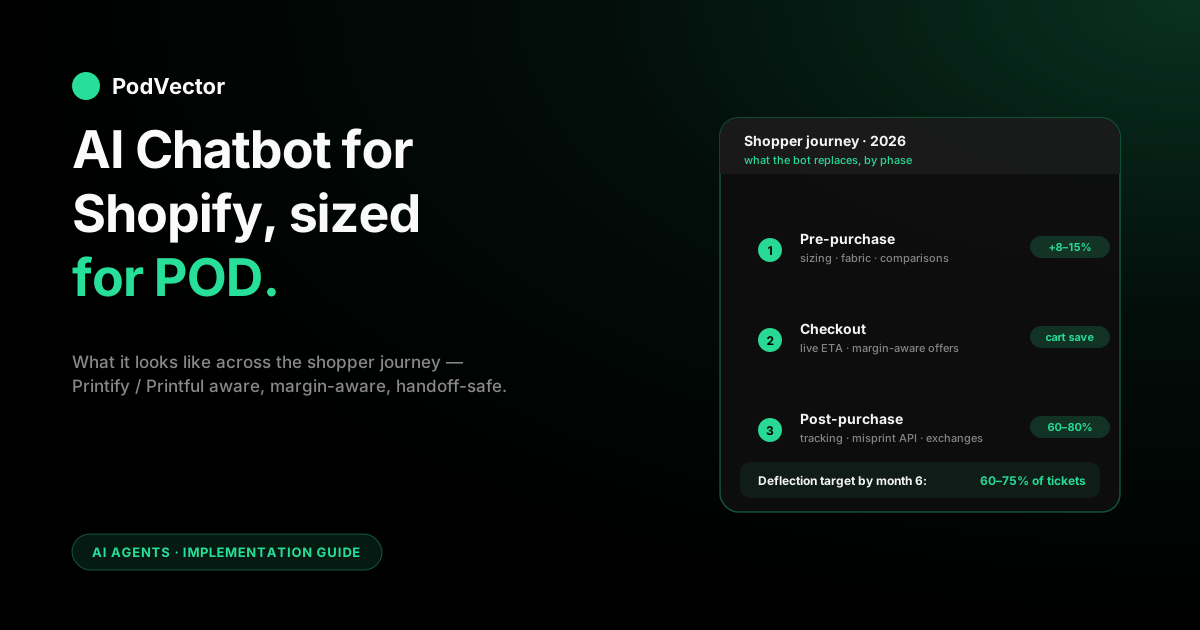
A useful way to think about the bot is as a single conversational thread that follows a shopper across three phases of their relationship with your store. In a mature POD deployment, each phase has its own dominant use case and its own success metric.
Pre-purchase (discovery and consideration)
The shopper landed on a product page from Instagram or a Meta ad. They have sizing questions, comparison questions, fabric and fit questions. The bot's job here is to answer in enough detail that the shopper buys without leaving the page. The metric is conversion rate on sessions that opened the widget versus sessions that didn't, over a meaningful window.
What fails this phase: bots that default to asking for an email before answering, bots that answer "check our size chart" without ever pulling the chart, and bots that route pre-purchase questions to a human queue instead of resolving them. All of these kill the conversation at exactly the moment conversion was closest.
Checkout (friction reduction)
The shopper has items in the cart but hasn't paid. They're re-reading the shipping page, the return page, the trust badges. The bot's job here is concrete: answer the specific objection — usually shipping time, cost, or returns policy — and close the sale. For POD, the answer is not the generic shipping page; it's the actual production-plus-shipping ETA for the exact items in the cart, computed from live Printify or Printful data. A bot that doesn't read supplier data during checkout is half-useful; one that does converts hesitating carts far more reliably than a static FAQ page.
Post-purchase (support and retention)
Ticket volume in a POD store concentrates heavily in the first two weeks after order: "when will it ship," "where is it," "it arrived damaged." The bot's job is to resolve the routine majority without a human, escalate the harder cases with full conversation context, and never lie about shipping dates. Done right, post-purchase chatbot handling is the highest-leverage part of the install — it's the biggest time drain a human was handling and the one a bot genuinely replaces rather than augments.
Worth the detour: the customer chatbot does not cover the merchant's own questions about the business. That's a different category, covered in AI analytics for print-on-demand and specifically in our conversational AI agents for ecommerce write-up. The two coexist; neither replaces the other.
POD-specific edges generic guides miss
If you read five generic Shopify chatbot articles back to back, you'll notice they all cover the same ground: tools list, benefits, how-to-pick. None of them touch the POD-specific edges that decide whether the bot works for your store. Five that matter.
Production time is not shipping time
Printify and Printful both run production separately from carrier shipping. A "7–10 day delivery" promise on your storefront is actually "production days plus transit days" and those numbers vary by supplier, by region, and by day of the week. As our AI chatbots Shopify integration guide notes, "the bot quotes shipping windows from Shopify's storefront settings instead of the real Printify/Printful production lead time, and shoppers get mad when their package arrives later than promised." Fix this by wiring the supplier API or metafield sync before you open the bot to production traffic.
Variant-level metadata is mandatory
Not optional. POD catalogs mix bases on a single product (a white Bella+Canvas tee and a black Gildan tee under the same listing). The size chart differs. The fabric weight differs. The production time differs. A chatbot installed against Shopify's product object without variant-level metafields cannot answer correctly. During setup, insist that the vendor walks you through how metafields flow from Printify or Printful into Shopify and then into the bot's retrieval layer.
Misprints are API-fileable
Printify and Printful both accept misprint claims via API. A chatbot that has the right integration can file the claim, issue the replacement, and email the customer — no human, no support ticket, no operator time. This is the single biggest ROI line item for a mid-market POD store. Losing it because your chatbot integrates Shopify but not the supplier defeats half the point.
Margin-aware discounts or no discounts
Said above, worth repeating. The bot's cart-recovery flow must enforce a discount ceiling per SKU or per collection. No exceptions. A bot that offers "generous" discounts to close sales is a bot actively draining your profit. The good news: every app in the mid-tier and above supports this rule — you just have to configure it during setup, and most operators skip this step.
Handoff context or you've wasted the install
When the bot escalates — a meaningful share of tickets, even in a good deployment — the human needs the full conversation. A handoff that drops the customer into a generic "how can I help you?" without transcript is worse than no bot at all. It's a trust violation. Apps worth buying route the escalation into Gorgias, Re:amaze, Front, Zendesk, or a shared inbox with the complete thread attached. Verify this during the demo. It's the easiest thing to half-implement and the hardest thing to notice is missing until CSAT collapses.
The tool stack that works for POD on Shopify
There's no single right answer — store size and ticket volume decide the stack. Four stages cover most POD operators.
Stage 1: Early-stage stores
Install Shopify Inbox and enable Shopify Magic. That's it. Free, native, integrated, covers FAQ-style pre-purchase questions and order-status lookups. The hard ceiling is Printify and Printful awareness (none) and misprint workflow (none). You'll feel that ceiling when your ticket queue starts to outrun you. Until then, installing a paid app is overkill.
Stage 2: Growing stores with a real ticket queue
Add Tidio with the Lyro AI tier or Chatty AI for multi-channel. According to our best AI chatbots for Shopify 2026 comparison, Tidio's free tier is genuinely usable with paid tiers starting at $29/month. This is where Printify/Printful metafield wiring starts to matter — both apps can read supplier data if you configure the metafields correctly, but neither does it automatically out of the box. Budget two weeks of operator time for the setup.
Stage 3: Established stores with dedicated support volume
Two-chatbot architecture. Gorgias AI Agent for post-purchase tickets and Tidio or SmartBot for the storefront widget. According to our best AI chatbots for Shopify 2026 roundup, Gorgias helpdesk starts at $10/month with automation add-ons priced per resolution, and earns its keep on a POD store because its misprint-workflow automations are among the strongest on the market. Most POD operators at this scale run both. For a deeper comparison across the ecommerce chatbot category, our best AI chatbots for ecommerce roundup covers the adjacent decision.
Stage 4: High-volume stores
Enterprise Gorgias or equivalent, plus a custom LLM fine-tune on your ticket history, plus tight integration to your reviews and ERP systems. At this scale, most operators also invest in custom conversational flows built by a dedicated ops person or agency, and the chatbot stops being an off-the-shelf product and starts being infrastructure.
For the shortlist ranked specifically for POD, rather than general Shopify, our best AI chatbot for Shopify store comparison goes vendor-by-vendor with POD-specific criteria weighted.
Setup timeline and what to test
Every failed chatbot install we've seen started with a rushed setup. Here's the realistic timeline and the tests to run before you flip the widget on production.
- Week 1 — catalog cleanup. The bot reads your product titles, descriptions, variant names, metafields, and policy pages. Broken or inconsistent data becomes broken or inconsistent answers. Spend a day standardizing, especially around variant names and size chart metafields per base.
- Week 1 — app install and API scopes. Connect the app to Shopify. Scopes: read on products, orders, customers, inventory, discounts; write on draft orders if you want cart recovery. Nothing wider, nothing narrower.
- Week 2 — Printify or Printful wiring. Production time per variant, claim-submission endpoint, supplier metadata flows into product metafields. If the app doesn't natively support your supplier, pause and change apps.
- Week 2 — policies as source documents. Returns, exchanges, misprints, shipping windows, discount rules. Load as plain text. The bot's grounding depends on these being current and consistent with each other.
- Week 2 — margin-aware discount ceilings. Per-SKU or per-collection. This is the single step that stops the bot from draining your profit. For the upstream economics, see our guide to break-even ROAS in POD.
- Week 3 — staging dry run. Shopify's development-store feature is built for this. Run realistic conversations covering: pre-purchase sizing, product comparison, order status, misprint claim, sizing exchange, refund request, shipping ETA. Grade each response on accuracy, not tone.
- Week 3 — handoff test. Deliberately trigger an escalation. Confirm the human agent receives the full conversation in whatever helpdesk you use. Fix if not.
- Week 4 — production launch with monitoring. Flip the widget live with CSAT tracking enabled. Read the transcripts daily for the first two weeks. Tune prompts and retrieval against what you see.
Four weeks is the realistic number for a POD catalog with Printify or Printful wiring and margin-aware cart recovery. Vendors will tell you it's "an afternoon." Believe the four weeks.
What the chatbot can't do — and what does that job
The storefront chatbot is a shopper tool. It is optimized for shopper conversations. If you ask it your own business questions — "which Printify SKUs lost money last week after ads and fulfillment" — you'll get polite nonsense. That's not a bug in any specific app; it's the category. Customer chatbots sit on one side of the store; AI employee agents sit on the other.
As our AI chatbot platform for ecommerce guide puts it, "the chatbot can't, because that's not its job, and the data it sees is customer-facing inventory, not internal unit economics." An AI employee reads your Shopify orders, your Printify or Printful product costs, and your Meta and Google Ads spend. It puts all of that together and tells you the real profit on each order, in plain English. Shopify Sidekick is the native entry in this category.
PodVector AI's Victor is purpose-built for POD sellers: he reads Shopify, Meta Ads, Google Ads, Printify, Printful, and Klaviyo — reconciling itemized supplier costs (the print charge, the shipping charge, the base cost, per SKU per order) live against ad spend, queryable in plain English from a chat interface. Beyond reading, Victor can also execute approved Shopify-side changes: reprice worst-margin SKUs, bulk-update product prices, create discount and free-shipping offers, manage collections, and adjust shipping settings. He does not talk to your shoppers. He talks to you about your business.
Most serious POD operators end up with both: a customer chatbot on the storefront handling shoppers, and an AI employee agent in the back office handling the weekly "what happened" review. Neither replaces the other. For the operator side, our complete guide to AI analytics for print-on-demand covers the category end to end, and the agentic AI for ecommerce piece covers where both are heading.
Metrics that prove it's working
Vendors publish case studies with dramatic conversion lifts and near-perfect deflection rates. These are their front page. Your store's real numbers will be lower and more honest. Five metrics worth tracking carefully, in priority order.
- Conversion lift on bot-engaged sessions. Compare sessions that opened the widget against sessions that didn't, controlling for traffic source. A real install produces a measurable lift within the first 60 days. Under any lift at all means the pre-purchase flow is weak.
- Ticket deflection rate. Percent of inbound tickets resolved without human escalation. Target the majority by the six-month mark. Low deflection rates almost always happen because the bot isn't properly connected to your Printify or Printful product costs.
- AOV lift on engaged sessions. Product-recommendation engines should lift average order value noticeably. Below expectation means the bot isn't reading margin or catalog metadata correctly.
- Median resolution time. Sub-30 seconds for routine questions (order status, sizing, shipping ETA). Humans take minutes. The gap is the operating leverage.
- Post-conversation CSAT. One-tap rating. Below 4.0/5.0 means the bot is frustrating people even when it technically deflects, and you'll feel it in retention.
What not to optimize for: total conversation count. A bot that's chatty without resolving drives the number up and does nothing for your P&L. Resolution rate × CSAT is the real signal.
FAQs
Does Shopify have an AI chatbot built into every store?
Yes. Shopify Inbox is the messaging app and Shopify Magic is the AI layer that grounds answers in your store content. Free, installed by default, covers FAQ-style questions and order-status lookups. Hard ceiling: no Printify or Printful awareness, no misprint workflow. Good enough for early-stage stores before ticket volume becomes a bottleneck.
How is a Shopify ecommerce store chatbot different from a generic website chatbot?
Integration depth. A generic website chatbot reads the text on your pages and a FAQ document. A Shopify-native chatbot reads the Shopify Admin API — product data, order data, customer data, inventory, discounts — and can act on that data. The ceiling between generic and Shopify-native is the difference between "read your FAQ" and "look up order 10234 and tell the shopper where it is." For a POD store, the gap is even wider once you wire Printify or Printful in.
Will an AI chatbot work with Printify and Printful out of the box?
Sometimes. Gorgias, Tidio, and Chatty all have Printify and Printful integrations, but the depth varies. Gorgias reads production status and can automate misprint claims. Tidio reads product metafields if you wire them. Shopify Inbox does neither. Always demand a live demo against your actual supplier data, not a canned one. For more on how Printify connects to the broader Shopify ecosystem, see our Printify vs Shopify explainer.
How much does an AI chatbot for a Shopify ecommerce store cost in 2026?
Free on the native path (Inbox + Magic). According to our best AI chatbots for Shopify 2026 comparison, Tidio's free tier is genuinely usable with paid starting at $29/month, and Gorgias helpdesk starts at $10/month with automation add-ons per resolution. Enterprise custom builds run significantly higher. Resolved-by-AI tickets are often metered separately on the mid-tier apps, so model unit economics before signing.
How long does it take to deploy an AI chatbot on a Shopify POD store?
Shopify Inbox with Magic: under an hour. A paid app on default settings: one to two weeks. Full tuning for a POD catalog with Printify or Printful integration, margin-aware discount ceilings, and misprint workflows: four to six weeks. Custom-built from scratch: significantly longer, and usually not worth it versus buying.
Can an AI chatbot handle sizing exchanges for POD products?
Yes, if wired correctly. POD exchanges are actually a refund plus a new print order (there's no stock to pull from), so the bot needs to execute two transactions through the Shopify API. Gorgias and Tidio both handle this if you configure the flow. Shopify Inbox does not. For more on how Printify handles the fulfillment side of these workflows, see our Printify getting started guide.
Do I still need a human support team with an AI chatbot installed?
Yes, smaller. The bot deflects the majority of routine tickets. The remaining cases — escalated complaints, VIP customers, edge cases — still need a human. Teams that try to fully replace humans usually see CSAT drop within 90 days, which then shows up in retention.
Can the chatbot answer international shoppers in their own language?
The modern AI tier does this natively — Tidio, Gorgias, and the other LLM-backed apps detect the shopper's language and reply in it, with a wide range of languages now standard on the mid-tier and above. For a POD store selling into the EU, UK, and Australia off the same catalog, that's not a nice-to-have. The catch is the same one that runs through this whole guide: the bot translates fluently but still answers from whatever data you wired in, so a localized reply with the wrong supplier ETA is just a wrong answer in French. Get the Printify or Printful layer right first, then turn on multilingual.
Is an AI chatbot on Shopify GDPR and EU AI Act compliant?
It depends on the app, and it's now a real evaluation criterion rather than fine print. Reputable apps carry Shopify's "Built for Shopify" certification, document their data handling for GDPR, and are adjusting to the EU AI Act's transparency rules (shoppers must be told they're talking to a bot, not a human). If you sell into the EU — and most POD stores do — confirm the vendor's compliance posture during the demo and make sure the widget discloses it's AI. Don't assume; it varies widely across the App Store long tail.
Does a Shopify chatbot replace the need for an AI employee agent?
No. Different tools solve different problems. A customer chatbot talks to your shoppers. An AI employee agent talks to you about your business — "which Printify SKUs lost money last week after ads" — from live data. Shopify Sidekick is Shopify's native attempt at the AI employee category. Victor is purpose-built for POD operators, reading live Printify and Printful cost data alongside Shopify orders, Meta Ads, Google Ads, and Klaviyo — and executing approved Shopify-side changes like repricing, discounts, and collection management. The two tools are complements, not substitutes.
How does advertising performance connect to chatbot ROI?
More than most operators realize. If your Meta or Google ads drive traffic that converts poorly because the chatbot can't answer sizing or shipping questions, your effective cost-per-acquisition climbs invisibly. A well-configured chatbot closes the loop that paid traffic opens. For a deeper look at how POD sellers should think about ad channel economics, see our comparison of Google Ads vs Facebook Ads for POD sellers and our guide on which ad channel is most effective for POD.
The storefront bot talks to your shoppers. Victor talks to you.
An AI chatbot on your Shopify ecommerce store handles customer conversations. Victor handles the questions you ask about your own business — "which Printify SKUs lost money last week after ads?" — reading live data across Shopify, Meta Ads, Google Ads, Printify, Printful, and Klaviyo, and executing the Shopify-side changes that protect your margin, with your approval. Purpose-built for POD sellers.
Try Victor free