
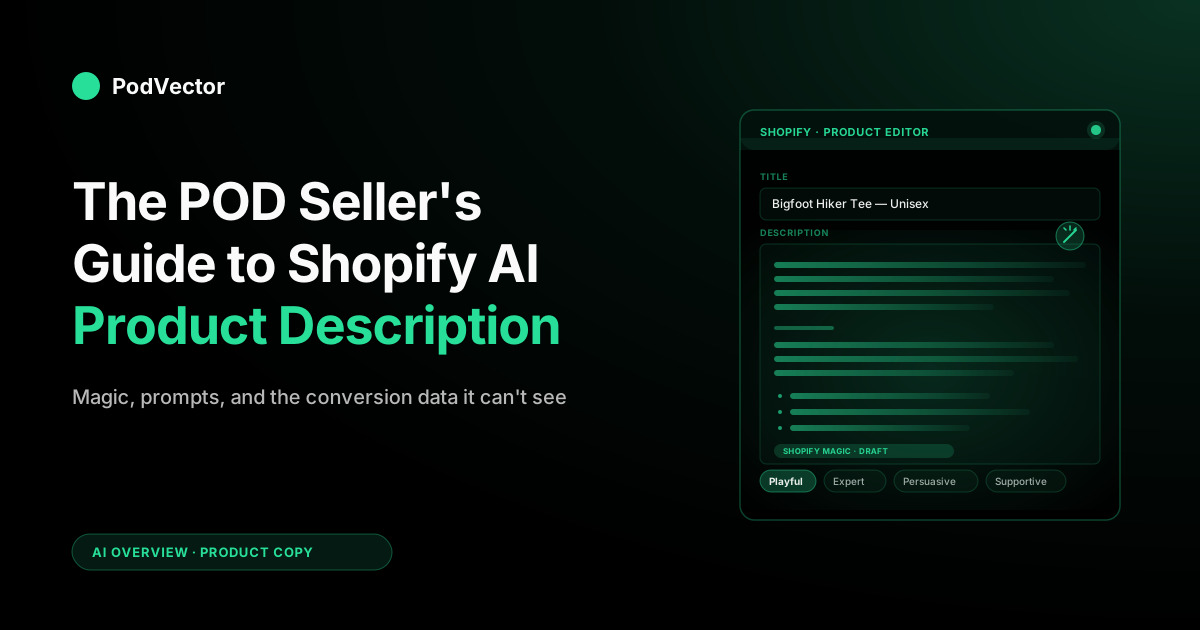
Quick Answer: Shopify's native AI product description tool — Shopify Magic — is free on every paid plan, lives inside your product editor, and writes a solid first draft in seconds. For most listings it's good enough out of the box.
Where it falls short for print-on-demand is variant scale (one design across 30+ SKUs sounding identical), audience-specific phrasing (the same Bigfoot mug needs different copy for hikers vs. dad-gift buyers), and the missing feedback loop (Magic never tells you which descriptions drove sales).
This guide covers how to get the most from Shopify Magic, when to layer in third-party apps, and the POD-specific prompts that move conversion above the generic-template floor.
What "Shopify AI product description" actually means
When people search "shopify ai product description," they usually mean one of three things:
- Shopify Magic — the native, free AI writer baked into the product editor in your Shopify admin. Click the magic-wand icon next to the description box, give it a few keywords and a tone, and it produces a draft in seconds.
- Third-party Shopify App Store apps that wrap GPT-class models with bulk generation, brand voice training, SEO controls, and Shopify-native publishing. Names like Describely, Hypotenuse AI, Bestir, and ChatGPT-AI Product Description fall here.
- External AI tools like ChatGPT or other general-purpose chatbots used in a separate browser tab, with descriptions copy-pasted back into Shopify by hand. Most POD sellers start here before discovering the in-admin options.
For a print-on-demand catalog — where one t-shirt design might exist as 6 colors × 5 sizes × 3 fits = 90 SKU variants on Printify alone — the choice between these matters more than it does for a typical brand. Generating one good description is easy. Generating 500 different-but-coherent descriptions across a catalog of design-driven products is where the tools separate.
How Shopify Magic generates a product description
Shopify Magic is built into every paid Shopify plan. It's the closest thing to a default and the right starting point for most POD sellers because there's nothing to install, nothing to pay for, and it lives where you already work.
The basic flow:
- Open a product in your Shopify admin.
- Click the magic-wand icon to the left of the Description field.
- Type a few keywords describing the product — what it is, who it's for, key features, materials.
- Pick a tone: Expert (professional, scientific), Supportive (empathetic), Persuasive (emotional), Playful, Sophisticated, or Daring.
- Hit "Autowrite." Magic returns a 3–5 paragraph description with bullet points where appropriate.
- Edit, regenerate, or accept.
Behind the scenes, Magic uses Shopify's hosted LLMs trained specifically on commerce content. That's why its output already reads like a product page rather than like a generic ChatGPT response — it knows to lead with benefit, include specs, and end with a soft sell. It also knows your store's settings: language, currency, market.
What Magic produces is a perfectly readable, SEO-aware first draft. For POD sellers selling on margin and time, "readable first draft" is a real upgrade over staring at a blank description box for the 47th product of the day.
The catch is that the floor is the same floor every other Shopify Magic user gets. If your competitors are also using Magic with the same tone selector and the same keywords, your descriptions will sound like theirs.
The POD problem Shopify Magic doesn't solve out of the box
POD businesses look like ecommerce on the surface but are structurally different in three ways that matter for AI-generated copy.
1. Variant explosion
A non-POD store might have 50 products and write 50 descriptions. A POD store might have 50 designs that each spawn 30+ supplier variants — different products (tee, hoodie, mug, sticker), different colors, different fits.
If you let Magic generate independent descriptions for each variant, you get either 1,500 nearly-identical paragraphs (cannibalizing each other in search) or 1,500 inconsistent voices that confuse buyers shopping your catalog. Neither is great.
The right structural answer is one master description per design, with variant-aware sections appended for each product type — not 1,500 isolated Magic generations.
2. Audience overloading
The same POD design serves multiple buyer personas at once. A Bigfoot-themed coffee mug might be bought by hikers, conspiracy fans, dads getting Father's Day gifts, and roommates buying gag gifts.
A single Shopify Magic description optimized for "outdoor enthusiasts" leaves the other three audiences with copy that feels like it's not for them. The dad-gift buyer is statistically likely to convert at a higher rate, but Magic has no way of knowing that without you telling it — and Magic has no memory between products to tell it again next time.
3. Design context is invisible
Magic only knows what you tell it. It doesn't see your design file.
It doesn't know the color palette, the artistic style, the cultural reference, or the in-joke. A great POD description usually surfaces a small specific detail from the design — the texture of the brushwork, the year referenced in the tagline, the obscure band the lettering is parodying — that turns a generic listing into a "they get it" moment for the right buyer. Magic produces generic-but-correct copy because that's all it can produce from the inputs it gets.
None of these are fatal flaws — they're just the gap between "Shopify Magic is great" (true) and "Shopify Magic is enough for a serious POD store" (not without a workflow on top).
Step-by-step: writing a POD product description in Shopify Magic
Step 1 — Set up a master prompt template
Before you generate the first description, write yourself a 5–8 line prompt template that captures your brand voice, your audience, and your "always include" elements. You'll paste this template into the Magic keyword field for every product, customizing the design-specific parts. Example:
Print-on-demand [PRODUCT TYPE] featuring [DESIGN NAME], a [STYLE] design depicting [SUBJECT]. Audience: [PRIMARY] who [BEHAVIOR]; secondary: [GIFT-GIVER PERSONA]. Always mention: ethically printed on demand, ships in 3–5 business days, [MATERIAL], [FIT NOTE]. Avoid: generic phrases like "perfect gift" or "high quality." Voice: [TONE].
Pasting a structured prompt yields a structured output. The 30 seconds you spend filling in the brackets per product more than pays for itself in description quality.
Step 2 — Generate the design-level description first
Pick the most-likely-to-sell variant of a design — usually the unisex tee in a popular color — and have Magic generate the description for that product. This becomes your "master" copy.
Step 3 — Adapt for variants
For each additional product type that uses the same design (mug, hoodie, sticker), open the variant product, paste the master description into the keyword field with a one-line modifier: Adapt for [PRODUCT TYPE]; keep the design intro paragraph identical, swap product-specific details (material, sizing, use case). Magic will preserve the brand voice and design framing while updating the practical details.
Step 4 — Layer in SEO keywords without keyword-stuffing
Open Shopify's SEO field for the product and let Magic write a meta description (it has a separate generator for that). Keep your in-body keywords natural. Search engines penalize the same phrase repeated across hundreds of variant pages — better to vary phrasing than to stuff.
Step 5 — Spot-check, edit, ship
Don't accept Magic output blind. Read every description before publishing.
Most need 30 seconds of editing — tightening a paragraph, fixing a phrase that doesn't sound like you, adding the design-specific detail Magic couldn't have known. The 80/20 is: Magic does 80% of the writing, you do 20% of the polishing on the products that matter.
POD-specific prompts that beat the generic Magic output
The default Magic output is fine. These prompt patterns make it better for POD specifically.
The "for the buyer who" pattern
Instead of writing "Great for outdoor enthusiasts," prompt Magic with: Write the second paragraph from the perspective of a [SPECIFIC BUYER PERSONA] who would notice [SPECIFIC DETAIL]. This forces Magic to drop generic adjectives and write to a real reader.
The "design story" prompt
POD sellers underuse design stories. Add a line like: Open the description with a 1-sentence story about the design — what inspired it, the cultural reference, or the in-joke for the audience. Magic will generate a story even if you don't supply one. Edit it to match your actual design narrative; the structure is what you want.
The "fit and fabric honesty" prompt
Buyers returning POD apparel because of fit issues is a margin killer. Have Magic include: Add a "Fit & Fabric" section listing the supplier (Printify/Printful/Gelato), the actual blank brand (Bella+Canvas, Gildan, etc.), the material composition, and a fit note (true to size / runs small / unisex cut). This is hard to fake and easy for Magic to template once it knows your supplier mapping.
The "POD-aware shipping" prompt
Don't let Magic write "ships in 1–2 business days" — that's not how POD works. Always include a line like: This is print-on-demand; each item is made-to-order, so production takes 3–5 business days before shipping. State this clearly without apologizing for it.
Buyers who understand POD don't mind the wait. The worst conversions come from buyers who weren't told and got surprised.
Third-party Shopify AI description apps worth knowing
Shopify Magic is the right starting point. Once you outgrow it, the third-party AI description app market is crowded but a few categories are worth knowing.
- Bulk generators (Describely, Bestir, ChatGPT AI Product Description). Their main value is generating descriptions for hundreds of products in one job, with shared brand voice and SEO settings. Useful if you're migrating an existing catalog or doing a quarterly catalog refresh.
- Brand-voice trainers (Hypotenuse AI, Copysmith). These let you upload examples of your existing copy and train the AI to match your voice. Worth it if you have a strong, distinctive brand voice that Magic's tone selector can't capture.
- SEO-first generators apps like SEO Booster + AI Writer that prioritize keyword targeting and schema markup. Useful if organic search is a major channel for you and you're competing in keyword-dense categories.
- POD-integrated. Almost no third-party Shopify description app is built specifically for POD. Most assume you're a brand with a small catalog. The closest fit is using a bulk generator with custom rules that bake in your POD constraints (variant logic, fulfillment timing, supplier callouts).
For a POD-specific overview of how AI tools fit together across the stack, see the complete guide to AI tools for POD sellers.
The analytics gap: which descriptions actually convert?
Here's the unspoken problem with every Shopify AI description tool — Magic, Describely, Hypotenuse, all of them. They generate copy. None of them tell you which copy worked.
You can A/B test descriptions manually. You can run Shopify Analytics and look at conversion rate by product. You can correlate that to which products had Magic-generated descriptions vs. hand-written ones. But none of this is automated, and for a POD store with hundreds of products, it's a research project nobody runs.
The practical shortcut is to track three things at the product level:
- Conversion rate — sessions that ended in a purchase, per product page.
- Add-to-cart rate — earlier signal, useful for catching descriptions that intrigue but don't close.
- Return rate — descriptions that overpromise drive returns; for POD, returns eat margin twice (you pay for the print, you pay for the refund).
Shopify's native analytics gives you the first two. Connecting them to your supplier costs (Printify per-item cost, Printful per-item cost) is the part Shopify doesn't do natively. That's the gap an analytics layer like AI analytics for print-on-demand closes — pulling Shopify, Printify, Printful, and ad spend into one place so you can ask "which descriptions are driving profitable sales?" and get a real answer.
It's also why we built Victor — an AI employee that works across your live POD data and acts on it. Victor flags which descriptions are underperforming, drafts replacements in your voice, and queues them for your approval before anything goes live — closing the write → measure → rewrite loop that Magic alone can't.
Mistakes to avoid
- Generating descriptions blindly across your whole catalog. Magic is fast enough to do 500 products in an afternoon. Resist. Spot-check the first 10, refine your prompt template, then scale. Bad templates × 500 products = 500 listings to fix later.
- Using the same tone for every product. A vintage rock-band tee should not have the same voice as a minimalist wedding gift mug. Pick tone per design family, not per store.
- Skipping the "fit and fabric" honesty section. Returns are the silent killer of POD margins. A clear fit note in the description prevents more returns than a great refund policy ever will.
- Letting Magic invent product details. AI hallucinations on product pages = legal exposure (false advertising) and customer service nightmares. Always verify material, fit, dimensions before publishing.
- Ignoring the conversion data. Generated descriptions without a feedback loop is a content treadmill. Track which products convert, tighten the prompt, regenerate the bottom 20%, repeat.
- Treating descriptions as a one-time job. POD catalogs evolve — new audiences discover old designs, ad copy reveals new angles. Refresh descriptions on the products that matter at least quarterly.
FAQs
Is Shopify Magic free?
Yes. Shopify Magic is included free on every paid Shopify plan, including the Starter plan. There's no per-generation cost, no monthly fee on top of your Shopify subscription. The only practical limit is rate-limiting if you try to generate hundreds of descriptions in rapid succession.
Will Google penalize AI-generated product descriptions?
Not for being AI-generated. Google's policy as of 2026 is that AI content is fine as long as it's helpful, accurate, and not spam. The penalties hit when descriptions are nearly-duplicate across products, keyword-stuffed, or factually wrong. Magic-generated descriptions, edited and varied, are firmly in the safe zone.
Can Shopify Magic write descriptions in languages other than English?
Yes. Magic supports core Shopify languages including Spanish, French, German, Italian, Portuguese, Dutch, Japanese, Chinese, and several more. Set your store's language preference and Magic will generate in that language by default.
How does Shopify Magic compare to ChatGPT for product descriptions?
Magic is purpose-built for commerce and ships inside the admin, so the workflow is faster — no copy-pasting between tabs, no losing context. ChatGPT is more flexible and lets you have a back-and-forth conversation to refine output.
For volume Shopify work, Magic wins on workflow. For one-off or unusually positioned products, a general-purpose chatbot gives you more control.
Can I bulk-generate descriptions for an entire Shopify catalog at once?
Not natively in Shopify Magic — it generates one product at a time. For bulk generation, look at third-party apps like Describely, Bestir, or ChatGPT AI Product Description, all of which offer bulk modes that loop through products with shared settings.
Will AI-generated descriptions convert as well as hand-written ones?
Generally, yes for the bulk of your catalog; usually no for your top 5–10 products. AI gives you a strong floor — readable, on-brand, SEO-aware copy that beats a blank description box. Your top sellers and your ad-targeted products still benefit from human polish, founder-voiced story blocks, and customer-quote insertions that AI can't generate from cold inputs.
Does Shopify Magic see my Printify or Printful supplier costs?
No. Shopify Magic only sees what's in your Shopify admin — title, description, tags, type, vendor. It has no visibility into supplier costs, margins, or fulfillment SLAs. That's why a separate analytics layer matters for understanding which descriptions are actually driving profitable sales for your POD business.
What's the best tone setting in Shopify Magic for POD products?
Depends on your design and audience. For most POD apparel and gifts, "Persuasive" or "Playful" outperforms "Expert" — you're selling emotion and identity, not technical specs. For functional POD products (notebooks, mousepads, water bottles), "Supportive" or "Sophisticated" tend to work better. Test both for your top sellers and let the conversion data decide.
For the broader picture of where Shopify AI fits across content, analytics, and customer service, our guide to Shopify AI for POD sellers walks through the full Magic + Sidekick + analytics stack. For more reading, Shopify's own launch announcement for AI-generated product descriptions covers the official feature scope.
Browse more in the AI Overview cluster or explore the AI Analytics topic for deeper dives on how AI fits into the rest of your POD operation.
Let Victor rewrite the descriptions that are costing you sales
Shopify Magic writes the first draft. Victor goes further: an AI employee that works across your live Shopify, Printify, and Printful data, spots the listings that aren't converting, and drafts better copy in your voice.
Every rewrite waits for your approval before it goes live. And find the listings worth rewriting first.
Try Victor free