
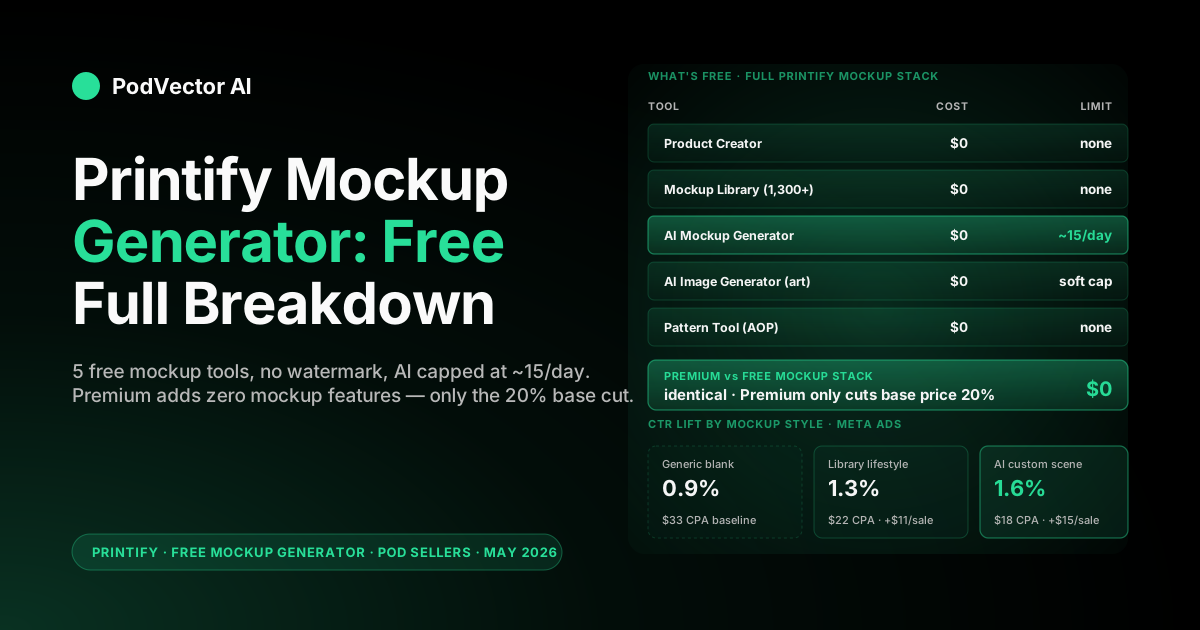
Quick Answer: The Printify Mockup Generator is $0. The full mockup stack — Product Creator, Mockup Library, Pattern Tool, AI Image Generator, and the AI mockup scene generator — is included free on every Printify plan, including the Free tier.
The only friction is the AI mockup scene generator, which is rate-limited to roughly 15 AI-generated mockups per day. Everything else — flat lays, lifestyle scenes from the curated library, color and angle variants — is unlimited.
The breakdown below is the operator math: what’s actually free, where the free workflow breaks down at scale, which mockup style converts best in Meta and Google ads, and the per-listing cost of skipping good mockups.
What you actually get for $0 on the free Printify mockup stack
Printify ships five mockup-related tools, and every one of them is free on the Free plan. No watermarks, no download caps, no daily limits except where flagged below.
Here’s the full stack:
| Tool | Cost on Free plan | What it does |
|---|---|---|
| Product Creator | $0 | Upload a design, place it on any Printify blank, preview the printed result, download mockup images. |
| Mockup Library | $0 | 1,300+ pre-built lifestyle and flat-lay scenes. Swap your design in; download in seconds. |
| AI Mockup Generator | $0, ~15/day | Describe a scene (“sunlit Brooklyn coffee shop, oak table”) and the AI renders your product in it. |
| AI Image Generator | $0 | Generates design artwork (not mockups) from text prompts. Useful when you need a quick variant. |
| Pattern Tool | $0 | Builds all-over print patterns from a single design asset. Mostly relevant for AOP apparel. |
For the full Printify cost picture — subscriptions, base prices, transaction fees — the Printify features and pricing breakdown covers what does and doesn’t cost money on the platform.
The headline: mockups are not a paywalled feature. They’re the lure that gets you to list products and pay for blanks. If you’re paying anything extra for mockups today, you’re paying for convenience, not capability.
The AI mockup generator: free, but rate-limited
The AI mockup generator is the one tool with a soft cap. Printify rate-limits AI scene generations to roughly 15 per day per account. That cap is documented in product help articles and confirmed by the visible counter inside the generator UI.
15 a day sounds like a lot until you actually use it. Each AI scene takes 2–4 generations to land — one to test the prompt, one to dial in lighting, one to fix the product placement. That’s 4–5 finished scenes per day, not 15.
If you’re launching a new t-shirt drop with 10 designs and want 3 AI mockup angles each, that’s 30 finished mockups across 90–120 prompt attempts. At 15/day, you’re looking at 6–8 days of staggered generation work.
The library-driven flow (1,300+ pre-built scenes) has no cap. Most sellers ship 90% of their listings from the library and reserve AI scenes for hero shots and ad creative.
Does Printify Premium change the mockup stack? No.
This is the most common confusion. Printify Premium ($24.99/mo or $29 monthly billing) discounts the base price of every product by 20%. It does not unlock new mockup features, raise the AI mockup limit, or add templates.
A Free-plan seller and a Premium seller working in the same Printify dashboard see identical mockup tooling. The library is the same. The AI generator runs at the same daily cap. Watermark behavior is the same (there are none).
If you stack Printify with a discount lever — either by upgrading or by applying a code — nothing on the mockup side changes. The Printify discount codes breakdown and the Printify discount full breakdown walk through which subscription-and-promo combinations actually move dollar costs.
So the answer to “do I need to upgrade to get better mockups?” is no. Upgrade for the 20% base-price cut once your monthly volume justifies the subscription. Don’t upgrade chasing a mockup feature that doesn’t exist.
Why mockup quality is a margin lever, not a design choice
Free mockups are free. Bad mockups are not.
The single largest determinant of conversion rate on a print-on-demand product page is the hero image. Industry data on POD listing performance puts the gap between a generic flat-lay and a context-rich lifestyle mockup at 20–50% conversion lift, depending on category and traffic source.
Put that in operator math. Say you’re running Meta ads to a Bella+Canvas 3001 listing at $0.70 cost per click, with a 2.5% conversion rate. A 30% conversion lift moves you to 3.25% — and your cost per acquisition drops from $28 to $21.50. That’s $6.50 in saved ad spend per sale, on every sale, forever.
Now flip it. You’re running the same campaign with the default Printify product photo — the generic blank against a white background. That’s the version that loses the auction to a competitor running a custom lifestyle mockup. Same product. Different cost per acquisition. Different margin.
The free mockup tool is genuinely free. Skipping it — or treating it as a checkbox — is the expensive part.
Flat lay vs lifestyle: which to use where
The Printify mockup library gives you both. Different placements need different styles.
| Placement | Best mockup style | Why |
|---|---|---|
| Hero image (listing) | Lifestyle / on-model | Buyer needs to picture themselves wearing it. Context sells the product. |
| Secondary images | Flat lay + detail crop | Buyer wants to verify the print quality and the design itself. Flat lay shows the artwork clean. |
| Color variant grid | Flat lay, same angle | Comparison requires identical framing. Lifestyle variations confuse the eye. |
| Meta / Google ad creative | AI lifestyle scene | Custom context fights ad blindness. Generic mockups read as drop-ship. |
| Etsy thumbnail | Flat lay with negative space | Etsy crops to square. Lifestyle gets chopped; flat lay survives the crop. |
The standard mistake is using the same mockup style everywhere. Lifestyle photos look great as listing heroes and terrible as Etsy thumbnails. Flat lays read clean on Shopify and dead on Meta. Match the mockup to the surface it’s shown on.
The free-tier mockup workflow that actually ships
Here’s the workflow that runs cleanly on the free Printify plan and respects the AI rate limit:
1. Upload the design once. Use the Product Creator to place the design on the blank. Get scale and positioning right inside Product Creator before touching any mockup library.
2. Pull 6–8 library mockups per listing. Two lifestyle (hero candidates), three flat-lay (secondary and variant comparison), one detail crop, one folded-tee shot if available. All from the free library, no AI quota consumed.
3. Reserve AI mockups for ad creative. Don’t burn AI generations on listing images you can pull from the library. Use the AI generator for paid social creative where custom context matters and the library options feel generic.
4. Batch your AI generation days. If you’re launching a 10-product drop, plan 6–8 days of AI generation work upfront. 15/day caps you at ~4 finished scenes/day after prompt iteration.
5. Save and reuse winning scenes. Once a specific AI prompt produces a great scene, write it down. You can’t re-roll past generations from history, but you can re-use a working prompt template across products.
The whole workflow ships on $0/month in mockup costs. The only spend is your time and the Printify subscription (which is also $0 on Free plan).
Where the free Printify mockup tool breaks down
The free stack is good. It’s not magic. Here’s where it leaks:
1. Brand consistency at scale. The library is shared across millions of sellers. The exact mockup template you picked for your hero image is also being used by 50 competitors. There’s no way to fully customize lighting, background, or model styling within the free tool.
2. Specific demographic representation. The AI generator handles “sunlit kitchen” well. It’s less reliable when you need a specific age, ethnicity, or body type wearing the tee. Prompts work; consistency does not.
3. Multi-product compositions. Want a flat lay with a tee plus a mug plus a poster, all matching brand? Library doesn’t do that. AI doesn’t do it reliably. You’d need a third-party tool or your own photography.
4. Video / motion mockups. Static images only. If you’re running TikTok or Reels ads that need motion (tee folding, color shift, on-model rotation), Printify’s tools don’t cover it.
5. Embroidery and texture realism. The mockup renders are 2D-flat. Embroidery, puff print, glitter vinyl — the textured finishes — render as flat color in the mockup. Buyers see the actual texture only after delivery, which is a return-risk vector.
None of these are dealbreakers. They’re the limits that mean “free” isn’t infinite. For 80% of POD listings, the free stack is enough. For the top-of-funnel ad creative and the brand-defining hero shots, plan for a paid tool or actual photography.
Free Printify mockups vs Placeit, Smartmockups, others
Sellers regularly compare the free Printify stack to paid alternatives. Quick orientation:
| Tool | Cost | Where it wins vs Printify free |
|---|---|---|
| Printify mockup stack | Free | Native integration, unlimited library use, decent AI scene generator |
| Placeit | ~$14.95/mo | Video mockups, broader non-apparel scenes, more model diversity |
| Smartmockups | ~$14–19/mo (or Canva Pro bundle) | Faster bulk rendering, tight Canva integration, packaging mockups |
| Pacdora / Smart-Mockups DIY | Variable | Niche product types (packaging, posters, books) |
| Custom photography | $200–$2,000+ per shoot | Full brand control, hero-image differentiation, exclusive scenes |
The right answer for most sellers under $20k/mo revenue: stay free on Printify, supplement with one Canva Pro subscription if you’re already paying for Canva. The case for Placeit or Smartmockups gets stronger when you’re running paid traffic at scale and the lifestyle scenes you need don’t exist in the Printify library.
For the storefront side of the equation — getting these mockups onto Shopify or Etsy listings — the how to link Printify to Shopify step-by-step and the how to sell on Etsy using Printify step-by-step walk through the sync mechanics for each channel.
The real cost of skipping good mockups
The mockup generator is free. Bad listings are not.
Walk the math on a single Bella+Canvas 3001 listing running Meta ads:
| Line | Generic mockup | Library lifestyle mockup | AI custom scene |
|---|---|---|---|
| CTR (Meta) | 0.9% | 1.3% | 1.6% |
| Listing conversion | 2.1% | 2.7% | 3.1% |
| Effective CPA on $25 tee | $33 | $22 | $18 |
| Margin per sale (vs $33 CPA baseline) | $0 | +$11 | +$15 |
| Time to produce mockup | 0 min | ~10 min | ~25 min |
Those numbers are illustrative, not guaranteed. The point isn’t the specific percentages — it’s the order of magnitude. The difference between a default mockup and a context-rich one is the difference between scaling profitably and burning cash. The free tool ships both. Picking the lazy option is a recurring tax on every sale you make from that listing.
This is also the kind of leak that doesn’t announce itself. You don’t get a notification that says “your mockup is costing you $11/sale.” You just see ROAS that doesn’t scale, and you blame the algorithm. The actual cause is upstream of the ad account.
The way to catch this in practice: pull your top-10 listings by ad spend, compare them by mockup style, and look at CPA delta. The pattern is usually obvious within five minutes — the listings with custom lifestyle mockups outperform the default Printify product photo by 20–40% on CPA.
For the broader cost picture across the Printify catalog — not just mockups — the Printify costs and charges hub indexes the rest of the operator economics: base prices, shipping, subscriptions, and the line items most sellers miss. The Printify operator hub rolls up the full topic.
The full Printify product page is also worth a direct read for the official feature list: see the Printify Mockup Generator page for the catalog of supported product types.
FAQs
Is the Printify mockup generator really free?
Yes. Every Printify plan, including the Free tier, includes unlimited use of the Product Creator and Mockup Library. The AI mockup scene generator is also free, with a daily rate limit of about 15 generations.
Are there watermarks on free Printify mockups?
No. Mockups download watermark-free at all plan levels. The whole point of the tool is to drive product listings; Printify makes money on the blank, not on the mockup file.
What’s the AI mockup daily limit?
Roughly 15 AI-generated scenes per day per account. That works out to 4–5 finished mockups after prompt iteration. The non-AI library workflow has no daily cap.
Do I need Printify Premium for better mockups?
No. Premium discounts the base price of products by 20%. It does not unlock mockup features, raise the AI cap, or add templates. The mockup stack is identical on Free and Premium.
Can I use Printify mockups outside the Printify platform?
Yes. Download the rendered mockup images and use them on Shopify, Etsy, your own site, Meta ads, Google ads, or anywhere else. Printify doesn’t restrict the output files.
Does Printify mockup quality match Placeit or Smartmockups?
Close enough for 80% of use cases. Placeit and Smartmockups win on video mockups, packaging, and broader model diversity. For static apparel mockups, the free Printify library is competitive.
How do I download a Printify mockup?
From the Product Creator or Mockup Library, select the scene you want and click Download. Files come as PNG or JPEG at presentation resolution. Multiple mockups can be batch-downloaded after design upload.
Can the AI mockup generator put my product into any scene?
It handles most environments well: kitchens, cafes, outdoor settings, retail backdrops. It’s less reliable on very specific demographic combinations (age + ethnicity + setting) and on multi-product compositions.
Will mockups affect my Etsy or Shopify ranking?
Indirectly. Better mockups drive higher click-through and conversion, which both feed listing rank algorithms on Etsy and product page conversion rate on Shopify. Mockup quality is one of the strongest indirect levers for organic visibility.
Does Printify support video mockups?
No. The native tools generate static images only. For motion-based ad creative (TikTok, Reels), you’d need a third-party tool like Placeit or post-process the static mockups into video yourself.
Stop guessing which mockup is killing your ad ROAS
Mockup quality moves CPA by 20–40% on POD listings. Most sellers never connect the dots between a specific listing’s mockup and the ad account’s margin.
Victor is an AI employee for POD sellers that runs your Meta and Google ads, pulls Printify costs and Shopify orders into one live data warehouse, and answers questions like “which mockup style is winning on my top-10 listings?” in seconds. He executes ad reallocation and Shopify catalog updates with approval gates — you stay in control of every spend decision.
Try Victor free