
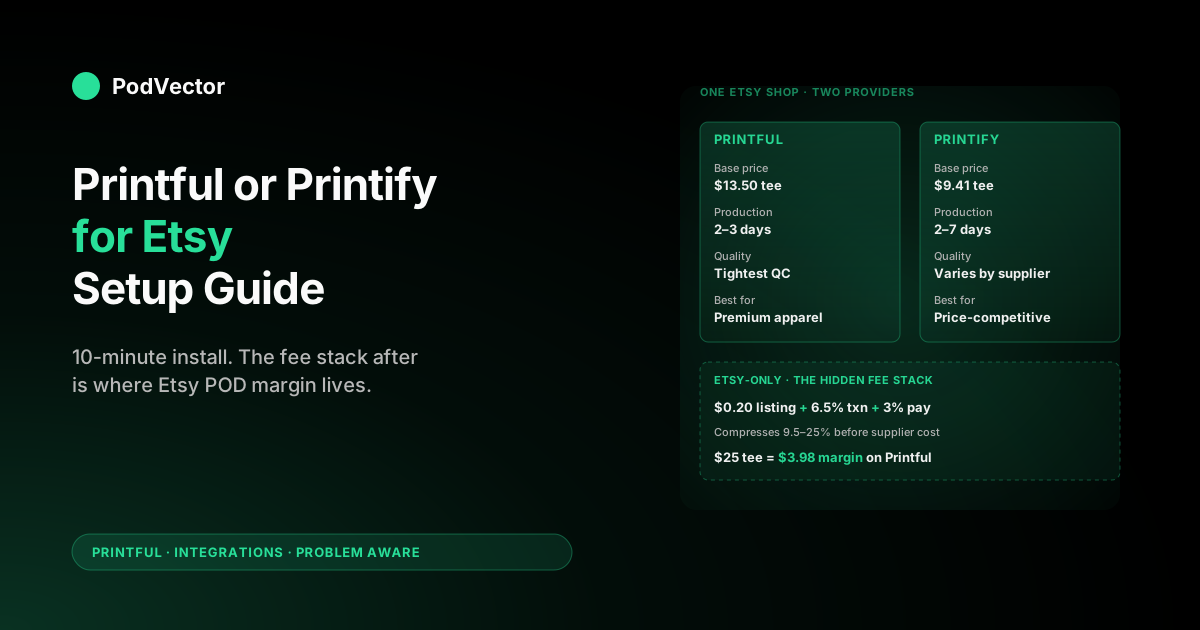
Quick Answer: For Etsy specifically, Printify wins on base cost and product breadth, while Printful wins on print quality, production speed, and branded packaging. Most Etsy POD shops should default to Printify for high-volume t-shirt and mug niches where price competition is brutal, and choose Printful for apparel-heavy stores where premium materials and 2–3 day production let you charge a margin Etsy buyers will actually pay for.
The setup itself takes 10–15 minutes either way. Open the Etsy integration inside the POD provider's dashboard, authorise the OAuth handshake with your Etsy shop, and the channel is connected. The work that decides whether your shop is profitable happens after — picking products, pricing against Etsy's fee stack, and tracking margin per SKU once orders start flowing.
The hidden cost neither provider tells you about: Etsy charges a 6.5% transaction fee, a 3% + $0.25 payment fee, and a $0.20 listing fee per item, on top of the POD supplier cost. A $25 t-shirt on Etsy with $12 supplier cost leaves you $8.30 of contribution margin before ad spend — not $13. Most shops blow up here by month three.
The Etsy-specific decision: which one and why
"Printful or Printify for Etsy" is two questions hiding in one search. The first is which provider you should integrate today. The second is which one survives Etsy's specific fee structure once you start scaling. Both matter, and the answer changes depending on what you sell.
Here's the short version, then the reasoning.
Choose Printify if:
- You sell in price-competitive niches — generic graphic t-shirts, mugs, tote bags, gift items — where the buyer is comparing against forty other listings.
- Your average order value sits below $30 and margin per unit matters more than print quality at the unit level.
- You want the widest product catalogue (1,300+ items) and the ability to switch suppliers within the same product type when one runs slow.
- You're building a high-SKU shop (200+ listings) and you need the lowest base cost across the catalogue.
Choose Printful if:
- You sell premium apparel — Bella+Canvas tees, fleece hoodies, embroidered hats — where buyers will pay a higher Etsy price for material and print quality they can see in photos.
- You compete on brand and reviews, not on price. Etsy's 5-star review system rewards consistency, and Printful's tighter quality control produces fewer review-killing print defects.
- Production speed matters: Printful averages 2–3 business days versus Printify's 2–7, which keeps you safely inside Etsy's stated processing-time window.
- You want branded packaging — printed pack-ins, custom labels on apparel — that Printful supports natively and Printify routes through specific suppliers only.
If you can't pick yet, the cost-stack section below has the actual math for two representative orders. Run your average SKU through it and the answer falls out.
Why the choice is different on Etsy than on Shopify
Most Printful-vs-Printify comparisons treat Etsy as just another sales channel. It isn't, and the differences materially change which provider wins.
Etsy's fee stack compresses margin before you start. A Shopify store pays the credit card processor (around 2.9% + $0.30) and the Shopify plan fee, and that's it. An Etsy listing pays the $0.20 listing fee, 6.5% transaction fee on the total sale (including shipping), 3% + $0.25 Etsy Payments processing, and roughly 12–15% if you use Etsy Ads. That's a 9.5–25% Etsy tax before you've paid the POD supplier.
That fee compression means the spread between Printful and Printify base prices — often $3–6 per unit — converts directly into either a margin you keep or a price advantage on Etsy's search results.
Etsy buyers are different from Shopify buyers. Etsy shoppers expect lower prices, higher uniqueness, and gift-friendly packaging. They're less brand-loyal and more price-sensitive on identical-looking products, which favours Printify's cost advantage on generic items. But they're also less tolerant of quality misses — a single 3-star review on a 50-review shop drops your conversion rate noticeably — which favours Printful's tighter quality control on premium apparel.
Etsy's processing-time policy adds operational risk. Etsy displays your processing time on every listing, and consistently shipping outside that window triggers a "Star Seller" demotion that cuts visibility in search. Printful's tighter production SLA reduces this risk; Printify's wider variance (depends on which supplier you've assigned) increases it.
Etsy's review system compounds wins and losses. A POD product with consistent 4.8+ reviews ranks higher, converts higher, and earns the Etsy badge. Printful's tighter quality control compounds slightly faster on this loop. The trade-off is that Printify lets you switch suppliers if a specific run produces bad units — Printful doesn't, because there's only one Printful.
For the broader cluster-level walkthrough on how Printful's integrations work across every channel — Etsy, Shopify, eBay, TikTok Shop — see the complete guide to Printful integrations for POD sellers.
Prerequisites: four checks before you connect anything
Skipping any of these makes the OAuth handshake fail mid-flow with errors that look like provider bugs but are account-state problems. Two minutes saves an hour of confused retries.
- Etsy shop in "Open" status. A draft shop, a shop on holiday mode, or a shop on Etsy's review hold list cannot complete the integration handshake. Open your shop fully, list at least one product manually (Etsy's auto-flow expects this), and confirm you can receive orders before you start.
- Verified Etsy Payments enabled. Both Printful and Printify charge your POD supplier cost to your saved payment method when an Etsy order lands. Without Etsy Payments live and verified, the order webhook arrives but the fulfillment trigger stalls. Etsy Payments verification takes 1–3 business days the first time.
- One billing method on your POD account. Add the card or PayPal you want to charge for supplier cost before you connect Etsy. Printful and Printify both auto-charge on order webhook; if no billing method exists, the order sits in "Awaiting payment" and Etsy starts its clock on your processing-time SLA.
- Decide your processing time before you list. Etsy asks you to commit to a processing-time window per listing. Set it conservatively (5–8 business days for Printify, 3–5 for Printful) on launch and tighten it once you have 30 orders of real production-time data. Loose-then-tight is recoverable; tight-then-loose triggers the Star Seller demotion.
One additional check specific to combined setups: if you plan to use Printful and Printify on the same Etsy shop, decide today which provider owns which listings before you start clicking. The "use both" section below has the full rationale.
Connect Printful to Etsy: step-by-step
Active time: 10 minutes. The integration is OAuth-based, so the work is mostly clicking through consent screens. Steps follow Printful's 2026 UI; the function hasn't changed in three years even when the labels have.
Step 1: Create your Printful account. Sign up at printful.com with a business email you'll keep. Skip the storefront wizard if it pushes one — you don't need a Printful storefront when you're selling on Etsy. Add the payment method you want charged for supplier cost before continuing.
Step 2: Open Stores. From the Printful dashboard, click "Stores" in the left navigation, then "Choose platform". Etsy appears in the marketplace section alongside eBay and Amazon. Pick Etsy.
Step 3: Authorise the connection. Printful redirects to Etsy's OAuth screen. Sign in with the Etsy account that owns the shop you want to connect — not a buyer-only account, not a team member. Etsy lists exactly which permissions Printful is requesting: read shop, read and create listings, read orders, manage shipping. Accept all of them. The integration won't function without listing-create and order-read.
Step 4: Pick your Etsy shop. If your Etsy account owns multiple shops, the OAuth flow shows them all in a dropdown. Pick the right one. There's no in-Printful "switch Etsy shop" button after the connection completes — switching means disconnecting and reconnecting, which loses your sync state.
Step 5: Set order acceptance. Inside the new Printful store settings, decide whether new Etsy orders auto-confirm to production or wait for manual review. Auto-confirm is correct once you trust your listings; manual review is the right default for the first 50 orders, because it catches design upload errors before they ship.
Step 6: Sync existing listings (optional). If you already have Etsy listings you want Printful to fulfil, the "Sync products" wizard pulls them in and lets you map each Etsy listing to a Printful product variant. You'll need to upload the design file again for each; Etsy stores mockups, not the print-ready source. Plan 5–10 minutes per existing listing for the sync.
Step 7: Push a test product. Create one Printful product — a $25 t-shirt is fine — and use "Push to Etsy" to publish it as an Etsy listing. Within 30 seconds you should see the listing in your Etsy shop manager in "Active" status with the Printful-uploaded mockup as the primary image. If it doesn't appear, the OAuth scope is wrong (back to Step 3) or your Etsy shop hit a listing-limit (Etsy starts new shops at a 250-listing soft cap).
That's the install. The integration is bidirectional from here: Etsy orders flow to Printful for fulfilment, tracking numbers flow back to Etsy automatically, and customers see the shipping update in their Etsy inbox.
Connect Printify to Etsy: step-by-step
Active time: 10 minutes. Functionally identical to Printful — OAuth handshake, scope acceptance, product push — but the UI nudges you toward different decisions, so the steps below highlight the Printify-specific choices that change outcomes.
Step 1: Create your Printify account. Sign up at printify.com. The dashboard immediately offers the Premium plan upgrade ($29/month, 20% off catalogue prices). On Etsy specifically, Premium pays back at roughly 100–150 orders per month — below that volume, the free plan is the right call. You can upgrade later without re-doing any of the integration.
Step 2: Open My Stores. From the Printify dashboard, click "Manage my stores" in the top navigation, then "Add new store". Etsy appears alongside Shopify, WooCommerce, eBay, and TikTok Shop. Pick Etsy.
Step 3: Authorise the connection. Printify redirects to Etsy's OAuth screen, same as Printful's flow. Sign in with the Etsy account that owns the shop. The permission scopes are similar — read shop, read and create listings, read orders, manage shipping. Accept them.
Step 4: Configure default supplier per product. This is where Printify's flow diverges from Printful's. Printify supports multiple suppliers for many product types — a Bella+Canvas 3001 t-shirt might be available from four different print providers at different prices and production times. Inside Printify settings, set your default supplier preference per product family before you push any listings. "Printify Choice" suppliers are the recommended balance of price and quality; the cheapest supplier on each product is rarely the best long-term call.
Step 5: Set the production-time defaults. Each Printify supplier has its own production-time range (e.g. SwiftPOD 2–4 business days, MyLocker 2–5 business days, OPT-OnDemand 4–8 business days). The wizard offers a single processing-time setting; pick the upper bound of your slowest planned supplier and add 1 business day buffer. This is what gets stamped on your Etsy listings.
Step 6: Sync existing listings (optional). Same as Printful — the "Connect existing listing" wizard pulls in Etsy listings and lets you map them to Printify products. The design upload step works the same way: you'll need the print-ready source file, because Etsy only stores the customer-facing mockup.
Step 7: Push a test product. Create a Printify product, pick the supplier, upload the design, and "Publish to Etsy". The listing appears in your Etsy shop manager in 30–60 seconds. Verify the supplier is what you expected — Printify defaults to "Printify Choice" but will fall back to the cheapest available supplier if Printify Choice is out of stock on the chosen variant, and that fallback isn't always what you want.
That's the install. The integration runs the same as Printful's — orders flow in, tracking flows back to Etsy — but the per-product supplier choice means you'll spend more setup time on Printify's product configuration screen than on Printful's.
The real Etsy + POD cost stack (itemised)
Neither Printful nor Printify shows you the full Etsy fee stack inside their dashboards. The pricing calculators they both offer count POD supplier cost and a profit margin, then stop. The actual cost of selling on Etsy includes seven line items, four of which are Etsy's.
Here's the same hypothetical sale priced under both providers. Bella+Canvas 3001 t-shirt, white, size M, one-color front print, sold at $24.99 with free shipping (Etsy nudges shops toward free shipping by ranking them higher in search).
Printful version
- Sale price (customer pays): $24.99
- Etsy listing fee: −$0.20
- Etsy transaction fee (6.5% of $24.99): −$1.62
- Etsy Payments processing (3% + $0.25 of $24.99): −$1.00
- Printful base price (white M, one-color print): −$13.50
- Printful shipping (US destination, included in customer price): −$4.69
- Sales tax remit (Etsy collects and remits): $0 net
- Contribution margin: $3.98
Printify version (Printify Choice supplier, free plan)
- Sale price (customer pays): $24.99
- Etsy listing fee: −$0.20
- Etsy transaction fee (6.5% of $24.99): −$1.62
- Etsy Payments processing (3% + $0.25 of $24.99): −$1.00
- Printify base price (white M, one-color print, Printify Choice supplier): −$9.41
- Printify shipping (US destination, included in customer price): −$4.45
- Sales tax remit (Etsy collects and remits): $0 net
- Contribution margin: $8.31
The $4.33 difference per unit isn't trivial. On a shop doing 500 orders a month, that's $2,165 of monthly margin difference, before you factor in Etsy Ads spend (typically 10–15% of revenue) or refund rates (typically 2–6% for apparel POD).
Two qualifiers worth flagging.
First, the Printify number assumes the free plan. On Printify Premium ($29/month), the base price drops to $7.53 and margin rises to $10.19 — a Premium plan pays back at roughly 16 units a month at this margin spread.
Second, this is gross contribution margin, not profit. Etsy Ads spend, refund-and-return cost, design tool subscriptions, time-cost of managing the shop — none of these are in the table. The real net margin on POD Etsy shops typically runs 40–60% of contribution margin, not 100%.
For a deeper breakdown of every Printful fee — including how production cost and shipping interact on multi-item orders — see the complete guide to Printful costs and fees for POD sellers. For Printful's US t-shirt shipping specifically, see Printful shipping rates t-shirts USA 2025.
Designs, mockups, and product listings
Both providers generate Etsy-ready mockups automatically once you upload a design. The mockup quality and the design tooling diverge meaningfully.
Printful's mockup generator. Higher resolution (2000×2000+), more realistic fabric textures, and consistent lighting across product families. The downside: fewer mockup variations per product, and the model photography (apparel worn on a person) is limited to specific products. For Etsy, where the primary listing image carries most of the conversion weight, the Printful mockup quality usually wins on click-through rate.
Printify's mockup generator. More mockup variations per product (sometimes 8–12 angles), more lifestyle and flat-lay options, and broader inclusion across the catalogue. The downside: the resolution and fabric texture vary by supplier, so a Printify product fulfilled by SwiftPOD and one fulfilled by MyLocker have mockups that don't visually match — bad if you're building a coherent shop aesthetic.
Design tooling. Printful's design maker is more polished for apparel-specific placement (chest print, sleeve print, all-over). Printify's is more flexible for non-apparel (mugs, posters, phone cases, blankets). Both accept the same file formats (PNG with transparency for most, SVG for cut-and-sew).
Listing copy and tags. Neither provider auto-writes Etsy-optimised titles, tags, or descriptions. You'll write those manually for every listing, and Etsy's SEO mechanics — long-tail tag combinations, attribute fields, and the description's first 160 characters — matter as much as the mockup for ranking.
Production time, shipping, and Etsy's processing-time policy
Etsy displays a "Ships in X-Y business days" estimate on every listing, and Star Seller status (which boosts search ranking) requires shipping inside that window on 95%+ of orders. POD providers blow this up if you set the window too tight.
Printful's production SLA. Stated 2–5 business days; actual median on apparel is 2–3 business days in 2026. Embroidery and all-over print run slightly slower (3–5). US fulfilment goes through US facilities; EU and UK orders route to regional facilities automatically. Failures within the stated SLA are rare enough that "ships in 3-5 business days" is a defensible Etsy listing setting.
Printify's production SLA. Varies by supplier. SwiftPOD averages 2–4 business days, MyLocker 2–5, OPT-OnDemand 4–8, and Monster Digital sits in the middle at 2–6. The catalogue lists each supplier's stated range, but the actual median often runs 1–2 business days slower than stated during peak seasons. Setting your Etsy processing time to "ships in 5–8 business days" is the safe default for most Printify suppliers, and tightening to 3–5 only on Printify Choice suppliers with a 30-order track record.
Shipping speed. Both providers ship via similar US carrier networks (USPS, FedEx, DHL eCommerce). Once a Printful or Printify order hands off to the carrier, the in-transit time is essentially identical for the same destination. The difference is the production stage before handoff.
What this means for Etsy specifically. Etsy buyers are increasingly Amazon-trained, expecting 5–7 day total delivery on standard items. POD's production-plus-shipping window of 7–12 days is on the slow end of acceptable, and Printful's tighter production SLA buys you 2–4 days of breathing room on customer expectation. For premium-priced shops where buyers understand they're buying handmade-style POD, this matters less. For price-competitive shops where buyers compare against Amazon-fulfilled Etsy sellers, it matters more.
Using Printful and Printify together on one Etsy shop
Etsy permits a shop to fulfil orders through multiple POD providers simultaneously. Each listing is mapped to exactly one provider, but different listings in the same shop can use different providers. This is the right setup for most Etsy POD shops once they cross 100 listings.
The split that usually works:
- Premium apparel listings (Bella+Canvas tees, fleece hoodies, embroidered hats) on Printful. Quality control and production speed earn the higher Etsy price point.
- Price-competitive listings (basic t-shirts, mugs, tote bags, posters, stickers) on Printify. Margin advantage on the high-volume, low-AOV products where Etsy buyers compare across forty listings.
- Niche products neither provider does well on its own. Compare both, pick the better fit per product. Examples: all-over-print apparel (Printify's CustomCat supplier often beats Printful), kids' clothing (Printful's catalogue is broader), embroidered hats (Printful only for now).
The operational cost of running both is real but bounded. Two dashboards to monitor instead of one, two billing methods to keep funded, two sets of supplier-side issues to triage when a print run fails. Most shops handle this by checking each dashboard once daily and routing customer-service questions to a shared inbox.
The trap to avoid: don't split the same product family across both providers (e.g. some t-shirts on Printful, some on Printify) because the print quality and mockup style won't match, and Etsy buyers who buy multiple items from your shop will notice. Pick one provider per product family and stick.
What to track once it's live
The integration install is the easy part. Knowing whether your Etsy POD shop is actually making money — on which SKUs, after which fees, against which marketing channel — is the harder part, and it's where most POD operators have a data problem rather than an integration problem.
The defaults you get from each tool, in isolation, tell you the wrong story.
- Etsy's stats page shows you views, favourites, orders, and gross revenue. It doesn't subtract Etsy fees or POD supplier cost. Etsy revenue numbers feel great until you do the margin math.
- Printful's reports show you what you've paid Printful and what you've earned (if you push retail price to Printful, which is optional). It doesn't know about Etsy fees or Etsy Ads spend.
- Printify's reports show you the same, with the same blind spots.
- Etsy Ads' dashboard shows you spend and attributed revenue. It doesn't subtract supplier cost or Etsy's transaction fees on those ad-attributed orders.
The questions that actually matter — which SKU is profitable after all fees, what's our true ROAS by listing on contribution margin not revenue, which Etsy Ads campaign is bleeding money before refunds — require pulling all four data sources into one view.
This is the workflow PodVector AI's agent Victor was built for on the Shopify side. Victor reads your live data warehouse — Shopify orders and fees, Printful and Printify supplier costs, Meta and Google ad spend, payment processor fees — and answers operator questions in plain English. "Which 10 listings made the most contribution margin last month?" "What's our true ROAS by product type, not revenue?" "Which Printify supplier is silently driving our refund rate up?" The same questions matter on Etsy; today PodVector AI focuses on Shopify-based POD operators.
Victor answers. Tomorrow the employee roadmap takes the same data and starts acting — pausing the SKUs that lose money on margin, flagging shipping-time drift, surfacing review-risk products before the 3-star review lands.
Five mistakes that kill POD Etsy shops in the first 90 days
Patterns we've seen consistently across stores that connect Printful or Printify to Etsy and then stall out.
- Pricing against gross revenue instead of contribution margin. A $24.99 shirt on Etsy with a $13.50 Printful base price feels like a $11.49 profit. After Etsy fees and shipping cost it's $3.98. Three months of growing revenue with no growing bank balance is the diagnostic; the fix is the cost stack section above.
- Setting Etsy processing time too tight. Listing "ships in 1-3 business days" when your Printify supplier averages 4-6 wins you the listing, costs you the order, and triggers a Star Seller demotion after 30 days of late shipments. Loose-then-tight is recoverable; the reverse is not.
- Not removing test listings before launch. The "Push to Etsy" test you did in Step 7 created a live Etsy listing. Etsy buyers find it, order it with a placeholder design, and you spend an hour explaining the refund. Delete every test listing before you turn on Etsy Ads.
- Splitting product families across providers. Some t-shirts on Printful, some on Printify, both visible in the same shop with mismatched mockup styles. Etsy buyers who buy from you twice notice. Pick one provider per product family.
- Skipping Etsy SEO entirely because the POD wizard wrote a default title. Both providers auto-populate the listing title and tags with generic terms. Generic terms don't rank on Etsy. Rewrite every listing's title, tags, and first 160 characters of description before the listing goes live.
For a hands-on comparison of Printful and Printify production specifically for Etsy sellers, the Ryan Hogue Printful vs Printify for Etsy comparison covers the dashboards, mockup tools, and pricing in operator-level detail. For the broader topic context, see the Printful for POD topic hub and the Printful integrations cluster hub.
FAQs
Can I use both Printful and Printify on one Etsy shop?
Yes. Etsy lets a shop integrate with multiple POD providers, and each listing is mapped to exactly one provider. Most Etsy POD shops that cross 100 listings end up running both: Printful for premium apparel, Printify for price-competitive products. Don't split the same product family across both providers — the mockup style and print quality differences are visible to repeat buyers.
Which one has better print quality for Etsy?
Printful, on average, for apparel. The print quality is more consistent because there's only one Printful production network and quality control is tighter. Printify's quality varies by supplier — Printify Choice suppliers and Monster Digital match Printful, while some budget suppliers run noticeably lower. If quality matters to your shop's review profile, default to Printful on apparel and to Printify Choice suppliers on everything else.
Which one is cheaper for Etsy sellers?
Printify, on most products, in most price brackets. The base-price spread is typically $3–6 per unit lower on Printify before the Premium plan, and $5–8 lower after. On Etsy where the fee stack already eats 10–15% of revenue, that spread is the difference between break-even and a viable shop.
How long does the Etsy integration take to set up?
10–15 minutes of active clicking for the OAuth handshake and first product push, on either provider. The real time investment is product setup — designs, mockups, listing copy, supplier choice on Printify — which runs 10–20 minutes per listing for a polished one. A 50-listing launch is a 10–15 hour project, not a one-evening project.
Do I need a paid plan on Printful or Printify for Etsy?
No. Both providers' free tiers include the Etsy integration with no functional limits. Printify Premium ($29/month) lowers base prices by ~20% and pays back at roughly 100–150 monthly orders on Etsy. Printful doesn't have a paid plan with base-price discounts; their Plus tier is product- and warehouse-focused.
Will Printful or Printify handle Etsy refunds and returns?
Neither provider handles refunds end-to-end. Both will accept return requests on their end (reprint policies vary by reason — wrong size, defect, supplier error) but the customer-facing refund happens through Etsy, on you, and the POD provider's cost is charged regardless. Build a 3–5% refund rate into your margin model, and don't promise free returns on listings unless you've priced for it.
Does Etsy allow Printful or Printify products at all?
Yes. Etsy's "production partner" policy requires you to disclose that you use a third-party production partner (Printful or Printify) inside the listing's production partner section, and to declare yourself the designer of the product. Both providers walk you through this disclosure during the integration setup. Skipping the disclosure violates Etsy's terms and triggers shop suspension if Etsy notices.
Can I switch from Printify to Printful (or vice versa) without re-listing?
Partially. The Etsy listing itself stays; what changes is which provider fulfils new orders on that listing. To switch, disconnect the existing provider's mapping for the listing, then map it to the new provider's product. You'll need to upload the design again on the new provider (each provider stores its own print files), but the Etsy listing URL, reviews, and history stay intact.
Where can I see Printful's or Printify's official Etsy documentation?
Printful's official Etsy connection guide lives at Printful Help Center — How do I connect Etsy with Printful. Printify's equivalent is at Printify Etsy integration page. Both cover the mechanical setup; neither addresses the cost-stack or Star-Seller-risk angles that decide whether the integration ends up profitable.
Set up the integration once, then run it on margin instead of revenue
The OAuth handshake takes 10 minutes. Operating a POD shop well — knowing which SKUs make margin after the fee stack, which ad campaigns are silently losing money on supplier cost, which Printify supplier is driving up your refund rate — is the daily one. For Shopify-based POD operators, Victor reads your Shopify, Printful, Printify, and ad-platform data live and answers operator questions in plain English so you decide on margin, not on revenue.
Try Victor free