
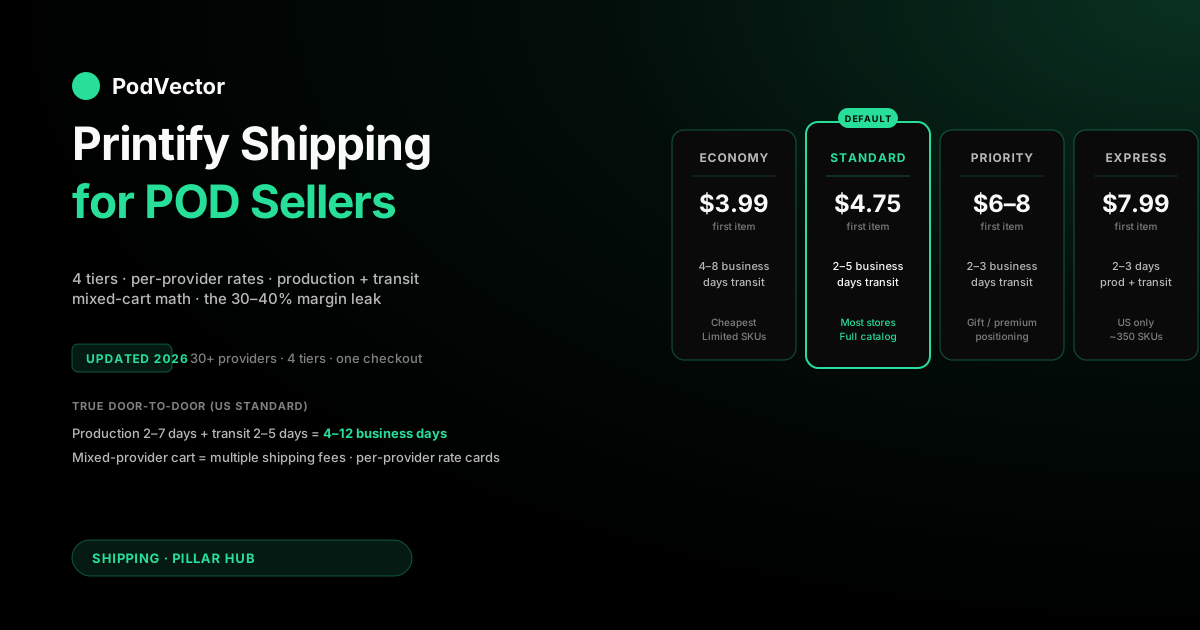
Quick Answer: Printify shipping is per-provider, not per-Printify — every rate, transit time, and destination list is set by whichever print provider fulfills the order, so "Printify shipping" is really 30+ different shipping policies stitched together at checkout. Sellers pick from four tiers: Economy (roughly 4–8 business days, cheapest, limited products), Standard (roughly 2–5 business days transit, the default — starting around $4.75 for the first item on most US apparel, per Printify's shipping rates page), Priority (roughly 2–3 business days transit, higher cost than Standard), and Express (2–3 business days production + transit combined, US-only, select SKUs — priced at $7.99 for the first item on eligible products such as the Bella+Canvas 3001 and Gildan 5000, per hulkapps.com's Printify shipping breakdown).
Total time to the customer is production (2–7 business days) plus transit — so a Standard US order takes roughly 4–12 business days door-to-door, not 2–5. Shipping is charged per order by provider, which means mixed-provider carts get charged multiple shipping fees — the single most common margin leak POD sellers don't track. Two things changed since late 2025: Printify updated its shipping rates network-wide starting October 2, 2025 (per EverBee's rate-change guide), and Printify's Premium plan monthly price increased from $29 to $39 as of February 2026 (per ecommerceceo.com) — both affect margin math you may have already baked in. This guide walks through how rates are calculated, how to find the exact rate for any product before you list it, which strategy (flat / free / tiered) matches your catalog, and the specific reporting gap that makes most Printify sellers underestimate shipping's true cost-of-sale.
How Printify shipping actually works: the per-provider model
The first thing to understand about Printify shipping is that there is no such thing as "Printify shipping" in any unified sense. Printify is a marketplace of print providers — Monster Digital, SwiftPOD, Dimona, MyLocker, The Dream Junction, Printify Choice (Printify's own in-house network), and roughly two dozen more — and every one of those providers sets its own shipping rates, destinations, and speeds. When a customer places an order, Printify routes it to whichever provider your product is configured with, and that provider's shipping policy applies.
This is the source of most of the confusion new sellers have with Printify shipping. You can't get a single "Printify shipping rate card." What you can get is 30+ provider-specific rate cards, which Printify aggregates on its shipping rates page but does not unify.
As traksource.com's 2026 Printify review puts it, "each print provider sets its own shipping rates and production times" — so two identical-looking Bella+Canvas 3001 tees in your catalog might have completely different shipping costs because one is fulfilled by Monster Digital and the other by Duplium. The catalog does not warn you about this at the mockup stage — you find out at checkout, or worse, when you run the margin report three months later.
One structural note that's new in 2026: according to traksource.com's updated Printify review, Printify and Printful now operate under a shared parent company (Fyul, formed in late 2025) — still separate brands, catalogs, and accounts, but the old rivalry is consolidated. This doesn't change Printify's per-provider shipping model, but it does mean the competitive landscape between Printify and Printful has shifted in ways that affect which platform you'd choose for shipping economics.
Three consequences fall out of the per-provider model, and they shape every decision you'll make about shipping:
- Mixed-provider carts get charged multiple shipping fees. If a customer buys a tee from Provider A and a mug from Provider B, they pay shipping for two packages. Your storefront's single-line "shipping total" hides this — the customer sees one number, but your Printify order-cost breakdown splits it in two. This is the #1 reason cart-level shipping charged to customers doesn't match shipping paid to Printify.
- Provider selection is a shipping-cost decision, not just a price or quality decision. According to feeproofed.com's Printify pricing guide, "shipping depends on provider, destination, product type, and order size" — you can't evaluate "which provider should I use" on base cost alone.
- Cross-border fulfillment depends on which providers support which destinations. "Does Printify ship to Australia?" has no single answer — some providers do, some don't. Orders to unsupported destinations get rejected at checkout, and the fix is swapping providers, not filing a ticket.
If you want the broader context on how Printify's marketplace model works — what it is, how it makes money, and why per-provider fulfillment is the trade-off for the 900+ product catalog — the complete Printify guide covers the structural picture. For shipping specifically, the rest of this article assumes you've internalized "Printify is 30+ fulfillment companies in a trench coat" and works through the practical implications.
The four shipping tiers: Economy, Standard, Priority, Express
Across the provider network, Printify exposes four standard shipping tiers at checkout. Not every provider offers all four, and not every product is eligible for all four within a given provider, but the tier names and rough ranges are consistent. Here's the complete picture:
| Tier | US delivery (transit only) | International | Typical first-item rate (US apparel) | When to use it |
|---|---|---|---|---|
| Economy | 4–8 business days | Limited; mostly unavailable | Lower than Standard; check your provider's rate card | Price-sensitive niches; low-margin SKUs where transit speed doesn't matter |
| Standard | 2–5 business days | 10–30 business days | Starting around $4.75 first item, per Printify's shipping rates page | The default for most stores; balanced cost and speed |
| Priority | 2–3 business days | 3–7 business days | Higher than Standard; varies by provider and product | Gift / occasion / last-minute buyers; premium positioning |
| Express | 2–3 business days (production + transit combined) | Not available | $7.99 first item for eligible apparel, per hulkapps.com | Same-week delivery; limited SKU set and US-only |
The important detail, which is easy to miss: Economy, Standard, and Priority refer to transit time only. You still have to add production time (2–7 business days) on top.
Express is the only tier where the advertised time window is end-to-end. So a Standard US order labeled "2–5 business days" at checkout actually reaches the customer in roughly 4–12 business days from order placement.
If you're setting expectations in your product descriptions or email confirmations, quote the combined range, not the transit range. The mismatch is the single largest driver of "where is my order" support volume for new Printify sellers.
For a deeper breakdown of what's happening inside that production window and why it varies so much by provider, how long does Printify take to ship walks through the end-to-end timeline with sample calculations by region.
How Printify charges for shipping: rate structure and real examples
Printify shipping rates follow a first-item / additional-item structure at the provider level. The first item in an order pays the full shipping rate; each additional item from the same provider in the same order pays a reduced rate. This is why a two-tee order from the same provider costs much less to ship than two separate single-tee orders — it's the POD equivalent of a volume discount baked into logistics.
As feeproofed.com's Printify pricing guide notes, "shipping depends on provider, destination, product type, and order size." Rates for specific product/provider combinations are available on Printify's shipping rates page — always verify the exact rate for your chosen provider before finalizing your pricing, because rates update as carriers adjust their pricing. Printify updated its rates network-wide starting October 2, 2025, per EverBee's rate-change guide — any rate tables or screenshots from before that date are stale.
Three things to notice about how the rate structure plays out in practice: mugs and tumblers often ship at rates comparable to tees despite being heavier, because their providers have negotiated strong domestic parcel contracts; large flat products such as canvas prints and blankets carry meaningful shipping premiums that you have to price in; and embroidered products frequently ship cheaper than their DTG counterparts because the providers have lower minimum parcel sizes. None of these are intuitive — test every SKU before you price it.
International rates scale steeply. Using a UK-based provider (Print Logic, T Shirt and Sons) can bring first-item rates down substantially compared to shipping from the US, but the trade-off is fewer catalog SKUs and longer production windows on some products. This is why Printify's "route to the nearest provider" setting is worth understanding, and why sellers with international traffic usually configure the same SKU against multiple providers.
For a comparison of how Printify's shipping economics stack up against Printful's bundled-fulfillment model, see the complete guide to Printful shipping. Printful uses flat shipping per region regardless of provider (because Printful is the provider), which makes rates more predictable but typically higher per SKU than Printify's cheapest options.
Three ways to find the exact shipping rate for any product
There is no single "Printify shipping rate calculator." You'll use one of three methods depending on how far you are in the listing process:
Method 1: the shipping rates page (quickest, least detail)
Printify's public shipping rates page lists every provider with a link into their rate card. Click into the provider you're using, select the product category, and you get a rate matrix by destination (US / Canada / UK / EU / Rest of World) and tier (Economy / Standard / Priority / Express where available). This is the fastest way to answer "how much is shipping from Monster Digital to Germany on Standard" before you've built a mockup.
Limitation: the page shows the rate card, not your actual checkout-time rate. Some providers have promotional free-shipping windows, volume thresholds, or Premium-member-only rates that don't show on the public card. The rate you see is the default, not always the final. Printify updated its shipping rates network-wide on October 2, 2025 — always cross-check against the live page rather than relying on screenshots or cached rate tables from before that date.
Method 2: the product catalog (most detail, before listing)
Open any product in the Printify catalog, pick a variant, and click the "Shipping" tab next to "Print Providers." You see the full rate grid for that provider-product-variant combination, including which tiers are available and which destinations are supported. This is the method to use when you're comparing providers for the same product — the shipping grid often flips the winner compared to base cost alone.
Use this before you list, not after. Once a SKU is live, customers start pricing in the shipping you configured; changing provider on an active SKU can silently change the shipping math without the listing price updating.
Method 3: the test order (ground truth)
The only way to see the exact shipping rate a customer will pay, including any account-level discounts and the specific cart-combination rules, is to place a test order in your own store and view Printify's order-cost breakdown. This is the method for final reconciliation — especially important when you're configuring multi-item bundles or offering free shipping and need to know the exact absorbed cost.
Free-plan sellers get unlimited test orders. You can cancel before production starts and pay nothing; set up a coupon code for yourself so the storefront math works out to zero while Printify's internal math still calculates shipping as if it were real.
Production time vs transit time: the number most sellers miscalculate
The single most common mistake in Printify shipping communication is quoting transit-only times as door-to-door times. Here's the actual end-to-end breakdown:
| Stage | Typical window | What happens |
|---|---|---|
| Order placement → production start | 0–1 business day | Printify validates the order, routes to the provider, and queues production |
| Production | 2–7 business days | Provider prints, checks quality, and packages the order |
| Transit (Standard, US) | 2–5 business days | Carrier picks up from the provider and delivers to the customer |
| Total (Standard, US) | 4–13 business days | Door-to-door, from order placement to delivery |
Peak-season production can stretch even further at providers that don't pre-scale capacity — the week of Black Friday through mid-December is typically the worst. Provider-level production time is visible on the catalog page per provider — pick one with a tight production SLA if you're running holiday campaigns.
The practical implication for your store copy: write a combined production + Standard transit range for US delivery in your product descriptions and confirmation emails. This sets expectations that won't generate angry emails. Don't write "ships in 2–5 business days" without clarifying it's transit only — customers read it as production-inclusive.
Printify Express Delivery: what qualifies, what it costs, when it breaks
Printify Express Delivery is a separate program, not just a fast shipping tier. It's the only tier that bundles production and transit into a single 2–3 business day end-to-end window, which makes it genuinely competitive with fast-fashion timelines. But it's heavily constrained:
- US destinations only. No international Express.
- Select SKUs only. According to hulkapps.com's Printify shipping breakdown, Express is available for specific products like the Bella+Canvas 3001 and Gildan 5000 t-shirts. No mugs, no canvas, no blankets, no embroidery.
- Printify Choice providers only. Express doesn't work with all providers — it's fulfilled through Printify's in-house Printify Choice network, which is why the SKU list is narrower than the general catalog.
- Flat-rate pricing. According to hulkapps.com, Express is priced at $7.99 for the first item on eligible apparel.
- Best-effort SLA. If Express misses the 2–3 day window, Printify will usually refund shipping as a concession but won't refund the order. Plan for the occasional miss if you're advertising "3-day delivery guaranteed" — that's Printify's phrasing, not yours to inherit literally.
Who Express makes sense for: Shopify stores running US-only traffic with a concentrated tee catalog that want to compete with fast-delivery alternatives on delivery speed. The higher per-order shipping cost is usually worth it because the faster fulfillment can reduce cart abandonment and let you charge a modest delivery-speed premium.
Who Express doesn't make sense for: multi-category stores (you'd need two shipping workflows), international-heavy stores, and any seller whose cost-per-order math already has thin margins — the extra shipping cost per order can eat the full contribution margin on low-priced SKUs.
International shipping: zones, taxes, and the provider-location rule
International Printify shipping is where the per-provider model hurts the most. Two rules control what's possible:
Rule 1: You can only ship where the provider ships. Each provider maintains its own destination list. Monster Digital (US) ships almost anywhere in the world via USPS International / DHL. Print Logic (UK) ships primarily to UK + EU. T Shirt and Sons (UK) ships UK + EU + select Rest of World. If your customer is in Australia and your configured provider doesn't ship to Australia, the order is blocked at checkout. The fix is adding a second provider for the same SKU that supports AU, and letting Printify's routing pick the best option.
Rule 2: Let the nearest provider fulfill. Printify's default routing picks the provider closest to the customer's destination if you have the same SKU configured against multiple providers. This is the single biggest lever for international shipping cost and speed. A US customer buying a tee that's configured against Monster Digital (US) and T Shirt and Sons (UK) will get the US fulfillment — faster and cheaper. A UK customer on the same SKU gets UK fulfillment. You set up multi-provider routing once per SKU; Printify handles the routing for every order.
International taxes are not included in Printify shipping. Printify charges you (the merchant) the base cost plus shipping. The customer pays what you charge them at your storefront (which should include VAT / GST collected via your store's tax settings on platforms like Shopify). Duties and import fees on arrival are the customer's responsibility unless you've enabled DDP (Delivered Duty Paid) shipping, which is only available through a handful of providers and specific DHL lanes. Most Printify sellers ship DDU (Delivered Duty Unpaid) and accept that a small percentage of international orders will generate a customer-service ticket about a surprise duty charge.
For a focused breakdown on whether Printify ships to your target country and how the routing decision plays out, see does Printify ship internationally and where Printify ships from.
Shipping strategy: flat rate, free shipping, or tiered — what matches your margins
Once you understand how Printify charges you for shipping, you have to decide how to charge your customers. Three strategies dominate, and each matches a different catalog type:
Strategy 1: Pass-through (Printify rates → customer)
You publish Printify's rate card directly to your storefront. The customer sees the Printify rate and pays exactly what Printify charges you. Margin-neutral on shipping.
Works when: you're starting out, margins are tight, or your cart AOV is low and adding shipping to product price would visibly raise prices above competitors. Breaks when: you run mixed-provider carts and customers see multiple shipping line items — this confuses checkout and raises abandonment.
Strategy 2: Free shipping (shipping rolled into product price)
You raise your product price by roughly the average shipping cost and advertise "free shipping" at checkout. Psychologically the strongest option — "free shipping" consistently beats a visible shipping charge in conversion tests, even when the total price is identical — but only works if your margins can absorb the absorbed shipping cost without dropping below target.
On Etsy specifically, this is not just a preference: according to Printify's official Etsy shipping setup guide, "Etsy's algorithm favors items with lower domestic shipping costs, so products with shipping fees above USD 6.00 may rank lower in search results." For higher-cost-to-ship products on Etsy, free shipping isn't just a conversion tactic — it's an SEO move.
Works when: you sell mostly single-item carts and your category is price-tolerant. Breaks when: you sell heavy items where shipping is high and absorbing it blows out margin, or when international shipping would force you to raise product prices dramatically.
For a full decision framework on free shipping specifically — when to offer it, how to calculate the margin impact, and which thresholds work — free shipping in POD: should you offer it walks through the math. And if you want to see how shipping threshold changes can lift average order value, see A/B price testing for POD.
Strategy 3: Tiered / threshold shipping
You charge a flat shipping rate on small orders and waive it above a threshold ("free shipping over $X"). This lifts AOV by nudging customers to add a second item and protects margin on low-value single-item purchases. The threshold should be set above your current average order value — high enough to push a purchase decision, low enough to actually be achievable with a realistic add-on.
Works when: your catalog supports cross-sell and up-sell naturally (tees + mugs, hoodies + hats), and you have analytics on your current AOV. Breaks when: you sell single-item categories where "add a second item" isn't a natural buying motion.
For how shipping strategy affects average order metrics and which threshold math actually lifts profit per order, see how to grow average order value in POD. To benchmark whether your current conversion rate is where it should be before changing your shipping display, average checkout completion rate benchmarks is the right reference point.
Setting up shipping in Shopify, Etsy, eBay, and TikTok Shop
Shipping setup varies by platform. Here's the short version for the four most common Printify integrations:
Shopify
The recommended flow: publish Printify's flat shipping rates directly to Shopify via the integration's "Use Printify's shipping rates" toggle. This auto-syncs rate changes from Printify to Shopify and handles mixed-provider rate aggregation cleanly.
If you want free shipping instead, set Shopify's shipping to zero across the board and raise product prices in Printify to absorb the shipping cost. Don't try to configure manual Shopify shipping zones while also pulling Printify rates — the two systems fight and the result is unpredictable checkout rates.
Victor, PodVector AI's AI employee, can set up a free-shipping discount or raise a free-shipping threshold directly in your Shopify store — with your approval — without you having to navigate Shopify's shipping settings manually. See how PodVector AI works for POD sellers for the full list of actions Victor can execute.
Etsy
According to Printify's official setup guide, you have the option to set up free shipping on Etsy by using the "Free shipping" toggle in Printify, which automatically includes the lowest shipping cost in the retail price. According to Printify's Etsy-specific shipping guide, calculated shipping profiles are not currently supported — you'll need to use flat or free shipping profiles. Most Etsy-focused Printify sellers use the free-shipping approach because, as Printify's own Etsy guide notes, the algorithm favors listings with lower shipping costs.
eBay
eBay shipping is buyer-visible at the listing level. Configure shipping in your eBay listing policy with either flat rates or calculated (by destination) rates. Printify's integration doesn't push rates to eBay — you're setting eBay shipping manually. Price eBay shipping to cover the most expensive provider's rate in your catalog; you'll lose a little on cheap-provider orders but won't get burned on expensive-provider ones.
TikTok Shop
TikTok Shop requires you to set up a pick-up warehouse address, a shipping template, and Seller shipping in your TikTok settings. You must use TikTok-approved carriers (USPS, UPS, FedEx, DHL, Amazon Shipping, select regional) — Printify's providers all meet this bar. The template options are "free shipping" or "quantity-based shipping," both of which are compatible with pulling in Printify fulfillment. TikTok's delivery-speed metrics (OTD — On Time Delivery) are aggressive; plan to use Standard or Priority tiers, not Economy, to hit the metrics.
For the broader integration picture and which platforms play well with Printify's shipping model, see the complete guide to Printify integrations for POD sellers.
The shipping margin leak nobody tracks
Here's the margin-math section most Printify guides skip. Shipping is usually the second-largest cost line on a POD order after base cost, and it's the most volatile. Unlike base cost (which is stable per SKU), shipping varies by customer destination, cart composition, and provider routing. As feeproofed.com's Printify pricing guide puts it, "shipping profit impact = shipping charged to customer − shipping paid to Printify" — that delta, tracked per order, is where most sellers leak margin silently.
Three specific leaks compound over a year of selling:
- Mixed-cart undercharging. A customer orders a tee + mug; your storefront charges one shipping fee. Printify charges you two separate provider-level shipping fees. The delta is absorbed margin the P&L doesn't show as "shipping" — it shows as missing margin somewhere in COGS.
- International destination drift. Your average shipping cost was modeled on US orders, but your international mix grew over time. International shipping is meaningfully more than domestic. Average shipping cost per order is now higher than your product prices were set against, but nothing in your analytics surfaces that.
- Provider-swap silent changes. You swapped a provider on a SKU for a better base cost or faster production. The new provider's shipping rate is higher per order. Multiplied by volume, that's a real number. Nothing in Printify tells you "shipping changed when you swapped providers."
A fourth leak landed in 2026: Printify's Premium plan monthly price rose from $29 to $39 as of February 2026, per ecommerceceo.com. If you modeled break-even on the old $29 rate, your subscription allocation per order has increased — adjust your pricing accordingly or switch to annual billing, which stayed at $24.99/month.
The fix isn't magic — it's watching shipping cost on its own, for every single order, broken down by where it ships and which supplier made it. You get an alert the moment your average shipping cost starts creeping up month to month. Almost nobody does this because it takes a lot of manual tracking.
For the broader picture of which costs kill POD profits and how shipping ranks against ad spend, refunds, and fees, the hidden costs that kill POD profits is the topic pillar for this. For margin benchmarks to calibrate against, see net profit margin benchmarks for POD.
How to actually track shipping cost variance per order
The reporting you need has three shapes:
- Shipping cost as a % of order value, per order, rolling 7/28/90 day. You want to know when this ratio spikes — that's a provider change, an international mix shift, or a cart-size shift. Printify doesn't surface this. Shopify doesn't either. You have to compute it from the raw order cost breakdown.
- Shipping-charged-to-customer vs shipping-paid-to-Printify, per order. This is the mixed-cart leak. When the delta is positive (you charged more than Printify charged you), great. When it's negative, that's a leak. You want the sign and size of the average delta, per-provider.
- Shipping cost variance per provider, per SKU. When you swap providers, you want an alert that says "shipping on SKU X changed — you may want to update the SKU price." Nobody in Printify's ecosystem surfaces this today.
This is exactly the reporting gap Victor — PodVector AI's AI employee — was built to close. Victor sees your live Shopify orders, Printify order costs, and ad spend together, so you can ask things like "what was my shipping-cost-of-sale last month" or "which SKUs have the worst shipping-to-margin ratio" and get a real answer in seconds. No hand-building dashboards, no exporting CSVs, no comparing supplier costs against storefront totals yourself.
Beyond analysis, Victor can also take action with your approval: if shipping variance is eroding margin on a SKU, Victor can reprice that product to a target margin — either individually or in bulk — and execute the change in Shopify once you approve. That closes the loop between spotting the leak and fixing it. For how the broader profit-tracking picture works in practice, see the complete guide to tracking profits in POD and how PodVector AI works for POD sellers.
FAQs
Does Printify charge the seller or the customer for shipping?
Printify charges the seller. The seller then chooses how to bill the customer — pass-through (customer pays the Printify rate), free shipping (customer pays nothing, seller absorbs the cost in product price), or tiered/threshold (customer pays a flat rate or gets free shipping above a threshold). Printify has no direct relationship with your customer; the customer sees only whatever your storefront charges. For the full breakdown, see does Printify charge you or the customer.
Can I offer free shipping on Printify?
Yes, but it's a pricing decision, not a Printify setting. You configure your storefront to charge nothing for shipping, and you raise product prices by roughly the average shipping cost to absorb it. Printify still charges you the per-order shipping rate — "free" means the customer doesn't see it as a separate line. According to Printify's official help documentation, there is a "Free shipping" toggle available for Etsy sellers that automatically includes the lowest shipping cost in the retail price. The main caveat is international shipping — if you offer global free shipping, you're absorbing a meaningfully higher shipping cost per international order, which can compress or eliminate margin on lower-priced SKUs.
How much does Printify Express cost?
According to hulkapps.com's Printify shipping breakdown, Express is priced at $7.99 for the first item on eligible apparel (such as the Bella+Canvas 3001 and Gildan 5000), to US destinations only. Express bundles production and transit into a 2–3 business day end-to-end window. It is limited to select SKUs fulfilled by Printify Choice providers — not the full catalog.
Does Printify ship to Canada / UK / Australia / EU?
Yes to all four, but the answer depends on which provider is fulfilling the order. Some providers ship worldwide, some are US-only, some are UK/EU-only. The practical setup is to configure the same SKU against multiple providers (one US, one UK) and let Printify's nearest-provider routing pick the cheapest option at order time. For a focused answer, see does Printify ship internationally.
How do I find shipping rates before I list a product?
Open the product in the Printify catalog, pick the provider you're considering, and click the "Shipping" tab next to "Print Providers." You'll see the full rate grid by destination and tier. This is the most detailed pre-listing view. For a public, no-login-required view, Printify's shipping rates page links into every provider's rate card.
Why did my customer get charged two shipping fees?
Because their cart contained items from two different print providers. Each provider ships separately, so each charges its own shipping. If you're seeing this often, either configure your catalog to keep products with the same provider (group by fulfillment origin), or raise product prices to absorb the shipping and offer free shipping at checkout. Most sellers discover this the hard way in their first 90 days.
How long does Printify actually take to deliver?
Delivery times combine production (2–7 business days) plus transit — production and transit together determine the true door-to-door window. Advertise ranges, not specific dates. For a detailed timeline by tier and region, see how long does Printify take to ship.
Is Printify shipping cheaper than Printful?
Usually cheaper per order on apparel, especially for the cheapest Printify providers. Printful's shipping is bundled with its single-vendor fulfillment model (Printful is the provider), which makes rates more predictable but typically higher per SKU than Printify's low end. Note that as of late 2025, both Printify and Printful operate under the same parent company (Fyul), per traksource.com's 2026 Printify review — still separate products, separate pricing, but the rivalry now lives under one roof. Printify generally wins on first-item shipping cost; Printful wins on consistency and multi-item additional-item rates. For the full head-to-head, the complete guide to Printful shipping covers the other side.
What's the single biggest shipping mistake new Printify sellers make?
Quoting transit times as door-to-door times. "Ships in 2–5 business days" gets read as "arrives in 2–5 business days" — it's actually production plus transit, so the real delivery window is materially longer. Set expectations with the combined window in your product descriptions and confirmation emails, and support volume drops meaningfully.
Did Printify change its shipping rates recently?
Yes. According to EverBee's Printify shipping rate-change guide, Printify updated its shipping rates starting October 2, 2025, and added a temporary holiday surcharge on US-destined orders between October 15, 2025 and January 17, 2026 (that surcharge has since expired). Additionally, Printify's Premium plan monthly price increased from $29 to $39 in February 2026, per ecommerceceo.com — the annual rate held at $24.99/month. Always check Printify's live shipping rates page for the current rate card — cached or screenshot-based rate tables are a common source of pricing errors in POD stores.
How does Printify Premium affect shipping costs?
Printify Premium doesn't directly reduce shipping rates — it primarily provides discounts on base product costs (up to 33% off, per feeproofed.com's verified July 2026 Printify pricing guide). Shipping is set by the provider and is the same whether you're on Free or Premium. The indirect effect is that lower base costs from Premium free up margin that can be used to absorb shipping when offering free shipping to customers. As of February 2026, Premium's monthly billing price is $39/month — factor this into your per-order subscription allocation before deciding whether the product-cost savings outweigh the plan fee.
Stop guessing at your real shipping cost per order
Printify shipping is volatile by design — per-provider rates, mixed carts, international routing, silent provider swaps, and rate changes that hit without warning. Victor, PodVector AI's AI employee, looks at your Shopify and Printify data together and tells you, per order, what you actually paid versus what you charged — so the margin leak shows up before it compounds. When the numbers reveal a problem, Victor can reprice SKUs to your target margin with your approval, right from the same conversation.
Try Victor free